fjp/frenet
Transform Frenet (s,d) to local Cartesian (x,y) coordinates.
Trajectory Planning in the Frenet Space
There are many ways to plan a trajectory for a robot. A trajectory can be seen as a set of time ordered state vectors
The following algorithm introduces a way to plan trajectories to maneuver a mobile robot in a 2D plane.
It is specifically useful for structured environments, like highways, where a rough path, referred to as reference, is available a priori.
Path planning in frenet coordinates:
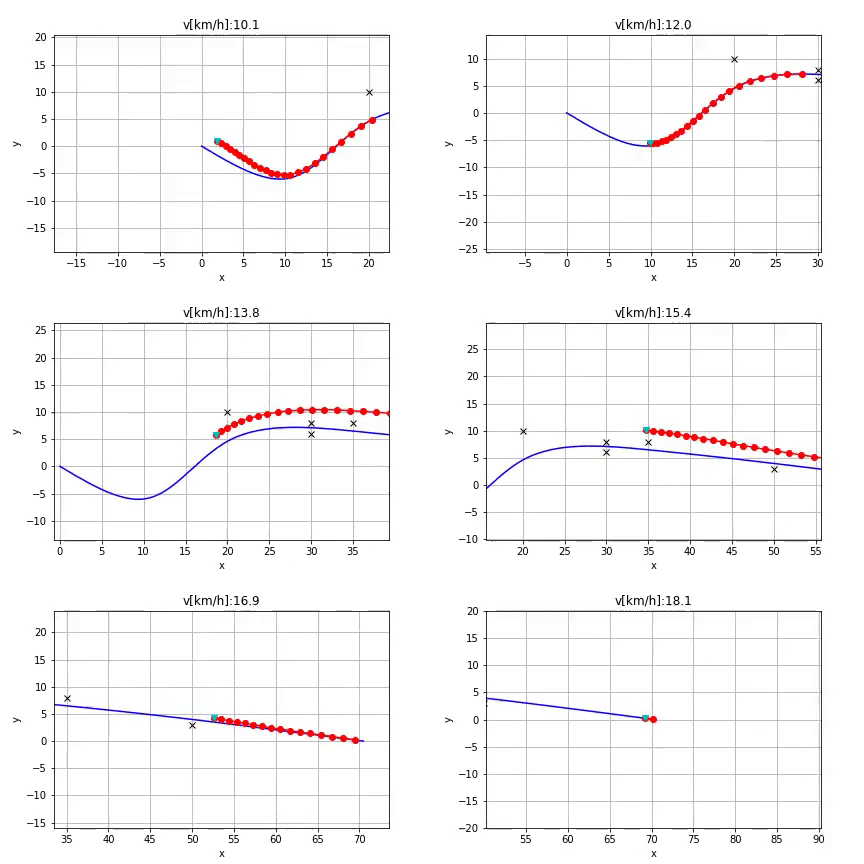 Trajectory Planning using frenet coordinates.
Algorithm
-
Determine the trajectory start state
$[x_1,x_2,\theta,\kappa,v,a](0)$
The trajectory start state is obtained by evaluating the previously calculated trajectory
at the prospective start state (low-level-stabilization).
At system initialization and after reinitialization, the current vehicle
position is used instead (high-level-stabilization). -
Selection of the lateral mode
Depending on the velocity$v$ the time based ($d(t)$) or running length / arc length based ($d(s)$)
lateral planning mode is activated. By projecting the start state onto the reference curve the
the longitudinal start position$s(0)$ is determined. The frenet state vector
$[s,\dot{s},\ddot{s},d,d',d''](0)$ can be determined using the frenet transformation.
For the time based lateral planning mode,$[\dot{d}, \ddot{d}](0)$ need to be calculated. -
Generating the laterl and longitudinal trajectories
Trajectories including their costs are generated for the lateral (mode dependent)
as well as the longitudinal motion (velocity keeping, vehicle following / distance keeping) in the frenet space.
In this stage, trajectories with high lateral accelerations with respect to the reference
path can be neglected to improve the computational performance. -
Combining lateral and longitudinal trajectories
Summing the partial costs of lateral and longitduinal costs using
$J(d(t),s(t)) = J_d(d(t)) + k_s \cdot J_s(s(t))$ , for all active longidtuinal mode every
longitudinal trajectory is combined with every lateral trajectory and transfromed
back to world coordinates using the reference path. The trajectories are verified if they obey physical driving limits by
subsequent point wise evaluation of curvature and acceleration.
This leads to a set of potentially drivable maneuvers of a specific mode in world coordinates. -
Static and dynamic collision check
Every trajectory set is evaluated with increasing total costs if static and dynamic
collisions are avoided. The trajectory with the lowest cost is then selected. -
Longitudinal mode alternation
Using the sign based (in the beginning) jerk$\dot{a}(0)$ , the trajectory with the
strongest decceleration or the trajectory which accelerates the least respectively
is selected and passed to the controller.
Frenet Coordinates
"Frenet Coordinates", are a way of representing position on a road in a more intuitive way than traditional (x,y)
Cartesian Coordinates.
With Frenet coordinates, we use the variables s and d to describe a vehicle's position on the road or a reference path.
The s coordinate represents distance along the road (also known as longitudinal displacement) and the d coordinate represents side-to-side position on the road (relative to the reference path), and is also known as lateral displacement.
In the following sections the advantages and disadvantages of Frenet coordinates are compared to the Cartesian coordinates.
Frenet Features
The image below depicts a curvy road with a Cartesian coordinate system laid on top of it, as well as a curved
(continuously curved) reference path (for example the middle of the road).
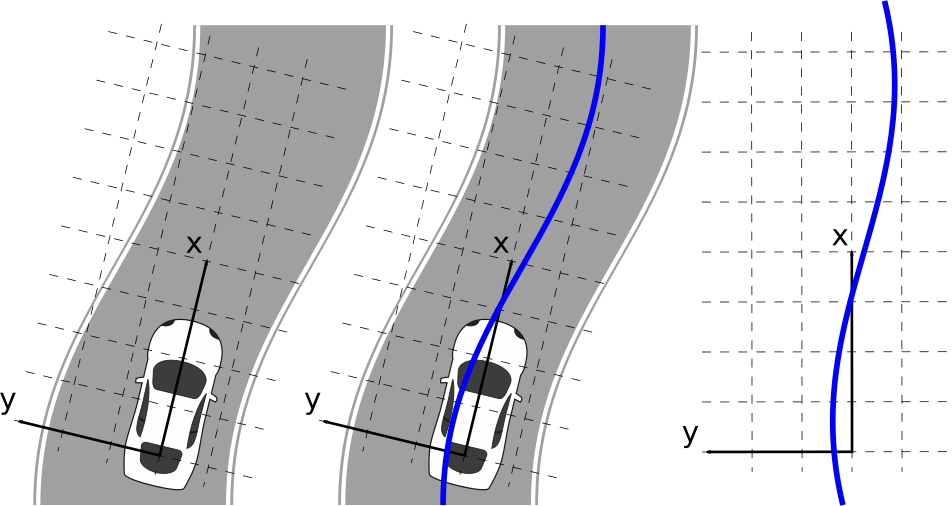 Representation of a reference path (blue) in Cartesian coordinates (x,y).
The next image shows the same reference path together with its Frenet coordinates.
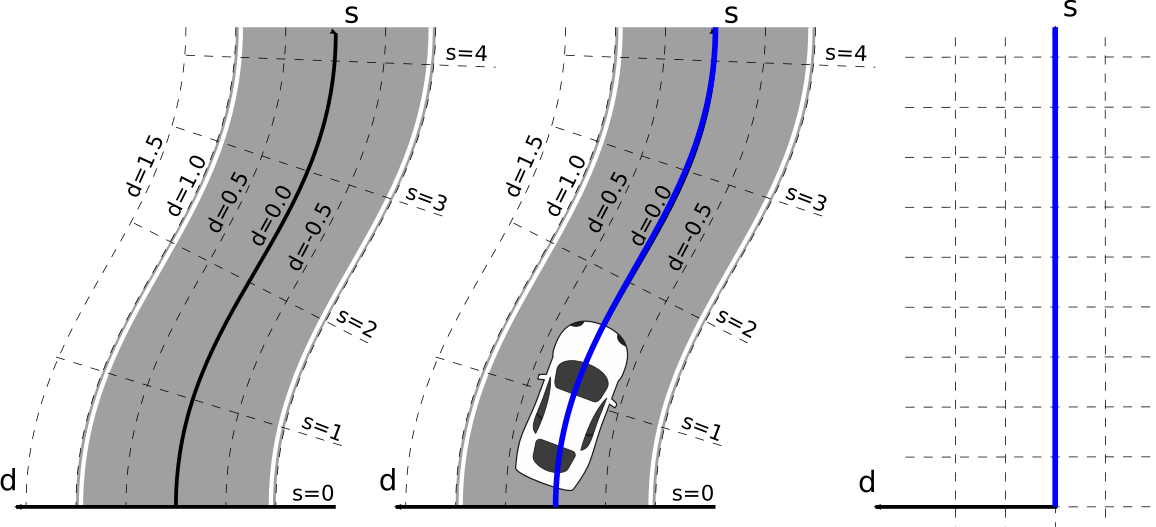 Representation of a reference path in Frenet coordinates (s,d) on a road segment.
The s coordinate represents the run length and starts with s = 0 at the beginning of the reference path.
Lateral positions relative to the reference path are are represented with the d coordinate.
Positions on the reference path are represented with d = 0. d is positive to the left of the reference path and
negative on the right of it, although this depends on the convention used for the local reference frame.
The image above shows that curved reference paths (such as curvy roads) are represented as straight lines on the
s axis in Frenet coordinates. However, motions that do not follow the reference path exactly result in non straight
motions in Frenet coordinates. Instead such motions result in an offset from the reference path and therefore the s axis,
which is described with the d coordinate. The following image shows the two different representations (Cartesian vs Frenet).
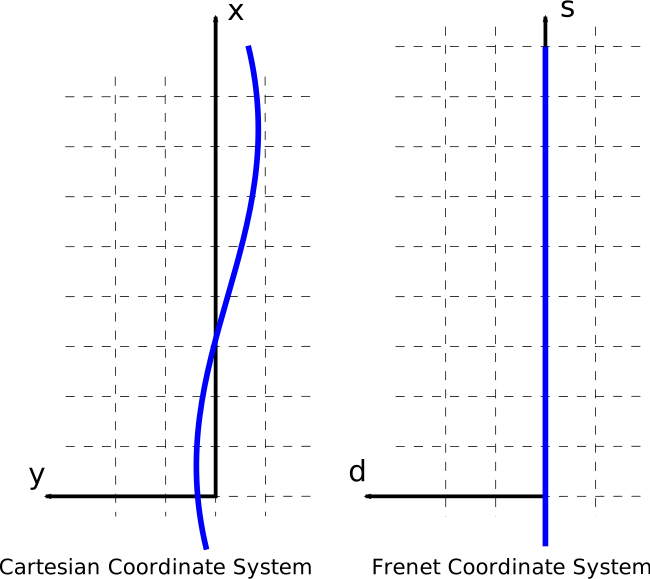 Comparison of a planned trajectory in Cartesian and Frenet coordinates.
To use Frenet coordinates it is required to have a continouosly smooth reference path.
Reference Path
Frenet coordinates provide a mathematically simpler representation of a reference path,
because its run length is described with the s axis. This reference path provides a rough reference
to follow an arbitrary but curvature continuous course of the road. To avoid collisions,
the planner must take care of other objects in the environment, either static or dynamic.
Such objects are usually not avoided by the reference path.
A reference path can be represented in two different forms although for all representations a run length information,
which represents the s axis, is required for the transformation.
- Polynome
- Spline (multiple polynomes)
- Clothoid (special polynome)
- Polyline (single points with run length information)
Clothoid
Polyline
Transformation
The transformation from local vehicle coordinates to Frenet coordinates is based on the following relations:
Given a point
The run length of
determins the s coordinate of the transformed point
If the reference path is sufficiently smooth (continuously differentiable) then the vector
to the reference path at the point
The sign is positive, if
The procedure to transform a point
is determined, which, in this point, is orthogonal to the reference path. The direction of this vector points towards
positive
Therefore, the vector
Usage
Python Package
Python is the primary maintained implementation. It uses uv for dependency management.
cd python
uv sync
This creates a virtual environment and installs the frenet package with its dependencies (numpy, matplotlib).
Frenet-Cartesian Transforms
from frenet.cubic_spline_planner import Spline2D
from frenet import frenet_to_cart, cart_to_frenet

# Create a reference path from waypoints
csp = Spline2D([0.0, 10.0, 20.0, 30.0], [0.0, 5.0, 0.0, 5.0])

# Frenet to Cartesian
x, y = frenet_to_cart(s=15.0, d=2.0, csp=csp)

# Cartesian to Frenet
s, d = cart_to_frenet(px=15.0, py=3.0, csp=csp)
Jupyter Notebook
In the python/src/ folder you find a Jupyter Notebook which shows the described planning algorithm.
Frenet GUI
Note: The Frenet GUI is not functional yet. Contributions are welcome. Here's the plan for this GUI:
Allows you to generate trajectories in a local (world) reference frame from two quintic polynomials.
One polynomial describes the longitudinal direction and the other one the lateral.
Providing a reference path and applying the Frenet coordinate transformation on this path will result in a trajectory.
Execute frenet.sh run the GUI. This will call uic (Qt's user interface compiler) to process the ui file.
Afterwards the main.py will be executed.
To install the optional GUI dependency:
cd python
uv sync --extra gui
MATLAB
The matlab/ directory contains an equivalent MATLAB implementation of the Frenet-Cartesian transforms (Cart2FRT.m, FRT2Cart.m, ClosestRefPoint.m). Note that running the MATLAB code requires a MATLAB license.
Testing
cd python
uv sync --extra dev
uv run pytest
This runs the test suite in python/tests/ which covers:
frenet_to_cartandcart_to_frenettransforms (straight and curved paths)- Round-trip consistency (Cartesian -> Frenet -> Cartesian)
- Sign convention (d > 0 = left of path)
quintic_polynomialandquartic_polynomialboundary conditionsSpline2Darc length, position, and yaw
References
Python code:
- https://github.com/AtsushiSakai/PythonRobotics#optimal-trajectory-in-a-frenet-frame
- https://github.com/AtsushiSakai/PythonRobotics/tree/master/PathPlanning/FrenetOptimalTrajectory
Helper Function
https://de.mathworks.com/matlabcentral/fileexchange/22441-curve-intersections