libnss_shim
Respond to Name Service Switch lookups with the output of custom commands. Both JSON and the typical
colon-separated *nix format are supported.
Overview
libnss_shim is an adapter to make integration with NSS easier. It is an NSS/nsswitch service that runs commands
defined per-function in /etc/libnss_shim/config.json.
- Commands can output responses to queries either in the colon-delimited Unix
format, or in JSON - The output of each command execution is parsed from
stdoutand validated before being passed back
to NSS- See Commands in the docs for details
- The
group,passwd, andshadowNSS databases/services are supported- See Configuration in the docs for details
- See the documentation for additional information
Demonstration
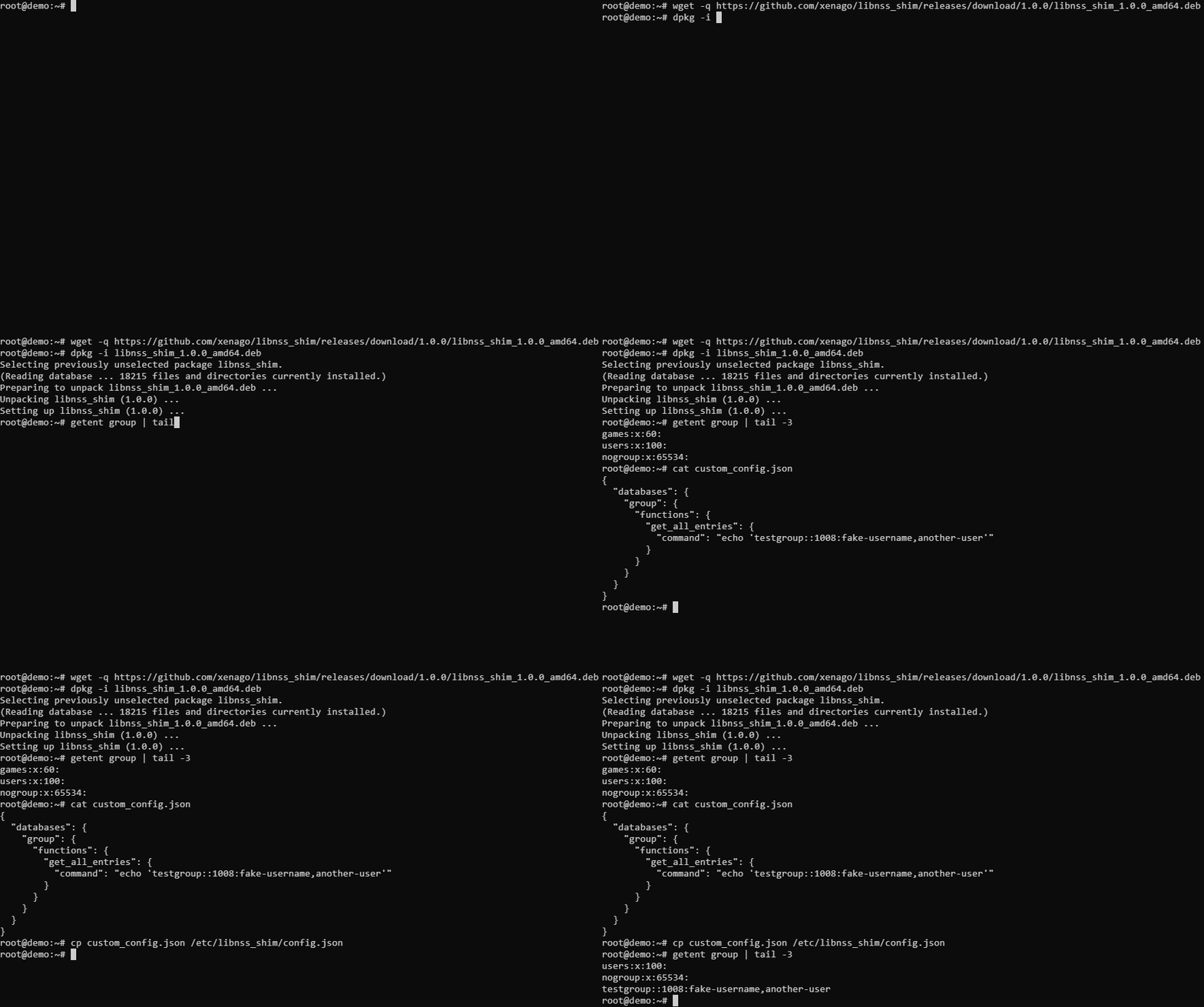
A more complex example implementation with config, scripts and Dockerfile can be found at
samples/advanced.
Background
Custom PAM modules alone are not enough to create a custom Linux authentication process - integration with NSS is
also required to inject custom user data to group/passwd/shadow lookups earlier in the login flow.
In other words: NSS determines if an account exists, and PAM determines how an account can be accessed.
For example, SSSD leverages both NSS and PAM to enable seamless LDAP authentication. Integrating directly with
NSS can be difficult, so libnss_shim was created to allow any command that can print to stdout in a supported format
to be used with NSS.
Installation
Compatibility notes
- Tested on:
- Debian 11
- Debian 12
- Ubuntu 20.04
- Ubuntu 22.04
- Ubuntu 24.04
- CentOS 7
- AlmaLinux 8
- AlmaLinux 9
- Builds for
amd64andaarch64architectures- See Development in the docs for information about building for other architectures
- Packaged in
.deband.rpmformats- If those formats are not supported by a target platform,
libnss_shimmight be usable if theassetsare installed
as described inCargo.tomlprior to running thedebian/postinstscript, but this has not been tested extensively
- If those formats are not supported by a target platform,
- To request support for a different configuration, please create an issue
Install/Upgrade
-
Prepare the commands/software that will be triggered by
libnss_shim. See Commands in
the docs for details. -
Download the latest release produced by GitHub Actions.
AMD64 deb:
curl -sLo libnss_shim.deb https://github.com/xenago/libnss_shim/releases/download/1.2.1/libnss_shim_1.2.1-1_amd64.debAMD64 RPM:
curl -sLo libnss_shim.rpm https://github.com/xenago/libnss_shim/releases/download/1.2.1/libnss_shim-1.2.1-1.x86_64.rpmFull table:
Architecture Package Link amd64deblibnss_shim_1.2.1-1_amd64.debamd64RPMlibnss_shim-1.2.1-1.x86_64.rpmaarch64deblibnss_shim_1.2.1-1_arm64.debaarch64RPMlibnss_shim-1.2.1-1.aarch64.rpmSee Downloading and Attestations in the docs for more
details. -
Install or upgrade it directly with
dpkgorrpm.deb:
sudo dpkg -i libnss_shim.debRPM:
sudo rpm -Uv libnss_shim.rpm -
Configure the shim by importing a custom
config.json.e.g.
sudo cp custom_config.json /etc/libnss_shim/config.jsonUsing the default
config.json,libnss_shimshould have no effect, as the default configuration has commands
defined that output nothing. Updates to the config take effect immediately and can be performed at any time after
libnss_shimhas been installed and used, without restarting.See Configuration and Commands in the docs for details.
-
When installed,
libnss_shimis mapped asshimin/etc/nsswitch.confas the last source for all supported
databases. In that file, the access order for each database's sources can be changed,shimcan be removed from
specific locations if not required, etc.Because
nsswitch.confis read only once per-process, any software actively using it will need to be restarted to
accesslibnss_shimwhen it is installed. Rebooting the system is often the safest/easiest way to do this:sudo rebootSee Interaction with
/etc/nsswitch.confin the docs for details. -
Perform NSS queries to validate the installation, for example using the built-in
getenttool.Some sample commands to test your implementation:
getent group
getent passwd
getent shadow
getent group <groupname>
A very basic test config is available that will respond to
getent groupcalls with a fake group (like in the
demo GIF):curl -sLo /etc/libnss_shim/config.json https://raw.githubusercontent.com/xenago/libnss_shim/main/samples/basic/custom_config.json getent group | tail -1If the installation worked, the output should look like:
test-shim-group::1008:fake-username,another-user
Uninstall
-
To remove
libnss_shim, run the same package manager used for installation.deb:
sudo dpkg -r libnss_shimRPM:
sudo rpm -e libnss_shim -
As mentioned above,
nsswitch.confis read only once per-process so restarting affected applications is required to
apply the change. A system reboot is an effective way to do this:sudo reboot
Security
The libnss_shim NSS plugin runs commands defined in /etc/libnss_shim/config.json, which only root can edit by
default. Ensure that this file, the commands defined inside it, and any other related resources remain read-only to
other users, or the system may be vulnerable to privilege escalation attacks. Do not store secrets in config.json or
any other file which can be read by non-root users.
To enable non-root users to access resources defined by libnss_shim, they must be able to access the commands defined
in config.json. For example, if a file group-script.py is being used to resolve group queries, it will need to be
readable (along with the Python interpreter used to run it):
sudo chown root:root /path/to/custom/group-script.py
sudo chmod 644 /path/to/custom/group-script.py
However, as the shadow database is generally only accessed via su/setuid etc., programs used to resolve shadow
queries can be left as 640:
sudo chown root:root /path/to/custom/shadow-script.py
sudo chmod 640 /path/to/custom/shadow-script.py
It is recommended to pass data (like <$name>) using environment variables rather than arguments, except for
testing purposes. Environment variables are generally private, whereas commands/launch args are not.
Commands are not passed through a shell for execution. Although it is possible to run software like bash
with libnss_shim, using a shell is not recommended as this comes with additional risks such as command injection.
See Attestations in the docs for information about validating official
libnss_shim release artifacts.
See SECURITY.md for information about reporting security problems.