vonhoff/Serilog.Sinks.RichTextBox.WinForms.Colored
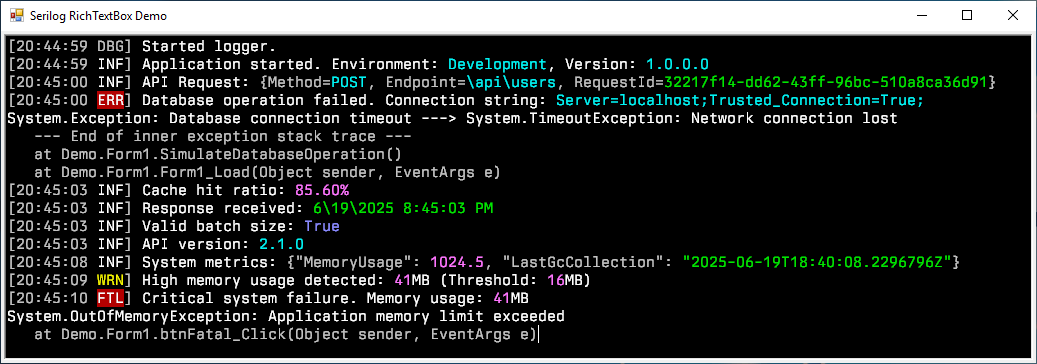
A Serilog sink that writes log events to a WinForms RichTextBox control with colors and theme support
Serilog.Sinks.RichTextBox.WinForms.Colored




A Serilog sink that writes log events to a WinForms RichTextBox with support for coloring and custom themes.
Features
- Colored log events in a WinForms RichTextBox control
- Multiple theme presets with customization options
- High-performance asynchronous processing
- Line limit to control memory usage
- Support for pretty-printing of JSON objects
- WCAG compliant color schemes based on the Serilog WPF RichTextBox sink.
Getting Started
Install the package from NuGet:
Install-Package Serilog.Sinks.RichTextBox.WinForms.ColoredDeclare your RichTextBox control:
private System.Windows.Forms.RichTextBox richTextBox1;

private void InitializeComponent()
{
    this.richTextBox1.BackColor = System.Drawing.SystemColors.Window;
    this.richTextBox1.Dock = System.Windows.Forms.DockStyle.Fill;
    this.richTextBox1.Font = new System.Drawing.Font("Cascadia Mono", 10.8F, System.Drawing.FontStyle.Regular, System.Drawing.GraphicsUnit.Point);
    this.richTextBox1.Location = new System.Drawing.Point(0, 0);
    this.richTextBox1.Name = "richTextBox1";
}
Configure the logger to use the sink using the RichTextBox extension method:
Log.Logger = new LoggerConfiguration()
    .WriteTo.RichTextBox(richTextBox1, theme: ThemePresets.Literate)
    .CreateLogger();

Log.Information("Hello, world!");
See the Extension Method for more configuration options.
Configuration Options
| Option | Description | Default Value |
|---|---|---|
theme |
The color theme applied when rendering individual message tokens. | ThemePresets.Literate |
autoScroll |
When true (default) the target control scrolls automatically to the most recent log line. |
true |
maxLogLines |
Maximum number of log events retained in the in-memory circular buffer and rendered in the control. | 256 |
outputTemplate |
Serilog output template that controls textual formatting of each log event. | [{Timestamp:HH:mm:ss} {Level:u3}] {Message:lj}{NewLine}{Exception} |
formatProvider |
Optional culture-specific or custom formatting provider used when rendering scalar values; null for the invariant culture. |
CultureInfo.InvariantCulture |
prettyPrintJson |
When true, formats JSON values with indentation and line breaks for better readability. |
false |
spacesPerIndent |
Number of spaces per indentation level when pretty printing JSON. | 2 |
Themes
Available built-in themes:
| Theme | Description |
|---|---|
ThemePresets.Literate |
Styled to replicate the default theme of Serilog.Sinks.Console (default) |
ThemePresets.Grayscale |
A theme using only shades of gray, white, and black |
ThemePresets.Colored |
A theme based on the original Serilog.Sinks.ColoredConsole sink |
ThemePresets.Luminous |
A light theme with high contrast for accessibility |
The themes based on the original sinks are slightly adjusted to be WCAG compliant, ensuring that the contrast ratio between text and background colors is at least 4.5:1.
You can create your own custom themes by creating a new instance of the Theme class and passing it to the RichTextBox extension method. Look at the existing themes for examples.
Support the Project 💖
This project is still under active development.
If you find this project valuable, please consider supporting it through:
Contributing
Contributions are welcome! You may report issues, improve documentation, or submit pull requests.
See CONTRIBUTING.md for more information.
License
Copyright © 2025 Simon Vonhoff & Contributors - Provided under the Apache License, Version 2.0.