


This is an Emacs configuration for a stubborn, shell-dwelling and melodramatic
vimmer disappointed with the text-editor status quo.
Doom tries to: look and act like modern editors (whatever that means to me on
any given day), espouse vim's modal philosophy as best it can and strive to
surpass vim in any way possible. It fits my needs as a software developer, indie
game developer, scientist and doom enthusiast.
It was written for Emacs 25.1+ on MacOS 10.11+ and Arch Linux 4.7+.
I use vim everywhere else.
Installation
git clone https://github.com/hlissner/.emacs.d ~/.emacs.d
cd ~/.emacs.d
cp init.example.el init.el  # maybe edit init.el
make install

# Have problems? Run this to check for common issues with your setup
make doctor
Once you've tweaked the config to your liking, you may optionally byte-compile
it. DOOM is designed to benefit from this. It will boost startup times and make
Emacs feel a bit snappier in general.
make compile  # may take a while
# or
make core     # faster alternative; only compiles init.el & core files

# If you byte-compile, changes to the config won't take effect until you
# recompile or delete the byte-compiled files with:
make clean
Package Management
Plugins can be managed from the command line with make:
make install     # install missing plugins
make update      # update installed plugins
make autoremove  # remove unused plugins
# be sure to run install and autoremove after modifying init.el

# run this if you change autoload files
make autoloads

# this is the equivalent of running all four of the above commands
make

# you can run any make command with DEBUG=1 for extra logging, and YES=1 to
# auto-accept confirmation prompts:
DEBUG=1 make install
YES=1 make update
These commands are also available from within Emacs:
doom/packages-installdoom/packages-updatedoom/packages-autoremovedoom/reload-autoloads
Deciphering my emacs.d
So you want to grok this madness. Here are a few suggestions:
- init.example.el: a birds eye view of available modules
- modules/README.org: a primer into module structure
- modules/private/hlissner/+bindings.el:
my custom keybinds. - modules/private/hlissner/+commands.el:
my custom ex-commands (for evil-mode). - modules/ui: the modules that makes my Emacs look the way it
does, including my theme, modeline, dashboard and more. - Find screenshots in the screenshots branch.
Highlights
- A popup management system using shackle to
minimize mental context switching while dealing with temporary or disposable
buffers. - Per-project code-style settings with editorconfig. Let someone else
argue about tabs versus spaces (spaces, of course). - Workspaces & session persistence with persp-mode. Provides tab emulation
that vaguely resembles vim's tabs. - Project & workspace-restricted buffer navigation and functions.
- A vim-centric environment with evil-mode
- 2-character motions (ala vim-seek/vim-sneak) with evil-snipe
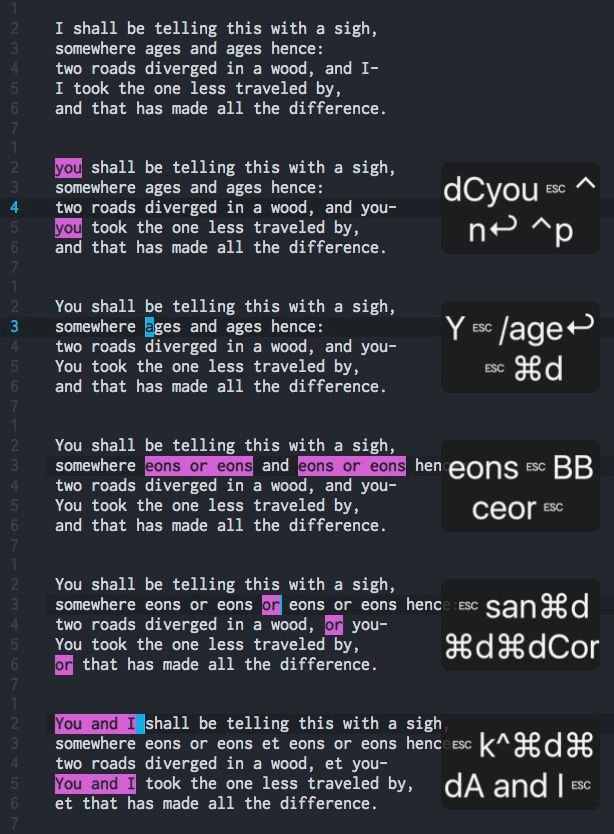
- Sublime Text-esque multiple cursors with
evil-mc and evil-multiedit - C-x omnicompletion in insert mode
- A better
:globalwith buffer highlighting - A slew of custom ex commands
- Fast search utilities:
- Inline/live code evaluation (using quickrun) and REPLs for a variety of
languages, including Ruby, Python, PHP, JS, Elisp, Haskell, Lua and more. - Minimalistic diffs in the fringe with git-gutter-fringe.
- A do-what-I-mean jump-to-definition implementation that tries its darnest to
find the definition of what you're looking at. It tries major-mode commands,
xref (experimental Emacs library), dumb-jump, ctags (WIP), then
ripgrep or the_silver_searcher. - Snippets and file-templates with yasnippet & auto-yasnippet.
- A smarter, perdier, Atom-inspired mode-line that adds:
- evil-search/iedit/evil-substitute mode-line integration
- Macro-recording indicator
- Python/ruby version in mode-line (for rbenv/pyenv)
- Emacs as an:
- Email client (using mu4e & offlineimap)
- Presentation app (using org-tree-slides, ox-reveal, +present/big-mode
& impatient-mode) - RSS feed reader (using elfeed)
- Word Processor (using LaTeX, Org and Markdown)

Troubleshooting
My config wasn't intended for public use, but I'm happy to help you use or crib
from it.
- If you have questions, drop me a line at henrik@lissner.net.
- If you have issues running or setting up DOOM, use
make doctorto diagnose
any common problems. - If you still can't make sense of it, run
DEBUG=1 make doctorand include
it with your bug report.
And please include steps to reproduce your issue, if possible.
Contributing
I welcome contributions of any kind: documentation, bug fixes/reports, extra
modules, even elisp tips. Really,
don't hesitate to tell me my Elisp-fu sucks! I'm eager to learn.