thor0215/hassio-xfinity-usage
Fetch Xfinity Internet Service Usage Data and publish it to Home Assistant sensor
Home Assistant App to fetch Xfinity Internet Usage Data
Fetch Xfinity Internet Service Usage Data and publish it to a Home Assistant sensor.
Thank you @csobrinho for your assistance in analyzing the Android Xfinity App API. And a shout out to @Shapes0 for their insight as well.


Setup
- Add this repository
https://github.com/thor0215/hassio-xfinity-usageto Home Assistant as a source for third-party apps. See the Home Assistant documentation if you have questions on how to do that. You can also use the button below.

Installation
-
Install the Xfinity Usage app
-
Run app once, then go to Log and copy the URL shown.
-
Open a new tab in your browser.
-
Right click on the empty browser page and go to Inspect.
-
In the new DevTools window, go to Network.
-
Paste the URL into the blank browser page and log into your Xfinity account
-
If you are prompted to open an application after login, cancel the prompt.
-
Go back to the DevTools, and in the Filter type 'code?'
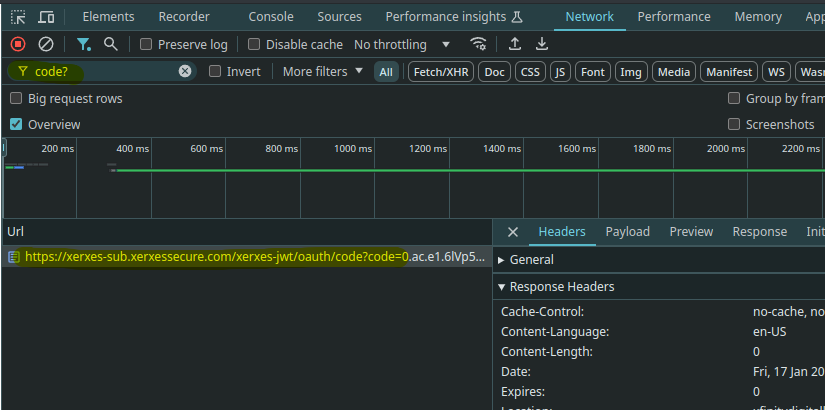
-
Click on the highlighted xerxessecure.com url.
-
Scroll to the Response Headers and find the 'Location' header
-
Copy the 'code' value. In the example below the code value is 251774815a2140a5abf64fa740dabf0c
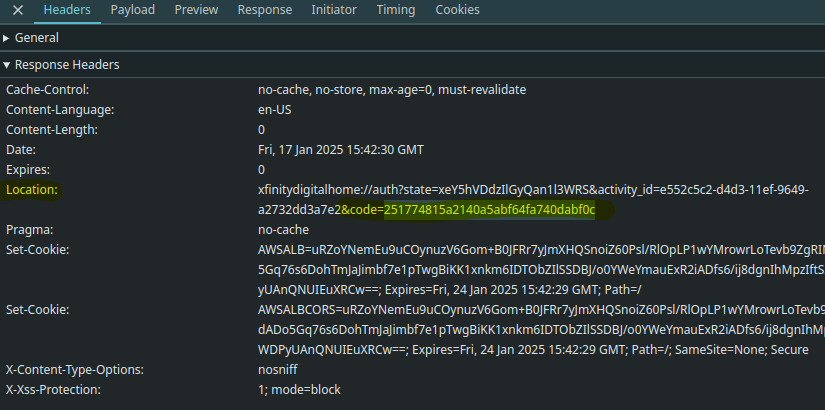
-
Now go back to the App Configuration and paste that code into the Xfinity Code option.
Sometimes the Configuration page does not update the changes pushed by the script. Simply go to the list of Apps and then back into this Apps and the Configuration page should be refreshed. -
Now Start the App and check the logs.
-
If you are using MQTT, see the MQTT Setup instructions below. If MQTT is enabled the app will no longer update the default sensor.
-
After starting the app, check the log for "INFO: Usage data retrieved and processed"
-
Now go to Developer tools -> States and search for sensor.xfinity_usage or for MQTT setups, sensor.xfinity_internet_usage
App Defaults: Page Timeout is 60 seconds and the script runs every 60 minutes (3600 seconds)
Docker/Kubernetes Setup
Known limitation for default sensor. This does not apply to MQTT setups.
There is a known limitation that the sensor will be unavailable if you restart Home Assistant. This is caused by the way Home Assistant handles sensors which are not backed up by an entity, but instead come from an add-on or AppDaemon. You can easily fix that with the following blueprint:

Or use this automation directly:
  alias: Restore Xfinity Internet Usage sensor on startup
  description: Restore Xfinity Internet Usage sensor on startup
  trigger:
    - platform: homeassistant
      event: start
  condition: []
  action:
    - service: hassio.app_restart
      metadata: {}
      data:
        app: 989f231b_xfinity-usage
  mode: single
Example sensor.xfinity_usage:
state: 554
policy_name: 1.2 Terabyte Data Plan
start_date: 04/01/2024
end_date: 04/30/2024
home_usage: 554
wifi_usage: 0
total_usage: 554
allowable_usage: 1229
unit_of_measure: GB
display_usage: true
devices:
- id: 44:A5:XX:XX:XX:XX
  usage: 559
  policyName: XI Superfast

additional_blocks_used: 0
additional_cost_per_block: 10
additional_units_per_block: 50
additional_block_size: 50
additional_included: 0
additional_used: 0
additional_percent_used: 0
additional_remaining: 0
billable_overage: 0
overage_charges: 0
overage_used: 0
current_credit_amount: 0
max_credit_amount: 0
maximum_overage_charge: 100
policy: limited
courtesy_used: 0
courtesy_remaining: 1
courtesy_allowed: 1
courtesy_months: 03/2023
in_paid_overage: false
remaining_usage: 675
friendly_name: Xfinity Usage
unit_of_measurement: GB
device_class: data_size
state_class: measurement
icon: mdi:wan
internet_download_speeds_Mbps: 800
internet_upload_speeds_Mbps: 20