theodoresiu/dlp-dataflow-deidentification
Data Tokenization PoC Using Dataflow/Beam 2.7 and DLP API
Data Tokenization PoC Using Dataflow/Beam 2.7 & DLP API
This solution deidentify sensitive PII data by using data flow and DLP API. Solution reads an encrypted CSV or text file from GCS and output to GCS and Big Query Table.
Some example use cases:
Example:1 (Fully Structure using DLP Table Object)
A CSV file containing columns like 'user_id' , 'password', 'account_number', 'credit_card_number' etc, this program can be used to deidentify all or subset of the columns.
Example:2 (Semi Structured Data)
A CSV file containing fields like 'comments' that may contain sensitive information like phone_number ("Please update my phone number to ") this program can be used to inspect and deidentify.
Example:3 (Non Structured Data)
A text file containing free text blobs (Chat logs for example)
"hasellus sit amet erat. Nulla tempus. Vivamus in felis eu sapien cursus vestibulum.".LU42 577W U2SJ IRLZ RSOO.Decentralized didactic implementation.0604998391122913.Self-enabling.unleash distributed ROI Gonzalo Homer.802-19-8847."In hac habitasse platea dictumst. Etiam faucibus cursus urna. Ut tellus.".AZ28 RSAD QAWQ RMMQ TRDZ XXKW YJXQ.Advanced systematic time-frame 3542994965622197.Function-based.productize efficient networks Melodi Ferdinand.581-74-6338."Proin eu mi. Nulla ac enim. In tempor, turpis nec euismod scelerisque, quam turpis adipiscing lorem, vitae mattis nibh ligula nec sem."
You can see there are some sensitive information in the blob. This program will inspect and deidentify for the all 4 info types in the example. This is useful for the use case where chat log or log files may contain sensitive information.
Currently it only supports reading file from GCS bucket and output to another GCS bucket.
Input file can use google managed key, customer supplied or customer managed encryption key. Please provide required arguments depends on the use case and encryption type.
Getting Started With Dataflow Template
Please read prerequisite section before execution.
Clone the repo locally.
For fully or semi structure data, a template can be created by
gradle run -DmainClass=com.google.swarm.tokenization.CSVBatchPipeline  -Pargs="--streaming --project=<project_id>--runner=DataflowRunner --templateLocation=gs://<bucket>/<object>
	 --gcpTempLocation=gs://<bucket>/<object>"
For non structure data, a template can be created by
gradle run -DmainClass=com.google.swarm.tokenization.TextStreamingPipeline  -Pargs="--streaming --project=<project_id>--runner=DataflowRunner --templateLocation=gs://<bucket>/<object>
	 --gcpTempLocation=gs://<bucket>/<object>"
If the template is created successfully, you should see a "Template is created successfully" in the console log.
Optionally, you can create a metadata file for the template:
There is a metadata file needs to be uploaded in the same location where the template is created. Please see the metadata file (dlp-tokenization-metadata) as part of repo.
To run the template from gcloud:
(Alternatively you can also execute the template from Dataflow UI- Running Jobs from template- custom template-> Bucket location)
gcloud dataflow jobs run test-run-1 --gcs-location gs://df-template/dlp-tokenization --parameters inputFile=gs://<path>/.csv,project=<id>,batchSize=4700,deidentifyTemplateName=projects/<id>/deidentifyTemplates/8658110966372436613,outputFile=gs://<path>,csek=CiQAbkxly/0bahEV7baFtLUmYF5pSx0+qdeleHOZmIPBVc7cnRISSQD7JBqXna11NmNa9NzAQuYBnUNnYZ81xAoUYtBFWqzHGklPMRlDgSxGxgzhqQB4zesAboXaHuTBEZM/4VD/C8HsicP6Boh6XXk=,csekhash=lzjD1iV85ZqaF/C+uGrVWsLq2bdN7nGIruTjT/mgNIE=,fileDecryptKeyName=gcs-bucket-encryption,fileDecryptKey=data-file-key
Note: if you are using google managed key for input file, please ignore optional arguments like csek, csekhash, fileDecryptKeyName, fileDecryptKey
Local Build & Run
Clone the project
Import as a gradle project in your IDE and execute gradle build or run. You can also use DirectRunner for small files.
Example 1: Full Structure data
gradle run -DmainClass=com.google.swarm.tokenization.CSVBatchPipeline -Pargs="--streaming --project=<id> --runner=DataflowRunner --inputFile=gs://<bucket>/<object>.csv --batchSize=<n> --deidentifyTemplateName=projects/<id>/deidentifyTemplates/<id> --outputFile=gs://output-tokenization-data/output-structured-data --csek=CiQAbkxly/0bahEV7baFtLUmYF5pSx0+qdeleHOZmIPBVc7cnRISSQD7JBqXna11NmNa9NzAQuYBnUNnYZ81xAoUYtBFWqzHGklPMRlDgSxGxgzhqQB4zesAboXaHuTBEZM/4VD/C8HsicP6Boh6XXk= --csekhash=lzjD1iV85ZqaF/C+uGrVWsLq2bdN7nGIruTjT/mgNIE= --fileDecryptKeyName=gcs-bucket-encryption --fileDecryptKey=data-file-key --pollingInterval=10 --numWorkers=5 --workerMachineType=n1-highmem-2 --tableSpec=<project_id>:<dataset_id>.<table_id>
Example 2: Semi Structure Data
gradle run -DmainClass=com.google.swarm.tokenization.CSVBatchPipeline -Pargs="--streaming --project=<id> --runner=DataflowRunner --inputFile=gs://<bucket>/<object>.csv --batchSize=<n> --deidentifyTemplateName=projects/<id>/deidentifyTemplates/<id> --outputFile=gs://output-tokenization-data/output-semi-structured-data --inspectTemplateName=--inspectTemplateName=projects/<id>/inspectTemplates/<id> --csek=CiQAbkxly/0bahEV7baFtLUmYF5pSx0+qdeleHOZmIPBVc7cnRISSQD7JBqXna11NmNa9NzAQuYBnUNnYZ81xAoUYtBFWqzHGklPMRlDgSxGxgzhqQB4zesAboXaHuTBEZM/4VD/C8HsicP6Boh6XXk= --csekhash=lzjD1iV85ZqaF/C+uGrVWsLq2bdN7nGIruTjT/mgNIE= --fileDecryptKeyName=gcs-bucket-encryption --fileDecryptKey=data-file-key --pollingInterval=10 --numWorkers=5 --workerMachineType=n1-highmem-2 --tableSpec=<project_id>:<dataset_id>.<table_id>
Example 3: Non Structured Data
gradle run -DmainClass=com.google.swarm.tokenization.TextStreamingPipeline -Pargs="--streaming --project=<id> --runner=DataflowRunner --inputFile=gs://<bucket>/<object>.csv --batchSize=<n> --deidentifyTemplateName=projects/<id>/deidentifyTemplates/<id> --outputFile=gs://output-tokenization-data/output-semi-structured-data --inspectTemplateName=projects/<id>/inspectTemplates/<id> --csek=CiQAbkxly/0bahEV7baFtLUmYF5pSx0+qdeleHOZmIPBVc7cnRISSQD7JBqXna11NmNa9NzAQuYBnUNnYZ81xAoUYtBFWqzHGklPMRlDgSxGxgzhqQB4zesAboXaHuTBEZM/4VD/C8HsicP6Boh6XXk= --csekhash=lzjD1iV85ZqaF/C+uGrVWsLq2bdN7nGIruTjT/mgNIE= --fileDecryptKeyName=gcs-bucket-encryption --fileDecryptKey=data-file-key --pollingInterval=10 --numWorkers=5 --workerMachineType=n1-highmem-2
Prerequisites
There are quite a few tasks before you can run this successfully:
Create a GCP project and input output GCS bucket
After you are done, you should have the information available for the following args to be used from dataflow pipeline
--inputFile=
--outputFile=
--project=
If you are using CSEK (Customer supplied encryption key), Please create a customer supplied encryption key and obtain KMS wrapped key for the encryption key. Also please read "How to Create KMS Wrapped Key" section
Instruction for creating a key can be found here:
https://cloud.google.com/storage/docs/encryption/using-customer-supplied-keys

Creating a Key rings and Key can be found here:
https://cloud.google.com/kms/docs/quickstart

At the end you should have a KMS wrapped key that can be used for dataflow pipeline for the argument --csek like below:
--csek=CiQAbkxly/0bahEV7baFtLUmYF5pSx0+qdeleHOZmIPBVc7cnRISSQD7JBqXna11NmNa9NzAQuYBnUNnYZ81xAoUYtBFWqzHGklPMRlDgSxGxgzhqQB4zesAboXaHuTBEZM/4VD/C8HsicP6Boh6XXk=
Create a hash of the encryption key:
 openssl base64 -d <<< encryption_key | openssl dgst -sha256 -binary | openssl base64

 After you run this command above by replacing with your own encription key created in the previous step, you will have to use this in the dataflow pipeline argument like:
 --csekhash=lzjD1iV85ZqaF/C+uGrVWsLq2bdN7nGIruTjT/mgNIE=
Create DLP template using API explorer. Please look for DLP API how to guide. https://developers.google.com/apis-explorer/#p/dlp/v2/
Please note there is NO code change required to make this program run. You will have to create your CSV data file and DLP template and pass it on to dataflow pipeline.
Create BQ dataset for tableSpec param.
https://cloud.google.com/bigquery/docs/datasets
How the Batch Size works?
DLP API has a limit for payload size of 524KB /api call. That's why dataflow process will need to chunk it. User will have to decide on how they would like to batch the request depending on number of rows and how big each row is.
Batch Size by number of rows/ call

--batchSize=4700
--batchSize=500
If you notice resource exception error in the log, please reduce the number of workers passed as an argument. Example : --numWorkers=1
How the Dataflow pipeline works?
It requires dataflow 2.6 and uses Splittable DoFn feature for both direct and dataflow runner.
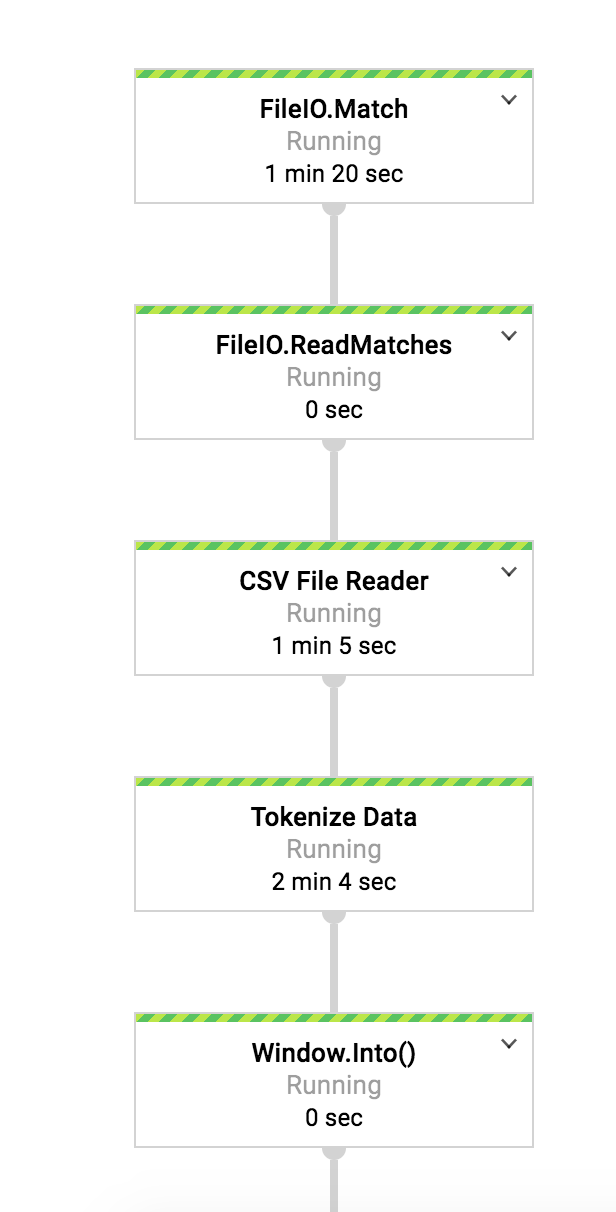
Dataflow pipeline continuously poll for new file based on the -pollingInterval argument and create a unbounded data set.
p.apply(FileIO.match().filepattern(options.getInputFile()).continuously(
				Duration.standardSeconds(options.getPollingInterval()),
				Watch.Growth.never()))
Next transformation will try to decrypt the customer supplied encryption key (if used) to read the file and create a buffered reader.
Please see this link below to understand how initial, split and new tracker restriction work for parallel processing.
https://beam.apache.org/blog/2017/08/16/splittable-do-fn.html
For the fully and semi structure use case, initial restriction is set to offset range (1, number of rows). Then the restriction is split based on batch size. For example: if the file has 100 rows
and batch size is 10. Initial restriction will be set to (1,100) and total number of restriction will be 10. Then restriction is split using offset of 1. {(1,2),(2,3)...(9,10)}.
@GetInitialRestriction
		public OffsetRange getInitialRestriction(ReadableFile dataFile)
				throws IOException, GeneralSecurityException {

			int totalSplit = 1;

			if (setProcessingforCurrentRestriction(dataFile)) {
				totalSplit = this.numberOfRows / this.batchSize.get();
				if ((this.numberOfRows % this.batchSize.get()) > 0) {
					totalSplit = totalSplit + 1;
				}
				LOG.info("Initial Restriction range from 1 to: " + totalSplit);
				br.close();

			}
			return new OffsetRange(1, totalSplit + 1);

		}
		@SplitRestriction
		public void splitRestriction(ReadableFile element, OffsetRange range,
				OutputReceiver<OffsetRange> out) {
			for (final OffsetRange p : range.split(1, 1)) {
				out.output(p);

			}
		}

		@NewTracker
		public OffsetRangeTracker newTracker(OffsetRange range) {
			return new OffsetRangeTracker(
					new OffsetRange(range.getFrom(), range.getTo()));

		}
For each split, 10 rows (--BatchSize=10) will be processed in parallel.
Pipeline calls the KMS api to decrypt the key in memory so that file can be read
If it's successful, file is successfully open and parsed by the batch size specified
It creates a DLP table object as a content item with the chunk data and call DLP api to tokenize by using the template passed
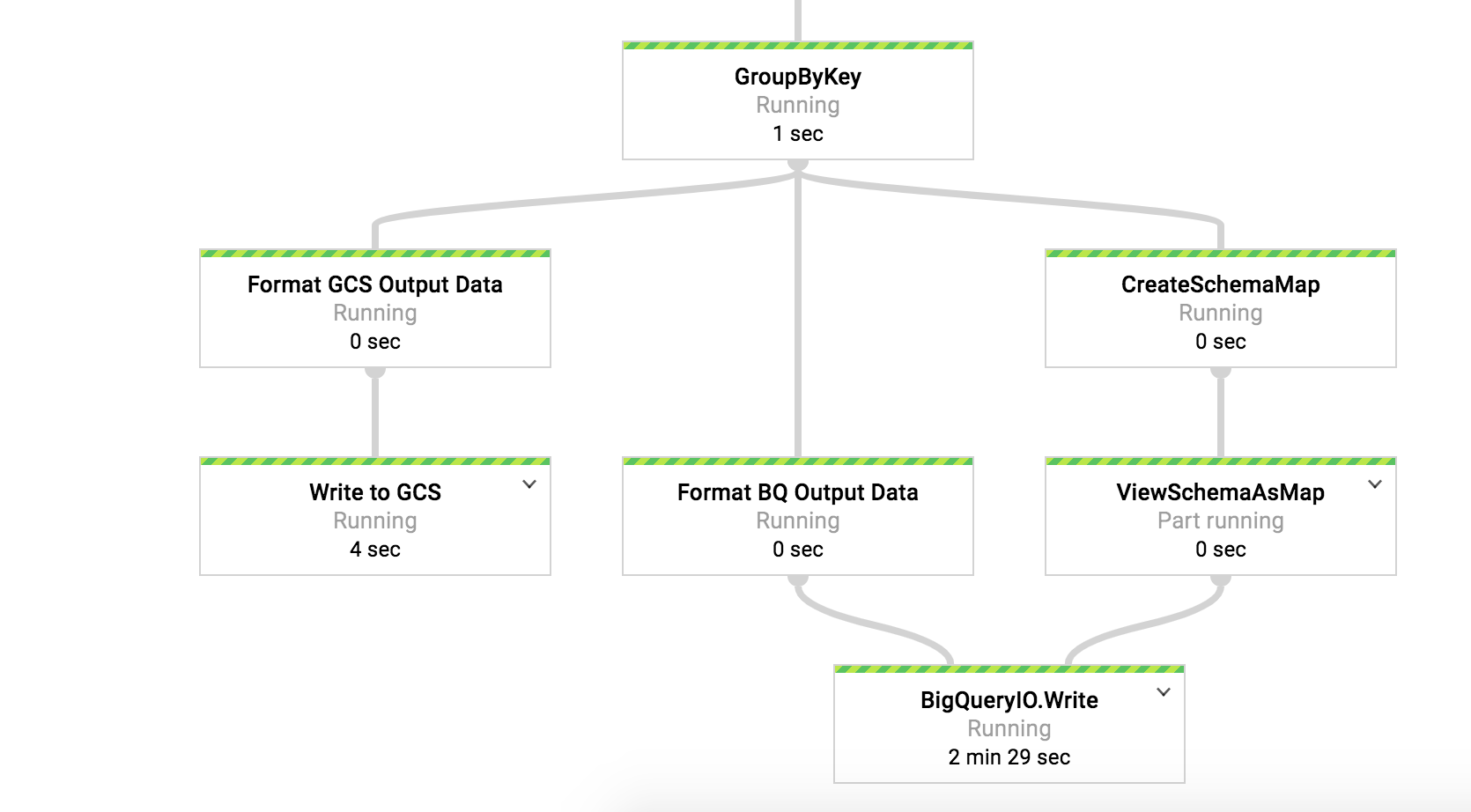
At then end it writes the tokenized data in a GCS bucket. There is a default one minute window setup to output the file.
Please note for GMK or customer managed key use cases, there is no call to KMS is made.
Data is also written in Big Query. Table schema is created dynamiclly based on header. Table name is passed as an argument and will be created as part of the pipeline.
Screen shot from dataflow pipeline.
Known Issue
Also there is a known issue regarding GRPC version conflict with other google cloud products. That's why in gradle build file uses shaded jar concept to build and compile. Once the issue is resolved, build file can be updated to take out shading part. (This only impacts Beam 2.0+).
***Update: This issue is resolved at beam 2.7.
How to generate KMS wrapped key
By using KMS API and pass a encryption key, you can generate a KMS wrapped key.
curl -s -X POST "https://cloudkms.googleapis.com/v1/projects/<id>/locations/global/keyRings/<key_ring_name>/cryptoKeys/<key_name>:encrypt" -d "{\"plaintext\":\"<key>"}" -H "Authorization:Bearer $(gcloud auth application-default print-access-token)" -H "Content-Type:application/json"
Example KMS Wrapped key:
"CiQAB3BWoa2D0UQTpmkE/u0sP5PRQBpQr8EoS4rc8b7EWKHReMcSQQAlBr7wi5erTwHkb+hhjrzC7o/uu0xCf8e7/bvUTaNkfIfh+rs9782nDwlrF9EyOhQlXIaNbRRIxroyKekQuES+"
DLP template used in the use cases
#####Example 1: Fully Structured Data
Sample input format in CSV:
UserId,Password,PhoneNumber,CreditCard,SIN,AccountNumber
dfellowes0@answers.com,dYmeZB,413-686-1509,374283210039640,878-44-9652,182001096-2
rkermath1@ox.ac.uk,OKJtHxB,859-180-4370,5038057247505321293,275-41-2120,793375128-8
snagle2@ftc.gov,VQsYF9Iv68,569-519-7788,3533613600755599,265-63-9123,644327532-2
DLP Deidentify Template Used:
{
 "name": "projects/{id}/deidentifyTemplates/8658110966372436613",
 "createTime": "2018-06-19T15:58:32.214456Z",
 "updateTime": "2018-06-19T15:58:32.214456Z",
 "deidentifyConfig": {
  "recordTransformations": {
   "fieldTransformations": [
    {
     "fields": [
      {
       "name": "SIN"
      },
      {
       "name": "AccountNumber"
      },
      {
       "name": "CreditCard"
      },
      {
       "name": "PhoneNumber"
      }
     ],
     "primitiveTransformation": {
      "cryptoReplaceFfxFpeConfig": {
       "cryptoKey": {
        "kmsWrapped": {
         "wrappedKey": "CiQAku+QvbDmstgYj4NEaoV6FGuB8l3jjWcUiyzJ+HR8NXYZSCASQQBdX/BxUhNiRixvCZnR5/zjFd8D0w9td1w6LUHccIb8HL0s+bK9iOzdllgcXRDC3X9tjx2oqI+S6lFd9tqE5ftd",
         "cryptoKeyName": "projects/{id}/locations/global/keyRings/customer-pii-data-ring/cryptoKeys/pii-data-key"
        }
       },
       "customAlphabet": "1234567890-"
      }
     }
    }
   ]
  }
 }
}
#####Example 2: Semi Structured Data
Sample input format in CSV:
UserId,SIN,AccountNumber,Password,CreditCard,Comments
ofakeley0@elpais.com,607-82-9963,679647039-7,5433c541-a735-4783-ac1b-bdb1f95ba7b5,6706970503473868,Please change my number to. Thanks
cstubbington1@ibm.com,543-43-5623,466928803-2,b2892e74-9588-4c23-9645-ea4fdf4729e8,3549127839068106,Please change my number to 674-486-9054. Thanks
ekaman2@home.pl,231-68-8007,242426152-0,ce7e4400-92ea-4ba9-8758-5c6215b68b47,201665969359626,Please change my number to 430-349-3493. Thanks
DLP Deidentify Template Used:
{
 "name": "projects/{id}/deidentifyTemplates/6375801268847293878",
 "createTime": "2018-06-18T19:59:13.902712Z",
 "updateTime": "2018-06-19T12:25:03.554233Z",
 "deidentifyConfig": {
  "recordTransformations": {
   "fieldTransformations": [
    {
     "fields": [
      {
       "name": "SIN"
      },
      {
       "name": "AccountNumber"
      },
      {
       "name": "CreditCard"
      }
     ],
     "primitiveTransformation": {
      "cryptoReplaceFfxFpeConfig": {
       "cryptoKey": {
        "kmsWrapped": {
         "wrappedKey": "CiQAku+QvbDmstgYj4NEaoV6FGuB8l3jjWcUiyzJ+HR8NXYZSCASQQBdX/BxUhNiRixvCZnR5/zjFd8D0w9td1w6LUHccIb8HL0s+bK9iOzdllgcXRDC3X9tjx2oqI+S6lFd9tqE5ftd",
         "cryptoKeyName": "projects/{id}/locations/global/keyRings/customer-pii-data-ring/cryptoKeys/pii-data-key"
        }
       },
       "customAlphabet": "1234567890ABCDEF-"
      }
     }
    },
    {
     "fields": [
      {
       "name": "Comments"
      }
     ],
     "infoTypeTransformations": {
      "transformations": [
       {
        "infoTypes": [
         {
          "name": "PHONE_NUMBER"
         }
        ],
        "primitiveTransformation": {
         "cryptoReplaceFfxFpeConfig": {
          "cryptoKey": {
           "kmsWrapped": {
            "wrappedKey": "CiQAku+QvbDmstgYj4NEaoV6FGuB8l3jjWcUiyzJ+HR8NXYZSCASQQBdX/BxUhNiRixvCZnR5/zjFd8D0w9td1w6LUHccIb8HL0s+bK9iOzdllgcXRDC3X9tjx2oqI+S6lFd9tqE5ftd",
            "cryptoKeyName": "projects/{id}/locations/global/keyRings/customer-pii-data-ring/cryptoKeys/pii-data-key"
           }
          },
          "customAlphabet": "1234567890-",
          "surrogateInfoType": {
           "name": "[PHONE]"
          }
         }
        }
       }
      ]
     }
    }
   ]
  }
 }
}
DLP Inspect template:
{
 "name": "projects/{id}/inspectTemplates/7795191927316697091",
 "createTime": "2018-06-23T02:12:32.062789Z",
 "updateTime": "2018-06-23T02:12:32.062789Z",
 "inspectConfig": {
  "infoTypes": [
   {
    "name": "PHONE_NUMBER"
   }
  ],
  "minLikelihood": "POSSIBLE",
  "limits": {
  }
 }
}
#####Example 3: Non Structured Data
Sed ante. Vivamus tortor. Duis mattis egestas metus.".SI84 7084 7501 2230 378.Operative dynamic frame.5602235457198185.non-volatile.innovate collaborative supply-chains
Selma Jade.407-24-8213."Morbi non lectus. Aliquam sit amet diam in magna bibendum imperdiet. Nullam orci pede, venenatis non, sodales sed, tincidunt eu, felis.".MD88 XCZD GPMR JX8X 8BN8 9RTA.Mandatory attitude-oriented migration.5285030805458686.function.harness 24/365 markets
Helga Lane.870-09-7239."Suspendisse potenti. In eleifend quam a odio. In hac habitasse platea dictumst.
DLP Deidentify Template Used:
{
 "name": "projects/{id}/deidentifyTemplates/2206100676278191052",
 "createTime": "2018-06-21T14:29:24.595407Z",
 "updateTime": "2018-06-21T14:29:24.595407Z",
 "deidentifyConfig": {
  "infoTypeTransformations": {
   "transformations": [
    {
     "primitiveTransformation": {
      "replaceWithInfoTypeConfig": {
      }
     }
    }
   ]
  }
 }
}
DLP Inspect template:
{
 "name": "projects/{id}/inspectTemplates/3113085388824253847",
 "createTime": "2018-06-21T14:32:49.905406Z",
 "updateTime": "2018-06-21T14:32:49.905406Z",
 "inspectConfig": {
  "infoTypes": [
   {
    "name": "CREDIT_CARD_NUMBER"
   },
   {
    "name": "PERSON_NAME"
   },
   {
    "name": "US_SOCIAL_SECURITY_NUMBER"
   },
   {
    "name": "IBAN_CODE"
   }
  ],
  "minLikelihood": "VERY_UNLIKELY",
  "limits": {
  }
 }
}
To Do
- Unit Test and Code Coverage