AndroidDagger
This application is a Dagger2 based application.
Technology
- Retrofit
- Dagger2
- RXJava
- MVVM architecture
App features
- Login
- API access using Retrofit
- Logout
- Menu
- Navigation Manager
Benefits of Dagger2
- It allows the developer do register dependencies on a single entry point for each component
- It sounds great the whole "no reflection" business"
- Since dependencies can be injected and configured externally, we can reuse those components.
- When injecting abstractions as collaborators, we can just change the implementation of any object without having to make a lot of changes in our codebase, since that object instantiation resides in one place isolated and decoupled.
- Dependencies can be injected into a component: it is possible to inject mock implementations of these dependencies which makes testing easier.
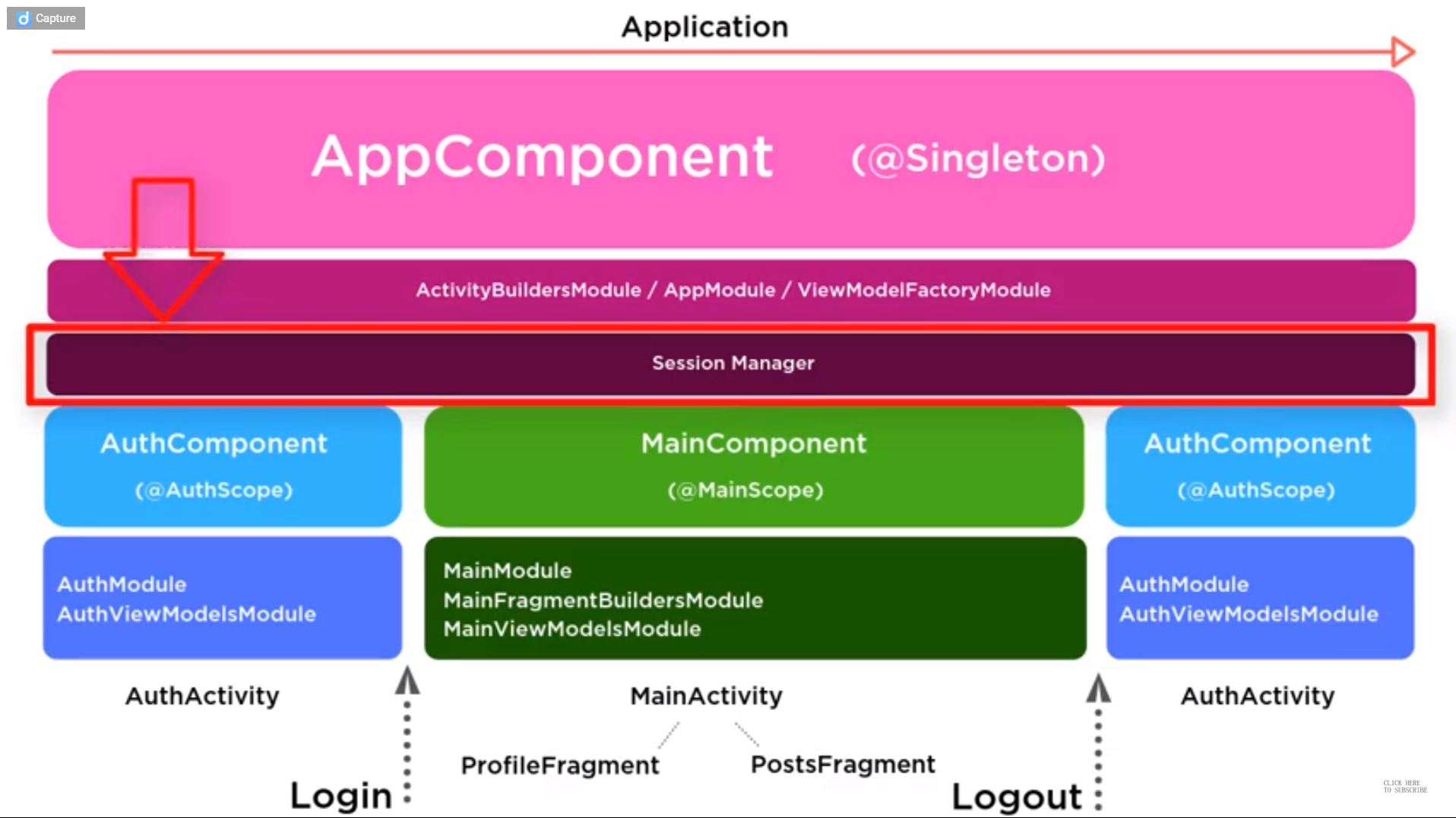
-
ViewModel is injected using a concept named Multi Binding.
-
@singleton is used to application level dependency, it will stay as long a application exists, and it should be static when it is possible
-
*@provides and @BINDS annotations are same, when we have a method body we use @BINDS andwhen the method body is missing the we use @provides
Dagger2 Componemts
-
@Inject: Basically with this annotation we request dependencies. In other words, you use it to tell Dagger that the annotated class or field wants to participate in dependency injection. Thus, Dagger will construct instances of this annotated classes and satisfy their dependencies.
-
@module: Modules are classes whose methods provide dependencies, so we define a class and annotate it with @module, thus, Dagger will know where to find the dependencies in order to satisfy them when constructing class instances. One important feature of modules is that they have been designed to be partitioned and composed together (for instance we will see that in our apps we can have multiple composed modules).
-
@provide: Inside modules we define methods containing this annotation which tells Dagger how we want to construct and provide those mentioned dependencies.
-
@component: Components basically are injectors, let’s say a bridge between @Inject and @module, which its main responsibility is to put both together. They just give you instances of all the types you defined, for example, we must annotate an interface with @component and list all the @modules that will compose that component, and if any of them is missing, we get errors at compile time. All the components are aware of the scope of dependencies it provides through its modules.
-
@scope: Scopes are very useful and Dagger 2 has has a more concrete way to do scoping through custom annotations. We will see an example later, but this is a very powerful feature, because as pointed out earlier, there is no need that every object knows about how to manage its own instances. An scope example would be a class with a custom @PerActivity annotation, so this object will live as long as our Activity is alive. In other words, we can define the granularity of your scopes (@PerFragment, @peruser, etc).
-
@qualifier: We use this annotation when the type of class is insufficient to identify a dependency. For example in the case of Android, many times we need different types of context, so we might define a qualifier annotation @ForApplication and @ForActivity, thus when injecting a context we can use those qualifiers to tell Dagger which type of context we want to be provided.
Advantages of Dagger 2
- Simple access to shared implementations.
- Simple settings of complex dependencies. The big apps usually have a lot of dependencies. Dagger 2 allows you to control all dependences easy.
- Simple unit testing and integration testing. We will discuss it in the article about testing with Dagger 2.
“Local” singletons. - Code generation. The received code is clear and available for debugging.
- No obfuscation problems. Both Point 5 and 6 are advantage properties of Dagger 2 in comparison with Dagger 1. Dagger 1 worked with reflection. That’s why there were problems with performance, obfuscation, strange errors in runtime.
- Small size of the library.
Sources: https://fernandocejas.com/2015/04/11/tasting-dagger-2-on-android/
https://android.jlelse.eu/dagger-2-part-i-basic-principles-graph-dependencies-scopes-3dfd032ccd82