studerus/swiss_german_gemini
Real-time Swiss German voice chat application supporting 8 dialects. Multi-AI provider support (Groq, Gemini, OpenAI) with optimized latency pipeline.
Swiss German AI Chat
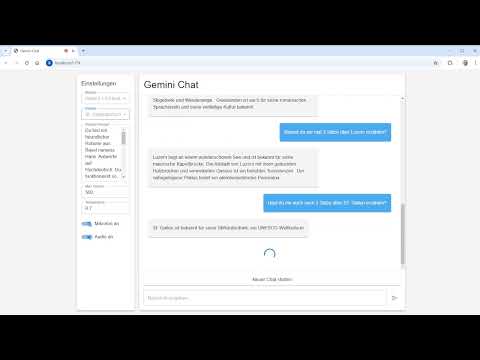
A React-based chat application with multi-provider AI support (Google Gemini, OpenAI, Groq) and Swiss German speech capabilities.
Features
Swiss German Support
- Native Swiss German speech input and output
- 8 Swiss German dialects supported:
- Aargauerdeutsch
- Berndeutsch
- Baseldeutsch
- Graubündnerdeutsch
- Luzernerdeutsch
- St. Gallerdeutsch
- Walliserdeutsch
- Zürichdeutsch
- Seamless voice conversations in your local dialect
- Powered by multiple specialized Swiss German TTS engines
AI Provider Support
- Multiple AI Providers: Switch between Google Gemini, OpenAI, and Groq
- Groq as Default: Ultra-low latency inference (set as default provider)
- Extensive Model Selection:
- Groq: Llama 3.3 70B, GPT-OSS 120B, Mixtral, Qwen, and more (⚡ fastest)
- Google Gemini: Gemini 3 Pro Preview, Gemini 3 Flash, Gemini 2.5 Pro and more
- OpenAI: GPT-5.2, GPT-5.1 Instant, GPT-5, o3/o4 reasoning models
- Real-time streaming responses with the Vercel AI SDK
- Configurable TTS Engine: Choose between FHNW (Gradio) and SlowSoft (Slang)
User Interface
- Modern and responsive UI with Material-UI
- Real-time streaming chat
- Configurable model settings (temperature, max tokens, system prompt)
- Speech-to-text and text-to-speech toggle controls
Technology Stack
- Frontend: React with TypeScript and Material-UI
- AI SDK: Vercel AI SDK for unified multi-provider support
- AI Providers:
- Google Gemini (via
@ai-sdk/google) - OpenAI (via
@ai-sdk/openai) - Groq (via
@ai-sdk/groq)
- Google Gemini (via
- Speech-to-Text: Microsoft Azure Speech Services
- Text-to-Speech:
- Build Tool: Vite
⚡ Response Latency Optimizations
This application implements several strategies to minimize response latency and provide a fluid conversational experience:
1. Continuous Streaming Speech-to-Text (Voice Input)
When using voice input, Azure Speech Services provides ultra-low latency through continuous streaming:
- Real-time transcription: Speech is transcribed while you're still speaking
- Continuous recognition mode: No need to stop and wait for processing
- Immediate feedback: Partial results appear instantly in the UI
- Recognized text sent immediately: As soon as a complete utterance is detected, it's sent to the AI
2. Ultra-Fast AI Provider (Groq)
- Groq as default provider for near-instantaneous inference
- Hardware-optimized LPU™ (Language Processing Unit) architecture
- ~300ms to first sentence: Typically 10x+ faster than traditional cloud providers
- Text appears on screen almost immediately
3. Real-Time Text Streaming
- Responses are streamed token-by-token as they're generated
- User sees the first words within ~300ms
- No waiting for complete response before display
4. Parallel Audio Processing Pipeline (Voice Output)
The Swiss German audio generation is optimized with a sophisticated pipeline:
- Stream parsing: Text chunks are parsed in real-time to extract complete sentences
- Immediate processing: As soon as the first sentence is complete (~300ms), it's sent to STT4SG for Swiss German TTS
- TTS generation: Audio generation takes ~500-1000ms depending on sentence length
- Parallel pipeline: While the first sentence is being converted to audio, subsequent sentences are queued and processed sequentially
- Queue-based playback: Audio segments are played in order as they become available
Timing breakdown:
- Time to first sentence text: ~300ms (Groq)
- Time for TTS generation: ~500-1000ms (depends on sentence length)
- Total time to first audio: ~800-1300ms
5. Smart TTS Engine Optimization
The app supports two TTS engines with optimized strategies:
- FHNW (Gradio): Uses Progressive Sentence Splitting. Each sentence is processed individually as soon as it's generated, ensuring the lowest possible latency for the entire stream.
- SlowSoft (Slang): Uses Hybrid Splitting. The first sentence is processed immediately for a fast start. The rest of the response is collected and processed as a single chunk, significantly improving prosody and audio naturalness while maintaining a snappy initial response.
Prerequisites
- Node.js (Version 18 or higher) - Download here
Installation
- Clone the repository:
git clone https://github.com/studerus/swiss_german_gemini
cd swiss_german_gemini- Install dependencies:
npm install- Create a
.envfile in the root directory and add your API keys:
# AI Provider API Keys (at least one required)
VITE_GEMINI_API_KEY=your_gemini_api_key_here
VITE_OPENAI_API_KEY=your_openai_api_key_here
VITE_GROQ_API_KEY=your_groq_api_key_here

# Speech Services (optional - only needed for voice INPUT via microphone)
# Note: Swiss German voice OUTPUT works without Azure
VITE_AZURE_SPEECH_KEY=your_azure_speech_key_here
VITE_AZURE_SPEECH_REGION=your_azure_region_here- Start the development server:
npm run devUsage
- After starting the dev server, the application will automatically open in your browser (typically at
http://localhost:5173) - Configure your settings:
- Select AI Provider: Choose between Google Gemini, OpenAI, or Groq
- Select Model: Pick from available models for the chosen provider
- Select Swiss German Dialect: Choose your preferred dialect
- Select TTS Engine: Toggle between FHNW (Gradio) and SlowSoft (Slang)
- Adjust Model Settings: Configure temperature, max tokens, and system prompt
- Interact with the AI:
- Text Input (works without Azure): Type messages in the input field
- Voice Input (requires Azure): Enable the microphone for speech recognition
- Swiss German Voice Output: Toggle audio output on/off (works without Azure)
- The AI response will be displayed as text and optionally read aloud in Swiss German
Quick Start for Testing (Minimal Setup)
Want to quickly test the Swiss German voice output? You only need:
- ✅ One AI provider API key (Groq recommended - free tier)
- ✅ Type your messages instead of using the microphone
- ✅ Enjoy Swiss German voice responses (powered by STT4SG)
No Azure account needed for this basic setup!
API Services
- Groq: Ultra-fast inference with open-weight models (Llama, Mixtral, etc.) - Default provider ⚡
- Google Gemini: Advanced AI models with multi-modal capabilities
- OpenAI: GPT-5 and GPT-4 series, including reasoning models
- STT4SG: Specialized Swiss German speech synthesis by FHNW
- SlowSoft Slang: Commercial-grade Swiss German TTS engine
- Microsoft Azure Speech Services: High-quality Speech-to-Text
API Key Setup
To use the application, you need at least one AI provider API key.
Note: You can use the app with just text input/output without Azure Speech Services. Azure is only needed if you want to use the microphone for voice input. Swiss German voice output (TTS) works independently through STT4SG.
AI Provider Keys (at least one required)
-
Groq API Key (Recommended - Default Provider ⚡)
- Visit Groq Console
- Create a new API key (generous free tier available)
- Add to
.envasVITE_GROQ_API_KEY - Benefits: Ultra-low latency, free tier, excellent for development
-
Google Gemini API Key
- Visit Google AI Studio
- Create a new API key
- Add to
.envasVITE_GEMINI_API_KEY
-
OpenAI API Key
- Visit OpenAI Platform
- Create a new API key
- Add to
.envasVITE_OPENAI_API_KEY
Speech Services (optional - only for voice INPUT)
- Microsoft Azure Speech Services (Optional)
- Only required for: Using the microphone for voice input (Speech-to-Text)
- Not required for: Text input or Swiss German voice output (TTS works without Azure)
- Setup:
- Create an Azure Account
- Create a Speech Services resource
- Add to
.env:VITE_AZURE_SPEECH_KEYVITE_AZURE_SPEECH_REGION
Security Notes
- Never share your API keys
- The
.envfile is already listed in.gitignoreand won't be synchronized with Git - Check before each commit that no sensitive data is included in the code
License
MIT