shravankumaruk/rs4v-framework
A Framework which could create proxy for ORTHANC (Legacy PACS DICOM) in local networks with self signed SSL Which would work flawless with multiple security features.
🏥 RS4V Orthanc Installer & Proxy Documentation (NITK Award winning 🥇 1st Place)




















🔍 Table of Contents
📝 Introduction
In modern healthcare, managing DICOM images securely is paramount. RS4V Orthanc Installer & Proxy offers an end-to-end solution to deploy Orthanc—a powerful, lightweight DICOM server—behind a hardened HTTPS proxy. This framework not only automates installation and configuration but also integrates advanced security controls such as WAF, rate limiting, CVE scanning, audit logging, two-factor authentication (2FA), and PDF report generation. The interactive CLI harnesses pyfiglet to present a fun, easy-to-navigate menu, while the underlying scripts ensure reproducible, production-ready deployments.
🎉 Features 🚀
Below is an overview of the key features included in RS4V Orthanc Installer & Proxy:
| Feature | Description |
|---|---|
| 🔒 Secure HTTPS Proxy | TLS termination via self-signed certs, integrated with own built in servers |
| 🔐 Two-Factor Authentication | Uses our in house .rs4v key based authentication which can be regenrated also. |
| 🔍 Automated CVE Scanning | Updated to scan Orthanc endpoints for known vulnerabilities (see PACS-DICOM.pdf for details) |
| 📋 Audit Logging & PDF Reports | Centralized logging of operations and user actions—all logs emitted by server.py in your home directory |
| 🛠️ Automated Installer | install.sh script installs dependencies, sets up services, gathers TLS certs, configures JSON/YAML files |
| 🎨 Interactive CLI Menu | ASCII-art headers and numbered options guided by pyfiglet, making operations intuitive and visually appealing |
| ⚙️ Config Management | Declarative JSON/YAML under your-project directory—easy to customize Orthanc, proxy, auth, and WAF settings |
| 🔄 Backup & Restore | One-line commands to view backup logs |
| 🔄 Health Checks & Monitoring | Built-in ORTHANC Webviewer to view DICOM(.dcm) files easily via browser |
| 🛡️ Rate Limiting & DoS Defense | Configurable rate limits on REST API calls to mitigate brute-force and flood attacks |
| 🧩 Plugin Architecture | Design patterns to extend backend logic, such as custom anonymization or routing plugins |
| 🛠️ Troubleshooting Helpers | Scripts and tips for common pitfalls—dos2unix for Windows line endings, permission fixes, port conflicts |


✅ Prerequisites
Before you begin, ensure your system meets the following requirements:
-
Operating System: Ubuntu 18.04 or newer (or Debian-based distros).
-
Python: Version 3.8+ installed and accessible as
python3. -
Git: For cloning this repository.
-
Sudo or root privileges.
-
Recommended Utilities:
dos2unix(to normalize script line endings).curlorwget(for network operations).jq(for JSON validation).
⚙️ Installation 🛠️
We support two installation methods—choose whichever suits your workflow.
Method 1: Manual Pip Installation
-
Clone the repository:
git clone https://github.com/shravankumaruk/rs4v-framework.git cd rs4v-framework -
Install Python dependencies:
pip3 install pyfiglet requests pyyaml
-
Run the main script:
sudo -E python3 main.py
- The
-Eflag preserves environment variables, ensuring certificates and paths resolve correctly.
- The
Method 2: Automated Script (install.sh)
For a single-command setup:
sudo bash install.sh
sudo -E python3 main.py
The install.sh does the following:
- Installs system packages:
orthanc,nginx,modsecurity,python3-pip, etc. - Obtains TLS certificates generates self-signed.
- Configures Nginx as a reverse proxy with WAF rules.
- Sets up Orthanc JSON config with secure defaults.
- Creates systemd services for auto-start on boot.
Pro Tip: If you hit a
python: bad interpreter: No such file or directoryerror, normalize line endings:dos2unix main.py
Method 3 : Run on cloud shell

🔧 Configuration
All configuration files live under the directory where you installed (type pwd in terminal):
captive_credentials.json: Orthanc users and pass with keys stored/etc/orthanc/orthanc.json: Original config for ORTHANC Servers.User.rs4V: This will be your generated Key.
My real snippet from captive_credentials.json:
{
    "RegisteredUsers": {
        "shravan": {
            "password": "07417e5860dfe946c74f32120b2a35500dd3fb508e9627ab7be7084bbdc4ba16",
            "key": "Xc4Dy9B905FEz6J147f03fup3l8ukh79"
        }
    }
Security Note: Our application stores password in hashes use server.py or access via main.py to change or remove passwords or add or remove users or else direct modification may result in errors.
✨ Usage
Below is the exact output when launching main.py:
shravan@shravan-pc:~/Desktop$ sudo -E python3 main.py
 ____  ____  _  ___     __
|  _ \/ ___|| || \ \   / /
| |_) \___ \| || |\ \ / /
|  _ < ___) |__   _\ V /
|_| \_\____/   |_|  \_/

 _____                                            _
|  ___| __ __ _ _ __ ___   _____      _____  _ __| | __
| |_ | '__/ _` | '_ ` _ \ / _ \ \ /\ / / _ \| '__| |/ /
|  _|| | | (_| | | | | | |  __/\ V  V / (_) | |  |   <
|_|  |_|  \__,_|_| |_| |_|\___| \_/\_/ \___/|_|  |_|\_\

Please select an option from the menu below:
1) Install orthanc with WebViewer automatically.
2) Run proxy server.
3) Scan for vulnerabilities in the system.

Enter your choice (1/2/3):
Use the numeric choice to access installer, proxy setup, or vulnerability scanning.
All logs are emitted by server.py in your home directory; you can view live logs by running python3 server.py, or check archived logs there. For PDF report generation details, refer to the Video Tutorial.
****************************************
*   RS4V WAF Server Panel              *
****************************************

=============================
Proxy Server Control Menu
=============================
1) View logs
2) Add/Remove user (no captcha)
3) View Users and Change Password
4) Save PDF report
5) Restart Server
6) Whitelist/Blacklist an IP address
7) Turn off Server
8) Generate new key for a user
=============================
Enter your choice (1-8): 1
Displaying log contents:
2025-06-26 23:13:51 - WARNING: This is a development server. Do not use it in a production deployment. Use a production WSGI server instead.
 * Running on all addresses (0.0.0.0)
 * Running on http://127.0.0.1:80
 * Running on http://192.168.142.144:80
2025-06-26 23:13:51 - Press CTRL+C to quit
2025-06-26 23:13:54 - WARNING: This is a development server. Do not use it in a production deployment. Use a production WSGI server instead.
 * Running on all addresses (0.0.0.0)
 * Running on https://127.0.0.1:443
 * Running on https://192.168.142.144:443
2025-06-26 23:13:54 - Press CTRL+C to quit

Press Enter to return to the menu...
🛡️ Vulnerability Scanner (scanner.py)
  _   _ _____ _______ _  __     _____  _____
 | \ | |_   _|__   __| |/ /    | ____|/ ____|
 |  \| | | |    | |  | ' /_____| |__ | |
 | . ` | | |    | |  |  <______|___ \| |
 | |\  |_| |_   | |  | . \      ___) | |____
 |_| \_|_____|  |_|  |_|\_\    |____/ \_____|

                      RS4V Security Scanner

====== Orthanc Vulnerability Scanner Menu ======
1) Scan For Vulnerability (Basic Orthanc info + config check)
2) List All CVEs
3) Save as PDF (Report with graphics and CVE scores)
0) Exit
==================================================
Enter your choice:
📄 Tip: Selecting Option 3 generates a detailed PDF report with visual CVE scoring graphs and summary tables.
📘 For CVE scan logic and methodology, refer to PACS-DICOM.pdf.
🎥 If unsure how to run this, check the Video Tutorial section.
📡 Proxy & Security
An Nginx reverse proxy fronts Orthanc to enforce robust security:
- TLS Termination: Secure all client-server traffic.
- ModSecurity WAF: Apply custom DICOM and OWASP CRS rules.
- Rate Limiting: Throttle per-IP API calls to prevent abuse.
- Daily CVE Checks: Automated vulnerability scanning against public feeds (see PACS-DICOM.pdf for scan methodology).
All logs are emitted by server.py in your home directory and include proxy, WAF, and scan events.
🎬 Video Tutorial
Prefer a step-by-step walkthrough? Watch on YouTube:
Follow along to see live installation, menu navigation, and sample report generation.
📸 Screenshots
- Installation Progress via
install.sh:

- Main Menu via
main.py:

- Server Panel via
server.py:

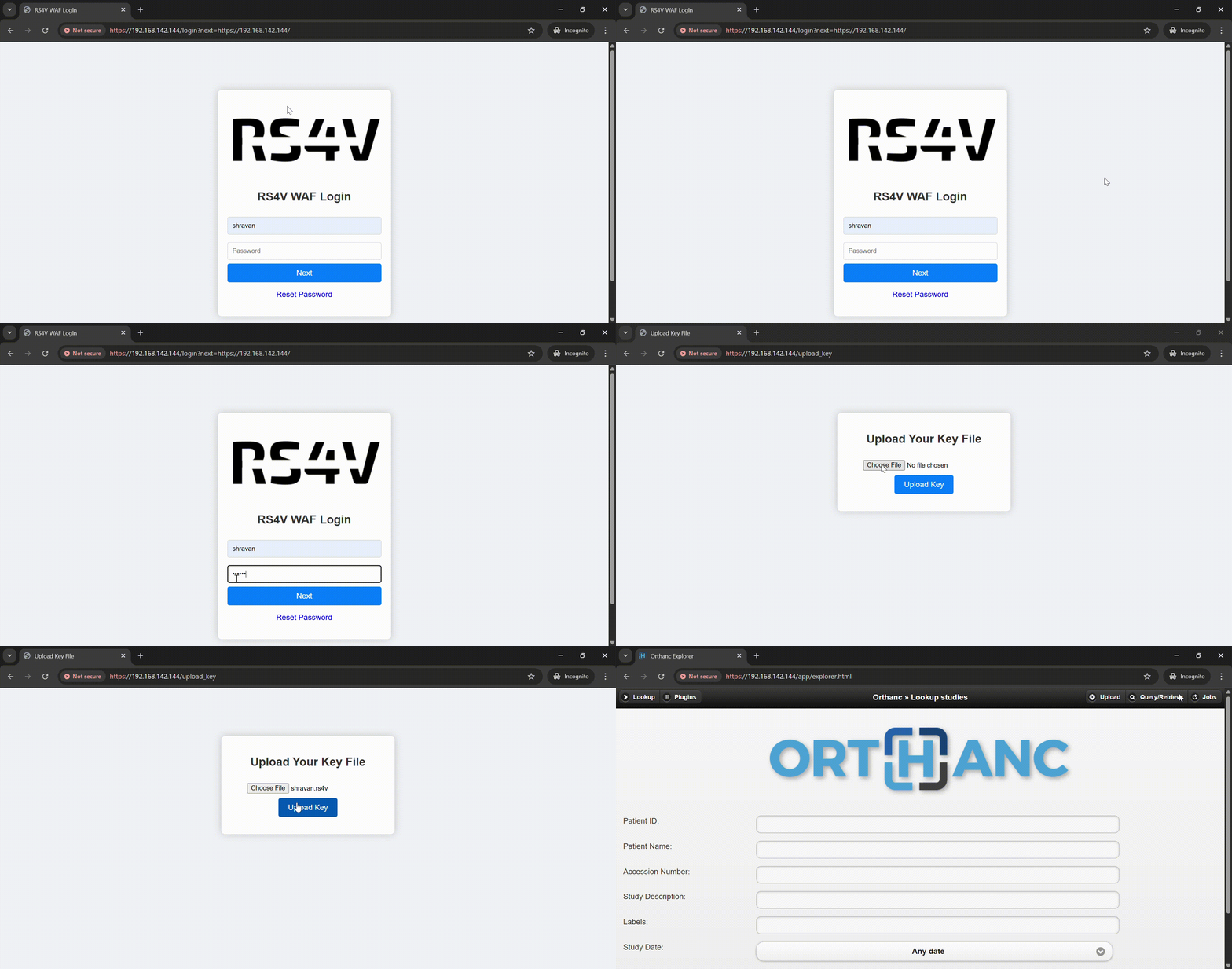
- Web Login access :


Uses our inhouse .rs4v key for the 2FA in place.

Successful sign-in of ORTHANC via our proxy.
6.WAF Blocking Bruteforce Attack

7.Our 2FA Blocks if any file other than .rs4v is uploaded.

8.Our WAF Blocks both XSS Attack and SQL Injections


🐞 Troubleshooting
Comprehensive troubleshooting table from real-world usage:
| Symptom | Possible Cause | Solution |
|---|---|---|
python: bad interpreter |
DOS line endings in Python scripts | Convert with dos2unix *.py |
Permission denied on install.sh |
Missing execute permission | chmod +x install.sh |
port 8042 already in use |
Another service occupying Orthanc port | Change HttpsPort in config/orthanc.json and restart service |
TLS handshake failure |
Invalid or expired certificates | Regenerate with sudo bash install.sh or certbot renew |
CVE database fetch failed |
Network connectivity or feed URL changed | Verify internet access, update CVE feed URL in main.py |
| Service starts but no UI | Proxy misconfiguration | Check server.py targets localhost:8042 and service is running |
| Slow image retrieval | High load or storage IO bottleneck | Enable caching in Nginx, monitor disk I/O, or increase database performance settings |
| 2FA token invalid | Time drift on server or client | Sync time with NTP (sudo apt install ntp && sudo service ntp restart) |
🛠️ Maintenance & Support
If you encounter any bugs, issues, or discover a potential vulnerability 🐞🔐, please help us improve by opening an issue.
Click the button below to report it directly:

We have custom labels like bug, security, enhancement, and question to categorize and speed up triage.
Your feedback keeps this project secure and strong 💪!
🤝 Contributing
We welcome all contributions—code, docs, tests, and bug reports! Please follow these steps:
-
Fork the repo and create a feature branch:
git checkout -b feature/MyFeature
-
Commit changes with descriptive messages.
-
Push branch and open a Pull Request.
-
Use our custom labels to categorize your PR.
Be sure to run flake8 and jsonlint to maintain code quality and config validity.
📄 License & Credits
© Shravan Kumar UK 2025
This project is licensed under the GNU General Public License v3.0. See LICENSE for full terms.
🙏 Acknowledgements
A big thank you to:
- Regan, Shashank, Varad for helping along with various DICOM Files and testing the server in local wireless ranges.
- Orthanc community for an extensible DICOM server.
- pyfiglet for making CLI art fun.
- Ubuntu for the best Open-Source OS
- PyCharm for free open source community edition IDE.
- Nginx for reverse proxy server.
🛠️ Made with ❤️ and a lot of coffee by Shravan Kumar UK
🩺 Empowering secure and smart medical imaging — happy diagnosing! 📸🧠