scriptPilot/google-calendar-correction
Apply corrections to Google Calendar events on any update to enforce golden rules.
Google Calendar Correction
Apply corrections to Google Calendar events on any update to enforce golden rules.
Made with Google Apps Script, related to Google Calendar Synchronization.
Installation
- Backup all Google Calendars to be able to restore them if something went wrong.
- Open Google Apps Script and create a new project
Calendar Correction. - Replace the
Code.gsfile content with this code. - Click at the
+next toServices, addGoogle Calendar APIv3asCalendar.
Usage
The following examples are based on assumed calendars Work and Family.
Correction
-
Click the
+next toFilesto add a new script fileonCalendarUpdate:function onCalendarUpdate() { // Correction function function correctionFunction(event) { // Enforce the default calendar color event.colorId = '0' // Do not forget to return the event return event } // Run correction, start 7 days in the past runCorrection('Work', 7, correctionFunction) }
-
Save the changes and run the
onCalendarUpdatefunction manually.- Allow the prompt and grant the requested calendar access.
- At the first run, all events within the time range are corrected.
- With any other run, only modified events are corrected.
-
On the left menu, select "Trigger" and add a new trigger:
- run function
onCalendarUpdate - trigger source
calendar - calendar email
work-calendar-id(to be found in the Google Calendar settings)
- run function
Now, any change to the Work calendar is being corrected.
Further reading for the correction function: Google API Documentation and color IDs.
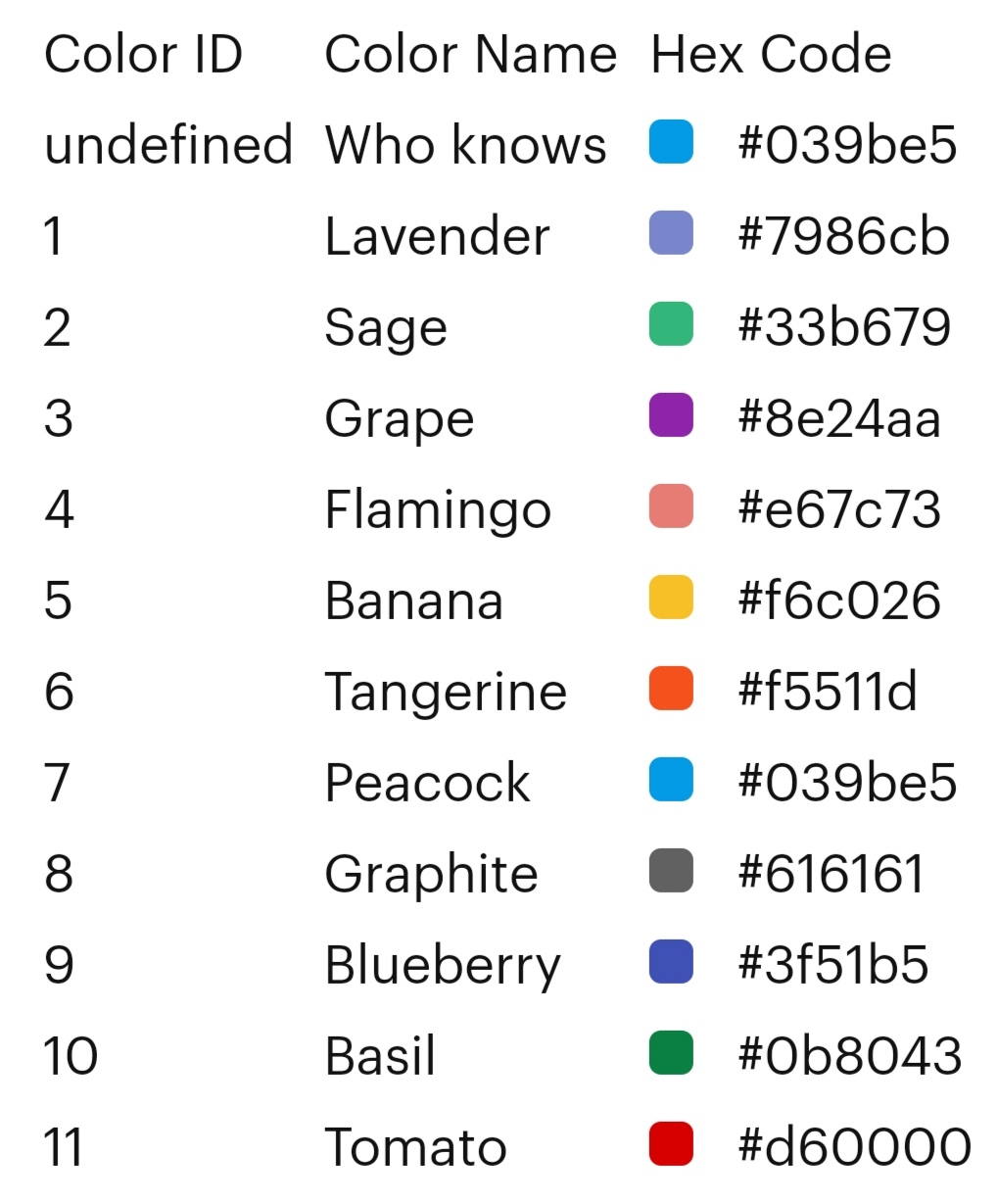
Start Date
As start date you have several options.
// Number of days in the past
runCorrection('Work', 7, correctionFunction)

// String in format "YYYY-MM-DD"
runCorrection('Work', '2020-31-12', correctionFunction)

// A date object
const dateObj = new Date()
dateObj.setHours(0, 0, 0, 0)
dateObj.setDate(dateObj.getDate() - 7)
runCorrection('Work', dateObj, correctionFunction)
Helper Functions
There are a couple of helper function available to support the correction function.
isSynchronizedEvent(event) // true if synchronized from any other calendar
isRecurringEvent(event)    // true if recurring event
isOOOEvent(event)          // true if out of office event
isAlldayEvent(event)       // true if allday event
isOnWeekend(event)         // true if on Saturday or Sunday
isBusyEvent(event)         // true if status is busy
isOpenByMe(event)          // true if needs action by me
isAcceptedByMe(event)      // true if accepted by me
isTentativeByMe(event)     // true if responded tentative by me
isDeclinedByMe(event)      // true if declined by me
Multiple Calendars
Same correction function
function onWorkCalendarUpdate() {
  runCorrection('Work', 7, correctionFunction)
}

function onFamilyCalendarUpdate() {
  runCorrection('Family', 7, correctionFunction)
}
Do not forget to configure two triggers respectively.
Different correction function
function onWorkCalendarUpdate() {
  runCorrection('Work', 7, workCorrectionFunction)
}

function onFamilyCalendarUpdate() {
  runCorrection('Family', 7, familyCorrectionFunction)
}
Do not forget to configure two triggers respectively.
Script Reset
By default, only updated events are corrected. To apply modified rules you want to reset the script to allow a full correction again. This can be done by running the function resetScript manually.
For test purpose, you can also add it to the beginning of the onCalendarUpdate function. Do not forget to remove it again after completing the development.
Update
To update the script version, replace the Code.gs file content with this code.
Deinstallation
Remove the Google Apps Script project. This will also remove all triggers.
Support
Feel free to open an issue for bugs, feature requests or any other question.