
The open-source Continuous Machine Learning Platform
Build ML pipelines with only Python, run on your laptop, or in the cloud.









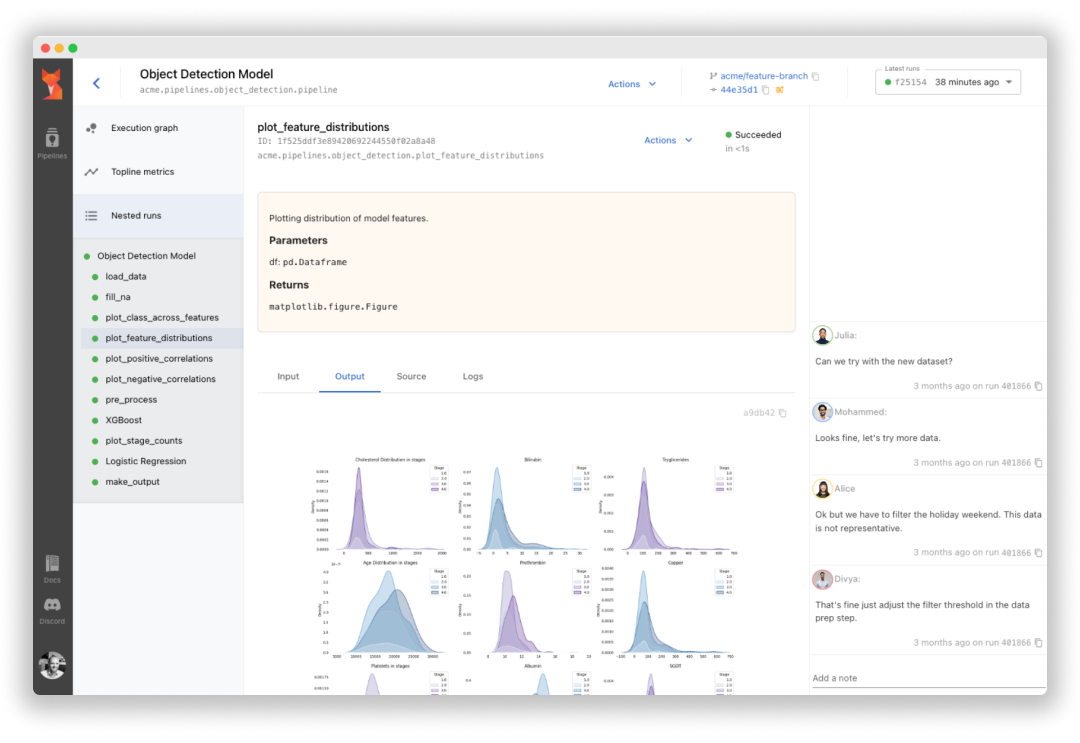
Sematic is an open-source ML development platform. It
lets ML Engineers and Data Scientists write arbitrarily complex end-to-end
pipelines with simple Python and execute them on their local machine, in a cloud
VM, or on a Kubernetes cluster to leverage cloud resources.
Sematic is based on learnings gathered at top self-driving car companies. It
enables chaining data processing jobs (e.g. Apache Spark) with model training
(e.g. PyTorch, Tensorflow), or any other arbitrary Python business logic into
type-safe, traceable, reproducible end-to-end pipelines that can be monitored
and visualized in a modern web dashboard.
Read our documentation and join our Discord
channel.
Why Sematic
- Easy onboarding – no deployment or infrastructure needed to get started,
simply install Sematic locally and start exploring. - Local-to-cloud parity – run the same code on your local laptop and on your
Kubernetes cluster. - End-to-end traceability – all pipeline artifacts are persisted, tracked,
and visualizable in a web dashboard. - Access heterogeneous compute – customize required resources for each
pipeline step to optimize your performance and cloud footprint (CPUs, memory,
GPUs, Spark cluster, etc.) - Reproducibility – rerun your pipelines from the UI with guaranteed
reproducibility of results
Getting Started
To get started locally, simply install Sematic in your Python environment:
$ pip install sematicStart the local web dashboard:
$ sematic startRun an example pipeline:
$ sematic run examples/mnist/pytorchCreate a new boilerplate project:
$ sematic new my_new_projectOr from an existing example:
$ sematic new my_new_project --from examples/mnist/pytorchThen run it with:
$ python3 -m my_new_projectTo deploy Sematic to Kubernetes and leverage cloud resources, see our
documentation.
Features
- Lightweight Python SDK – define arbitrarily complex end-to-end pipelines
- Pipeline nesting – arbitrarily nest pipelines into larger pipelines
- Dynamic graphs – Python-defined graphs allow for iterations, conditional
branching, etc. - Lineage tracking – all inputs and outputs of all steps are persisted and
tracked - Runtime type-checking – fail early with run-time type checking
- Web dashboard – Monitor, track, and visualize pipelines in a modern web UI
- Artifact visualization – visualize all inputs and outputs of all steps in
the web dashboard - Local execution – run pipelines on your local machine without any
deployment necessary - Cloud orchestration – run pipelines on Kubernetes to access GPUs and other
cloud resources - Heterogeneous compute resources – run different steps on different
machines (e.g. CPUs, memory, GPU, Spark, etc.) - Helm chart deployment – install Sematic on your Kubernetes cluster
- Pipeline reruns – rerun pipelines from the UI from an arbitrary point in
the graph - Step caching – cache expensive pipeline steps for faster iteration
- Step retry – recover from transient failures with step retries
- Metadata and collaboration – Tags, source code visualization, docstrings,
notes, etc. - Numerous integrations – See below
Integrations
- Apache Spark – on-demand in-cluster Spark cluster
- Ray – on-demand Ray in-cluster Ray resources
- Snowflake – easily query your data warehouse (other warehouses supported
too) - Plotly, Matplotlib – visualize plot artifacts in the web dashboard
- Pandas – visualize dataframe artifacts in the dashboard
- Grafana – embed Grafana panels in the web dashboard
- Bazel – integrate with your Bazel build system
- Helm chart – deploy to Kubernetes with our Helm chart
- Git – track git information in the web dashboard
Community and resources
Learn more about Sematic and get in touch with the following resources:
Contribute!
To contribute to Sematic, check out open issues tagged "good first
issue",
and get in touch with us on Discord.
