petrvecera/SenchaArchitect-aux
Example user extension (aux) for Sencha Architect - these extensions are just ext packages with few customization for SA
Sencha architect .aux extension example
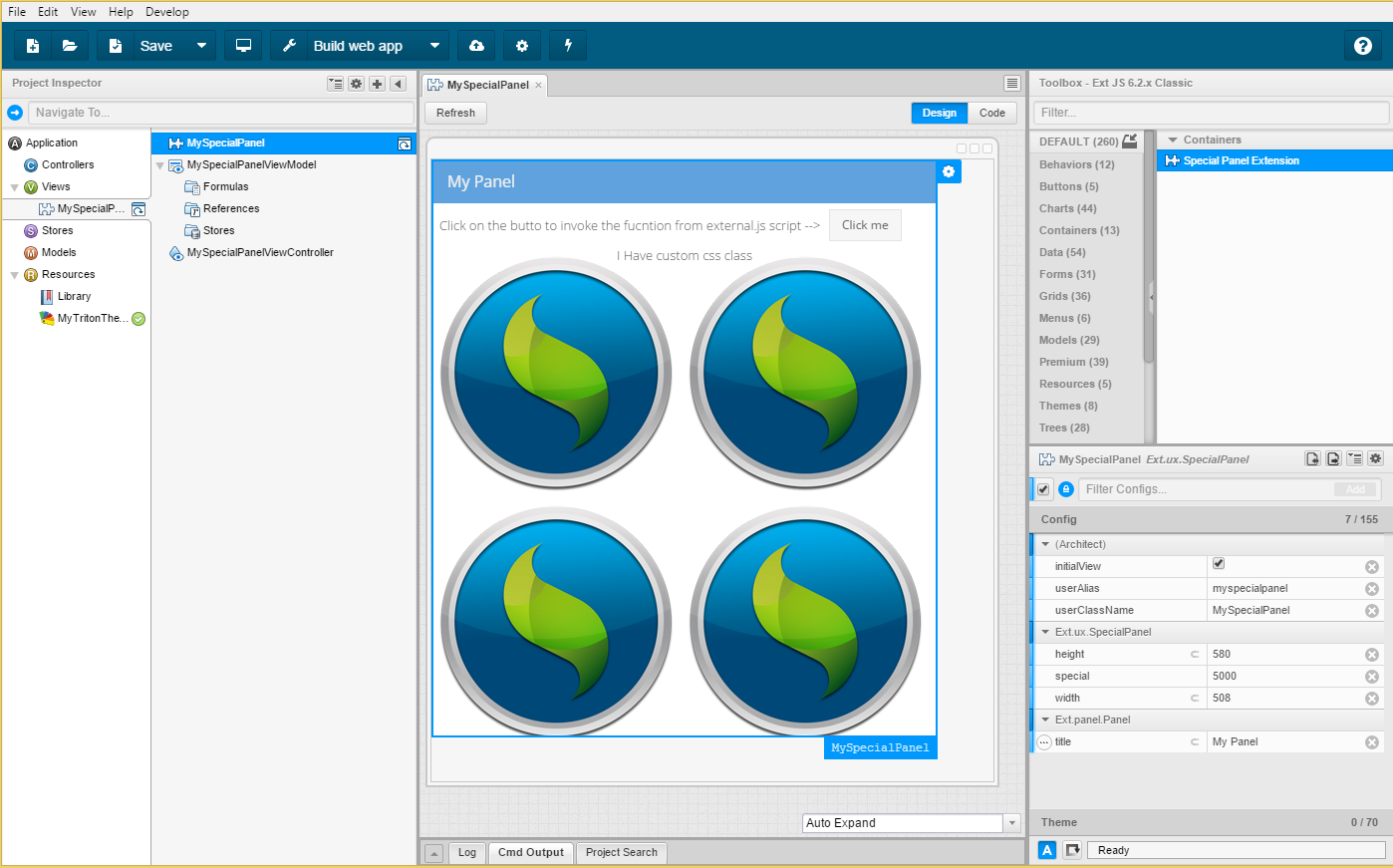
This is example of the aux extension for the Sencha Architect.
The aux extension are basically ExtJS Cmd packages with few extra files.
You should follow these guides:
http://docs.sencha.com/architect/4.2/guides/extending_architect/creating_user_extensions.html
http://docs.sencha.com/architect/4.2/guides/extending_architect/using_user_extensions.html
http://docs.sencha.com/architect/4.2/guides/reference/user_extension_structure.html
http://docs.sencha.com/cmd/guides/cmd_packages/cmd_creating_packages.html
Installation
- Open SA -> File -> Install user extension -> Select the .aux file
OR - Put the FooExtension folder into
C:\Users\<user>\Documents\Architect\Extensions
How to create your own extension
- Follow the guide for creating new package / or just copy the FooExtension folder
Notice that SA extension is 2 folders deep:<extensionName>/<version>/<actualfiles> - Put your files into the extension folder.
Put the class files into the folder src: src/SpecialPanel.js
Put your css resources into: resources/css/customPanel.css
Put your other files into the resource folder:
resources/sencha.png
resources/special.js
- Now we need to specify everything in the
package.jsonin the root folder
Add these extra objects:
"architect": {
    "compatFrameworks": [
        "ext62"
    ],
    "classes": [
        {
            "definition": "SpecialPanel.Definition.js",
            "className": "Ext.ux.SpecialPanel",
            "js": [
                "SpecialPanel.js"
            ]
        }
    ]
},
"css": [
    {
        "path": "resources/css/customPanel.css"
    }
],
"js": [{
  "path": "resources/special.js",
  "bundle": true
}],
Let's talk about it in detail:
"architect": {
    "compatFrameworks": [
        "ext62"
    ],
    "classes": [
        {
            "definition": "SpecialPanel.Definition.js",
            "className": "Ext.ux.SpecialPanel",
            "js": [
                "SpecialPanel.js"
            ]
        }
    ]
},
This defines the classes for SA. The compactFrameworks specifies in which frameworks your extension will be avaliable.
Possible values: ["ext62", "ext60", "modern62", "modern60"] etc
Now we need to specify the classes, the SpecialPanel.js is taken from src folder, class name and definition file: "SpecialPanel.Definition.js"
Our custom css files to be loaded:
"css": [
    {
        "path": "resources/css/customPanel.css"
    }
],
We also want our 3rd party libararies or some helper scripts just anything:
"js": [{
  "path": "resources/special.js",
  "bundle": true
}],
- The last thing we need to do is to write definitions for SA toolbox.
- Create folder architect in the package
- Put inside a file
SpecialPanel.Definition.js
{
    classAlias: "widget.specialpanel",
    className: "Ext.ux.SpecialPanel",
    // this specifies if it should iherit configs from some class
    inherits: "panel",
    autoName: "MySpecialPanel",

    // this specifies in which groups it's shown in the SA toolbox
    "toolbox": {
        "name": "Special Panel Extension",
        "category": "Containers",
        "groups": ["Containers", "Views"]
    },

    // you can define your custom configs (they are shown in the config panel in SA)
    configs: [
    {
        name: 'special',
        type: 'number',
        bindable: true,
        hidden: false,
        initialValue: 5000
    },{
        name: 'width',
        type: 'number',
        bindable: true,
        doc: 'This is help icon info',
        hidden: false,
        initialValue: 743
    },{
        name: 'height',
        type: 'number',
        hidden: false,
        initialValue: 585
    },{
        name: 'myFunction',
        type: 'function',
        params: [{
            name: 'first'
        },{
            name: 'second'
        }]
    },{
    	name: 'customOptions',
    	type: 'string',
    	editor: 'options', // you can't edit options, you have to select one from the menu
        defaultValue: 'top',
    	options: ['top', 'bottom']
    },{
    	name: 'customCombo',
        type: "auto",
        allowBoolean: true,
        editor: "combo",
        options: [
            ['false', false],
            ['true', true],
            ['horizontal', 'horizontal'],
            ['vertical', 'vertical'],
            ['both', 'both']
        ]
    },{
        name: 'shouldRender',
        type: 'boolean',
        alternates:[{
            type: 'object'
        }]
    }
    ]
}
You will find all the other useful information in the linked guides.