neerajtiwari360/RAG-Local-Deployment
RAG Local Deployment Master the art of RAG local deployment with our comprehensive guide. From detailed steps to best practices, optimize your workflow for seamless integration. Discover troubleshooting tips and expert insights to ensure a smooth and successful deployment process.
EnergyInsight: Chat with Renewable Energy Reports Using RAG
🌱 EnergyInsight is an AI-powered tool that allows you to interact with renewable energy documents like “Renewable Energy: Emerging Technologies and Innovations to Reduce Climate Change” by Robyn Lui (UNICEF). Using the power of Retrieval-Augmented Generation (RAG), you can ask questions and get accurate, context-based answers directly from the report.
What Is EnergyInsight?
EnergyInsight leverages RAG to turn static documents into dynamic, interactive Q&A assistants. By combining retrieval (searching relevant text) with generation (producing human-like responses), it ensures:
- Accurate Answers: Every response is based on real data from the document.
- Time Efficiency: No need to manually sift through hundreds of pages.
- Ease of Use: Ideal for students, researchers, and professionals in renewable energy.
Key Features
- 📖 Document Search: Seamlessly query insights from renewable energy reports.
- ⚡ RAG Workflow: Combines document retrieval with AI-powered response generation.
- 🔍 Fast & Accurate Retrieval: Uses embeddings and vector search for lightning-fast results.
- 🌿 Sustainability Focus: Specifically designed to assist in understanding renewable energy innovations.
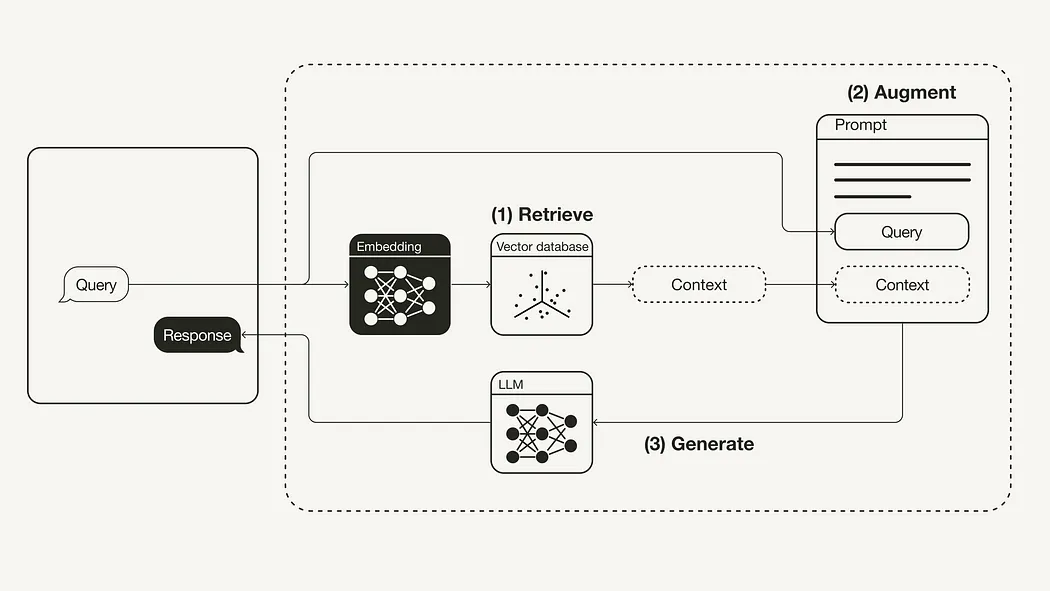
How It Works
- Load the PDF: Extract text from the renewable energy report.
- Split the Text: Break the document into manageable chunks.
- Embed the Text: Convert chunks into vector representations for search.
- Retrieve Relevant Chunks: Use FAISS to find the best matches for your query.
- Generate an Answer: Craft an insightful response with OpenAI’s GPT model.
Diagram of the RAG Workflow
Installation
Prerequisites
- Python 3.7+
- API Key for OpenAI (to use GPT models)
Setup Steps
-
Clone the Repository:
git clone https://github.com/your-repo-link.git cd your-repo-link -
Install Dependencies:
pip install -r requirements.txt -
Add Your OpenAI API Key:
- Create a
.envfile in the project root and add:OPENAI_API_KEY=your_api_key_here
- Create a
-
Run the Tool:
python main.py
Usage
Once you’ve set up the tool, you can ask questions like:
- “What renewable energy technologies does UNICEF highlight?”
- “How can renewable energy combat climate change?”
The tool retrieves relevant insights from the report and generates a precise answer.
Demo Video
📺 Watch the detailed walkthrough on YouTube:
👉 How to Build EnergyInsight with RAG
Folder Structure
📂 EnergyInsight
├── 📄 main.py          # Main application script
├── 📄 requirements.txt # Dependencies
├── 📂 data             # Contains the PDF document
├── 📂 embeddings       # Stores chunk embeddings
├── 📂 utils            # Utility scripts for preprocessing and retrieval
└── 📄 README.md        # This file
Sample Code
Here’s a glimpse of how retrieval works:
query = "What are the emerging renewable energy technologies UNICEF highlights?"
retrieved_chunks = retrieve(query)
prompt = create_prompt(query, retrieved_chunks)
answer = generate_answer(prompt)
print("\nAnswer:\n", answer)
Contributing
Contributions are welcome! If you have suggestions for improving the tool or adding features, feel free to open a pull request or issue.
Start interacting with renewable energy insights now!
👉 GitHub Code Repository
📺 YouTube Walkthrough
Let me know if you'd like further customizations! 😊