panicparse
Parses panic stack traces, densifies and deduplicates goroutines with similar
stack traces. Helps debugging crashes and deadlocks in heavily parallelized
process.


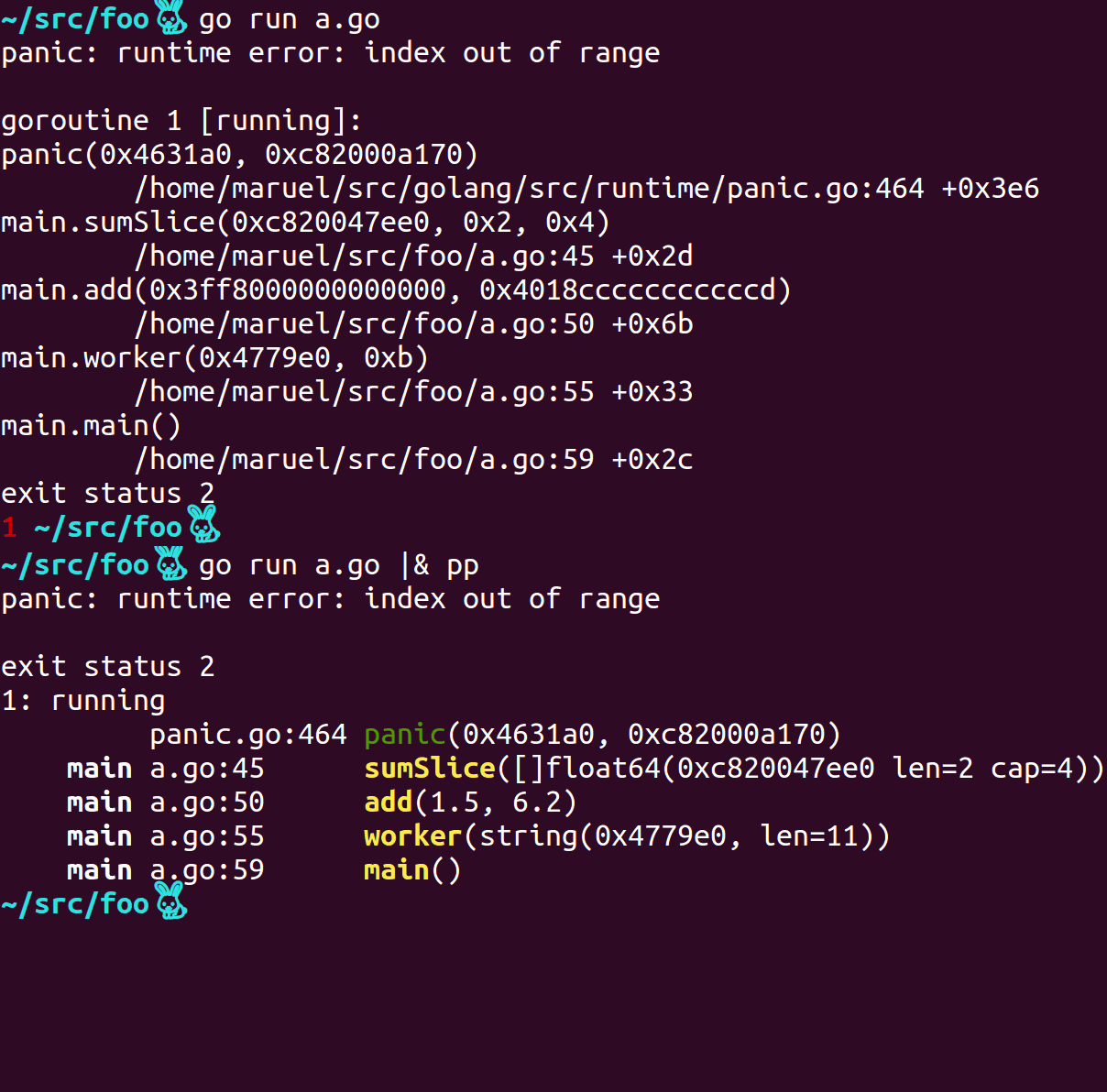
panicparse helps make sense of Go crash dumps:
Features
- Race detector support, e.g. it can parse output produced by
go test -race - HTML export.
- Easy to use as an HTTP Handler
middleware. - High performance parsing.
- HTTP web server
that serves a very tight and swell snapshot of your goroutines, much more
readable than net/http/pprof. - >50% more compact output than original stack dump yet more readable.
- Deduplicates redundant goroutine stacks. Useful for large server crashes.
- Arguments as pointer IDs instead of raw pointer values.
- Pushes stdlib-only stacks at the bottom to help focus on important code.
- Parses the source files if available to augment the output.
- Works on any platform supported by Go, including Windows, macOS, linux.
- Full go module support.
- Requires >=go1.17. Use v2.3.1 for older Go versions.
Installation
go install github.com/maruel/panicparse/v2/cmd/pp@latest
Usage
Piping a stack trace from another process
TL;DR
- Ubuntu (bash v4 or zsh):
|& - macOS, install bash 4+, then:
|& - Windows or macOS with stock bash v3:
2>&1 | - Fish shell:
^|
Longer version
pp streams its stdin to stdout as long as it doesn't detect any panic.
panic() and Go's native deadlock detector print to
stderr via the native print()
function.
Bash v4 or zsh: |& tells the shell to redirect stderr to stdout,
it's an alias for 2>&1 | (bash
v4,
zsh):
go test -v |&pp
Windows or macOS native bash (which is
3.2.57): They don't
have this shortcut, so use the long form:
go test -v 2>&1 | pp
Fish: &| redirects stderr and stdout. It's an alias for 2>&1 |
(fish piping):
go test -v &| pp
PowerShell: It has broken 2>&1 redirection. The workaround is to shell out to cmd.exe. :(
Investigate deadlock
On POSIX, use Ctrl-\ to send SIGQUIT to your process, pp will ignore
the signal and will parse the stack trace.
Parsing from a file
To dump to a file then parse, pass the file path of a stack trace
go test 2> stack.txt
pp stack.txt
Tips
Disable inlining
The Go toolchain inlines functions when it can. This causes traces to be less
informative. Optimization also interfere with traces. You can use the following
to help diagnosing issues:
go install -gcflags '-N -l' path/to/foo
foo |& pp
or
go test -gcflags '-N -l' ./... |& pp
Run go tool compile -help to get the full list of valid values for -gcflags.
GOTRACEBACK
By default, GOTRACEBACK defaults to
single, which means that a panic will only return the current goroutine trace
alone. To get all goroutines trace and not just the crashing one, set the
environment variable:
export GOTRACEBACK=all
or set GOTRACEBACK=all on Windows. Probably worth to put it in your .bashrc.
Updating bash on macOS
Install bash v4+ on macOS via homebrew or
macports. Your future self will appreciate having
done that.
If you have /usr/bin/pp installed
If you try pp for the first time and you get:
Creating tables and indexes...
Done.
and/or
/usr/bin/pp5.18: No input files specified
you may be running the Perl PAR Packager instead of panicparse.
You have two choices, either you put $GOPATH/bin at the beginning of $PATH
or use long name panicparse with:
go install github.com/maruel/panicparse/v2@latest
then using panicparse instead of pp:
go test 2> panicparse
Hint: You may also use shell aliases
alias gp=panicparse
go test 2> gp

alias p=panicparse
go test 2> p
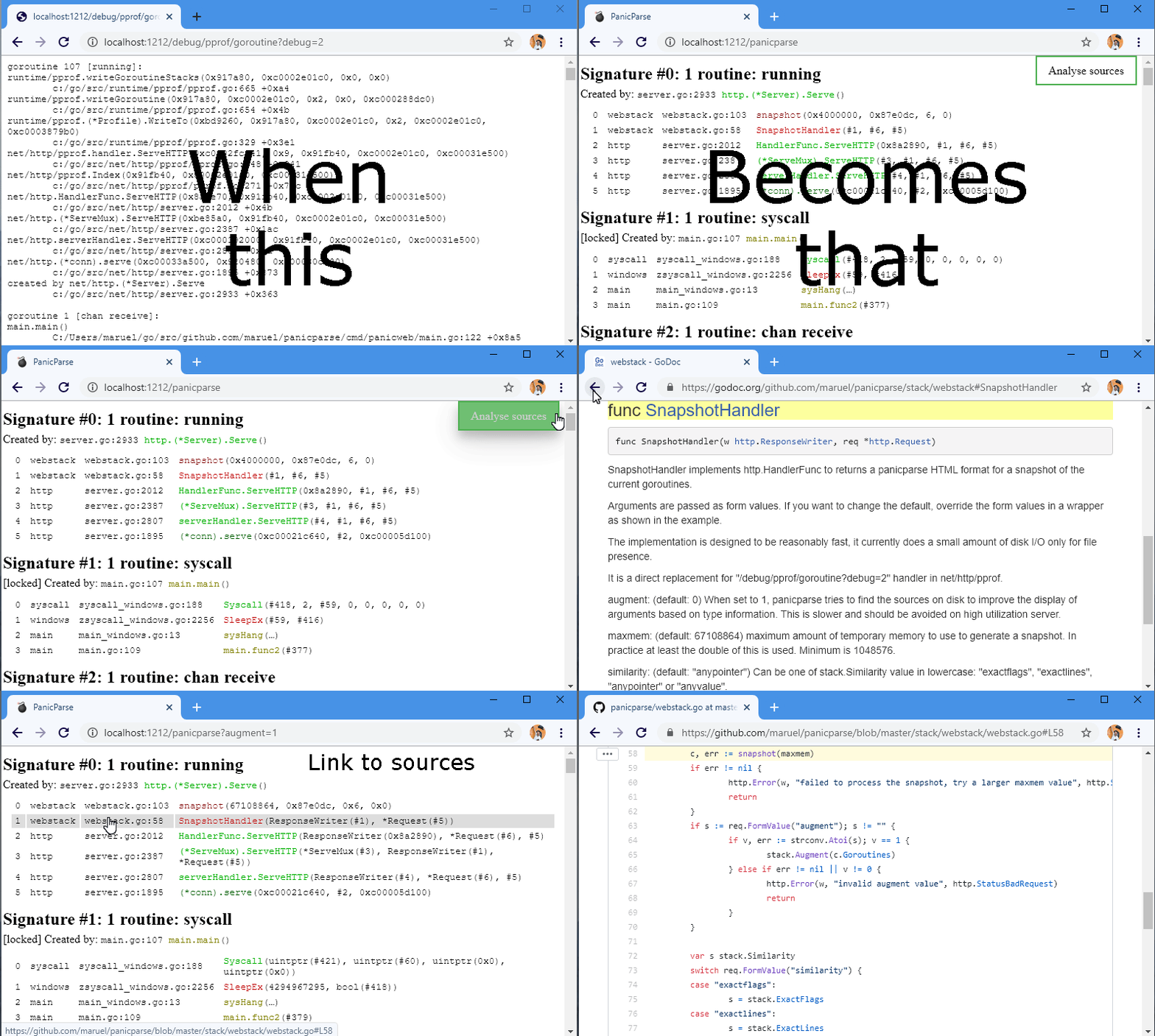
webstack in action
The
webstack.SnapshotHandler
http.Handler enables glancing at at a snapshot of your process trivially:
Authors
panicparse was created with ❤️️ and passion by Marc-Antoine
Ruel and
friends.