myvsparth/flutter_form_validation
How to implement Form Validation in Flutter
FORM VALIDATION IN FLUTTER
How to implement Form Validation in Flutter
Introduction:
In this article we will learn how to apply form validation in flutter. For form validation we will use flutter_form_builder which provide us syntactic sugar for creating a form widget and reduce the boilerplate needed to build a form, validate fields, react to changes, and collect the value of the form in the form of a map. So let’s begin to implement form validation in flutter.
Output:
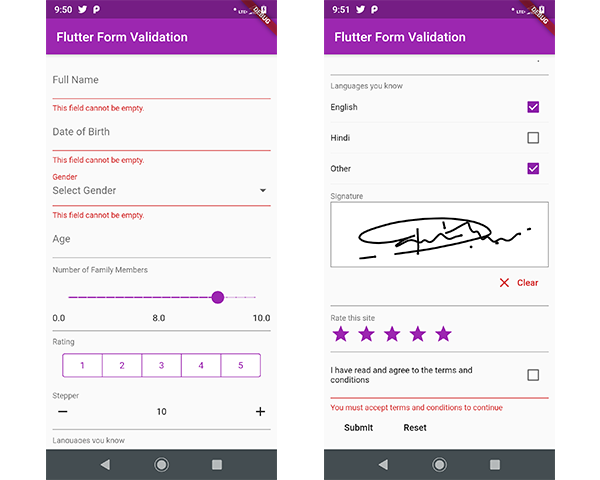
Plugin Required: flutter_form_builder: ^3.4.1
Programming Steps:
-
First and basic step to create new application in flutter. If you are a beginner in flutter then you can check my blog Create a first app in Flutter. I have created an app named as “flutter_form_validation”
-
We need to add form builder plugin which provide us form validation for that, open the pubspec.yaml file in your project and add the following dependencies into it.
dependencies:
 flutter:
   sdk: flutter
 cupertino_icons: ^0.1.2
 flutter_form_builder: ^3.4.1
- Now, go to main.dart and import form builder package.
import 'package:flutter_form_builder/flutter_form_builder.dart';
- Now, we will implement all types of form validation controllers to understand how to apply validation to form controllers. Following is the programatically implementation for that.
import 'package:flutter/material.dart';
import 'package:flutter_form_builder/flutter_form_builder.dart';
import 'package:intl/intl.dart';

void main() => runApp(MyApp());

class MyApp extends StatelessWidget {
 @override
 Widget build(BuildContext context) {
   return MaterialApp(
     theme: ThemeData(
       primarySwatch: Colors.purple,
     ),
     home: MyHomePage(),
   );
 }
}

class MyHomePage extends StatefulWidget {
 @override
 _MyHomePageState createState() => _MyHomePageState();
}

class _MyHomePageState extends State<MyHomePage> {
 var data;
 bool autoValidate = true;
 bool readOnly = false;
 bool showSegmentedControl = true;
 final GlobalKey<FormBuilderState> _fbKey = GlobalKey<FormBuilderState>();

 @override
 Widget build(BuildContext context) {
   return Scaffold(
     appBar: AppBar(
       title: Text("Flutter Form Validation"),
     ),
     body: Padding(
       padding: EdgeInsets.all(10),
       child: SingleChildScrollView(
         child: Column(
           children: <Widget>[
             FormBuilder(
               key: _fbKey,
               initialValue: {
                 'date': DateTime.now(),
                 'accept_terms': false,
               },
               autovalidate: true,
               child: Column(
                 children: <Widget>[
                   FormBuilderTextField(
                     attribute: 'text',
                     validators: [FormBuilderValidators.required()],
                     decoration: InputDecoration(labelText: "Full Name"),
                   ),
                   FormBuilderDateTimePicker(
                     attribute: "date",
                     inputType: InputType.date,
                     validators: [FormBuilderValidators.required()],
                     format: DateFormat("dd-MM-yyyy"),
                     decoration: InputDecoration(labelText: "Date of Birth"),
                   ),
                   FormBuilderDropdown(
                     attribute: "gender",
                     decoration: InputDecoration(labelText: "Gender"),
                     // initialValue: 'Male',
                     hint: Text('Select Gender'),
                     validators: [FormBuilderValidators.required()],
                     items: ['Male', 'Female', 'Other']
                         .map((gender) => DropdownMenuItem(
                             value: gender, child: Text("$gender")))
                         .toList(),
                   ),
                   FormBuilderTextField(
                     attribute: "age",
                     decoration: InputDecoration(labelText: "Age"),
                     keyboardType: TextInputType.number,
                     validators: [
                       FormBuilderValidators.numeric(),
                       FormBuilderValidators.max(70),
                     ],
                   ),
                   FormBuilderSlider(
                     attribute: "slider",
                     validators: [FormBuilderValidators.min(6)],
                     min: 0.0,
                     max: 10.0,
                     initialValue: 1.0,
                     divisions: 20,
                     decoration: InputDecoration(
                         labelText: "Number of Family Members"),
                   ),
                   FormBuilderSegmentedControl(
                     decoration: InputDecoration(labelText: "Rating"),
                     attribute: "movie_rating",
                     options: List.generate(5, (i) => i + 1)
                         .map(
                             (number) => FormBuilderFieldOption(value: number))
                         .toList(),
                   ),
                   FormBuilderStepper(
                     decoration: InputDecoration(labelText: "Stepper"),
                     attribute: "stepper",
                     initialValue: 10,
                     step: 1,
                   ),
                   FormBuilderCheckboxList(
                     decoration:
                         InputDecoration(labelText: "Languages you know"),
                     attribute: "languages",
                     initialValue: ["English"],
                     options: [
                       FormBuilderFieldOption(value: "English"),
                       FormBuilderFieldOption(value: "Hindi"),
                       FormBuilderFieldOption(value: "Other")
                     ],
                   ),
                   FormBuilderSignaturePad(
                     decoration: InputDecoration(labelText: "Signature"),
                     attribute: "signature",
                     height: 100,
                   ),
                   FormBuilderRate(
                     decoration: InputDecoration(labelText: "Rate this site"),
                     attribute: "rate",
                     iconSize: 32.0,
                     initialValue: 1,
                     max: 5,
                   ),
                   FormBuilderCheckbox(
                     attribute: 'accept_terms',
                     label: Text(
                         "I have read and agree to the terms and conditions"),
                     validators: [
                       FormBuilderValidators.requiredTrue(
                         errorText:
                             "You must accept terms and conditions to continue",
                       ),
                     ],
                   ),
                 ],
               ),
             ),
             Row(
               children: <Widget>[
                 MaterialButton(
                   child: Text("Submit"),
                   onPressed: () {
                     _fbKey.currentState.save();
                     if (_fbKey.currentState.validate()) {
                       print(_fbKey.currentState.value);
                     }
                   },
                 ),
                 MaterialButton(
                   child: Text("Reset"),
                   onPressed: () {
                     _fbKey.currentState.reset();
                   },
                 ),
               ],
             )
           ],
         ),
       ),
     ),
   );
 }
}
- Great, you are done with form validation in flutter. Run this project in device or emulator and check the output.
Conclusion:
In this article we have learned how to implement form validation in flutter. You can check out more validation in plugins official documentation.
Reference: https://pub.dev/packages/flutter_form_builder
Git: https://github.com/myvsparth/flutter_form_validation