lldap - Light LDAP implementation for authentication
LDAP made easy.






- About
- Installation
- Client configuration
- Comparisons with other services
- I can't log in!
- Contributions
About
This project is a lightweight authentication server that provides an
opinionated, simplified LDAP interface for authentication. It integrates with
many backends, from KeyCloak to Authelia to Nextcloud and
more!
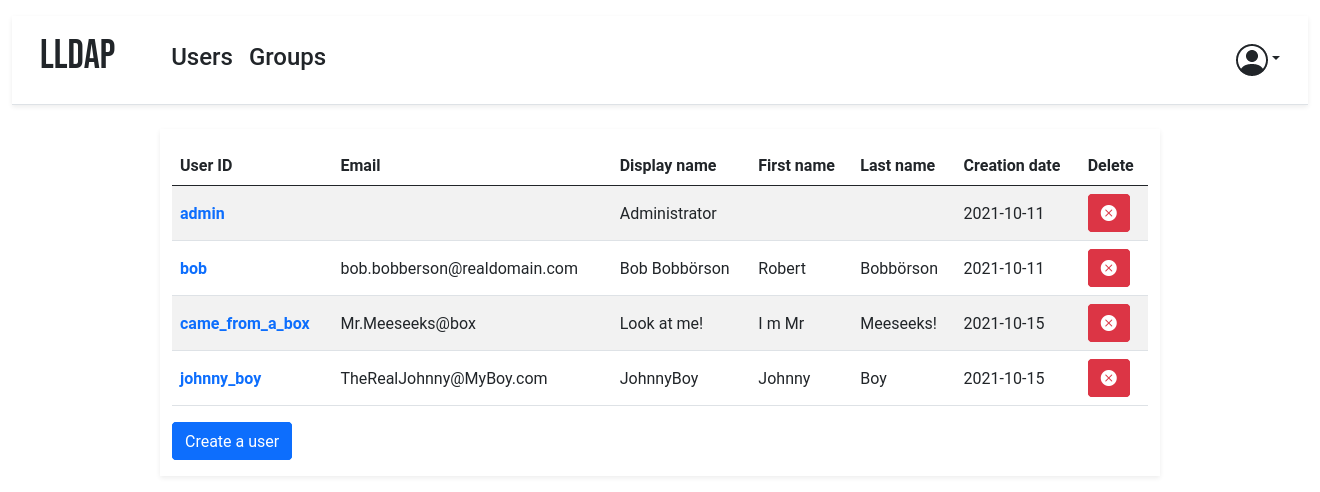
It comes with a frontend that makes user management easy, and allows users to
edit their own details or reset their password by email.
The goal is not to provide a full LDAP server; if you're interested in that,
check out OpenLDAP. This server is a user management system that is:
- simple to setup (no messing around with
slapd), - simple to manage (friendly web UI),
- low resources,
- opinionated with basic defaults so you don't have to understand the
subtleties of LDAP.
It mostly targets self-hosting servers, with open-source components like
Nextcloud, Airsonic and so on that only support LDAP as a source of external
authentication.
For more features (OAuth/OpenID support, reverse proxy, ...) you can install
other components (KeyCloak, Authelia, ...) using this server as the source of
truth for users, via LDAP.
By default, the data is stored in SQLite, but you can swap the backend with
MySQL/MariaDB or PostgreSQL.
Installation
With Docker
The image is available at nitnelave/lldap. You should persist the /data
folder, which contains your configuration, the database and the private key
file.
Configure the server by copying the lldap_config.docker_template.toml to
/data/lldap_config.toml and updating the configuration values (especially the
jwt_secret and ldap_user_pass, unless you override them with env variables).
Environment variables should be prefixed with LLDAP_ to override the
configuration.
If the lldap_config.toml doesn't exist when starting up, LLDAP will use default one. The default admin password is password, you can change the password later using the web interface.
Secrets can also be set through a file. The filename should be specified by the
variables LLDAP_JWT_SECRET_FILE or LLDAP_LDAP_USER_PASS_FILE, and the file
contents are loaded into the respective configuration parameters. Note that
_FILE variables take precedence.
Example for docker compose:
- You can use either the
:latesttag image or:stableas used in this example. :latesttag image contains recently pushed code or feature tests, in which some instability can be expected.- If
UIDandGIDno defined LLDAP will use defaultUIDandGIDnumber1000. - If no
TZis set, defaultUTCtimezone will be used.
version: "3"

volumes:
  lldap_data:
    driver: local

services:
  lldap:
    image: nitnelave/lldap:stable
    ports:
      # For LDAP
      - "3890:3890"
      # For LDAPS (LDAP Over SSL), enable port if LLDAP_LDAPS_OPTIONS__ENABLED set true, look env below
      #- "6360:6360"
      # For the web front-end
      - "17170:17170"
    volumes:
      - "lldap_data:/data"
      # Alternatively, you can mount a local folder
      # - "./lldap_data:/data"
    environment:
      - UID=####
      - GID=####
      - TZ=####/####
      - LLDAP_JWT_SECRET=REPLACE_WITH_RANDOM
      - LLDAP_LDAP_USER_PASS=REPLACE_WITH_PASSWORD
      - LLDAP_LDAP_BASE_DN=dc=example,dc=com
      # If using LDAPS, set enabled true and configure cert and key path
      # - LLDAP_LDAPS_OPTIONS__ENABLED=true
      # - LLDAP_LDAPS_OPTIONS__CERT_FILE=/path/to/certfile.crt
      # - LLDAP_LDAPS_OPTIONS__KEY_FILE=/path/to/keyfile.key
      # You can also set a different database:
      # - LLDAP_DATABASE_URL=mysql://mysql-user:password@mysql-server/my-database
      # - LLDAP_DATABASE_URL=postgres://postgres-user:password@postgres-server/my-database
Then the service will listen on two ports, one for LDAP and one for the web
front-end.
With Kubernetes
See https://github.com/Evantage-WS/lldap-kubernetes for a LLDAP deployment for Kubernetes
From source
Backend
To compile the project, you'll need:
- curl and gzip:
sudo apt install curl gzip - Rust/Cargo: rustup.rs
Then you can compile the server (and the migration tool if you want):
cargo build --release -p lldap -p lldap_migration_toolThe resulting binaries will be in ./target/release/. Alternatively, you can
just run cargo run -- run to run the server.
Frontend
To bring up the server, you'll need to compile the frontend. In addition to
cargo, you'll need:
- WASM-pack:
cargo install wasm-pack
Then you can build the frontend files with
./app/build.sh(you'll need to run this after every front-end change to update the WASM
package served).
The default config is in src/infra/configuration.rs, but you can override it
by creating an lldap_config.toml, setting environment variables or passing
arguments to cargo run. Have a look at the docker template:
lldap_config.docker_template.toml.
You can also install it as a systemd service, see
lldap.service.
Cross-compilation
Docker images are provided for AMD64, ARM64 and ARM/V7.
If you want to cross-compile yourself, you can do so by installing
cross:
cargo install cross
cross build --target=armv7-unknown-linux-musleabihf -p lldap --release
./app/build.sh
(Replace armv7-unknown-linux-musleabihf with the correct Rust target for your
device.)
You can then get the compiled server binary in
target/armv7-unknown-linux-musleabihf/release/lldap and the various needed files
(index.html, main.js, pkg folder) in the app folder. Copy them to the
Raspberry Pi (or other target), with the folder structure maintained (app
files in an app folder next to the binary).
Client configuration
Compatible services
Most services that can use LDAP as an authentication provider should work out
of the box. For new services, it's possible that they require a bit of tweaking
on LLDAP's side to make things work. In that case, just create an issue with
the relevant details (logs of the service, LLDAP logs with verbose=true in
the config).
General configuration guide
To configure the services that will talk to LLDAP, here are the values:
- The LDAP user DN is from the configuration. By default,
cn=admin,ou=people,dc=example,dc=com. - The LDAP password is from the configuration (same as to log in to the web
UI). - The users are all located in
ou=people,+ the base DN, so by default user
bobis atcn=bob,ou=people,dc=example,dc=com. - Similarly, the groups are located in
ou=groups, so the groupfamily
will be atcn=family,ou=groups,dc=example,dc=com.
Testing group membership through memberOf is supported, so you can have a
filter like: (memberOf=cn=admins,ou=groups,dc=example,dc=com).
The administrator group for LLDAP is lldap_admin: anyone in this group has
admin rights in the Web UI. Most LDAP integrations should instead use a user in
the lldap_strict_readonly or lldap_password_manager group, to avoid granting full
administration access to many services.
Sample client configurations
Some specific clients have been tested to work and come with sample
configuration files, or guides. See the example_configs
folder for help with:
- Airsonic Advanced
- Apache Guacamole
- Authelia
- Authentik
- Bookstack
- Calibre-Web
- Dell iDRAC
- Dex
- Dokuwiki
- Dolibarr
- Ejabberd
- Emby
- Gitea
- Grafana
- Hedgedoc
- Jellyfin
- Jitsi Meet
- KeyCloak
- Matrix
- Mealie
- Nextcloud
- Nexus
- Organizr
- Portainer
- Rancher
- Seafile
- Shaarli
- Syncthing
- Vaultwarden
- WeKan
- WG Portal
- WikiJS
- XBackBone
- Zendto
Migrating from SQLite
If you started with an SQLite database and would like to migrate to
MySQL/MariaDB or PostgreSQL, check out the DB
migration docs.
Comparisons with other services
vs OpenLDAP
OpenLDAP is a monster of a service that implements
all of LDAP and all of its extensions, plus some of its own. That said, if you
need all that flexibility, it might be what you need! Note that installation
can be a bit painful (figuring out how to use slapd) and people have mixed
experiences following tutorials online. If you don't configure it properly, you
might end up storing passwords in clear, so a breach of your server would
reveal all the stored passwords!
OpenLDAP doesn't come with a UI: if you want a web interface, you'll have to
install one (not that many look nice) and configure it.
LLDAP is much simpler to setup, has a much smaller image (10x smaller, 20x if
you add PhpLdapAdmin), and comes packed with its own purpose-built web UI.
However, it's not as flexible as OpenLDAP.
vs FreeIPA
FreeIPA is the one-stop shop for identity management:
LDAP, Kerberos, NTP, DNS, Samba, you name it, it has it. In addition to user
management, it also does security policies, single sign-on, certificate
management, linux account management and so on.
If you need all of that, go for it! Keep in mind that a more complex system is
more complex to maintain, though.
LLDAP is much lighter to run (<10 MB RAM including the DB), easier to
configure (no messing around with DNS or security policies) and simpler to
use. It also comes conveniently packed in a docker container.
vs Kanidm
Kanidm is an up-and-coming Rust identity management
platform, covering all your bases: OAuth, Linux accounts, SSH keys, Radius,
WebAuthn. It comes with a (read-only) LDAPS server.
It's fairly easy to install and does much more; but their LDAP server is
read-only, and by having more moving parts it is inherently more complex. If
you don't need to modify the users through LDAP and you're planning on
installing something like KeyCloak to provide
modern identity protocols, check out Kanidm.
I can't log in!
If you just set up the server, can get to the login page but the password you
set isn't working, try the following:
- (For docker): Make sure that the
/datafolder is persistent, either to a
docker volume or mounted from the host filesystem. - Check if there is a
lldap_config.tomlfile (either in/datafor docker
or in the current directory). If there isn't, copy
lldap_config.docker_template.tomlthere, and fill in the various values
(passwords, secrets, ...). - Check if there is a
users.dbfile (either in/datafor docker or where
you specified the DB URL, which defaults to the current directory). If
there isn't, check that the user running the command (user with ID 10001
for docker) has the rights to write to the/datafolder. If in doubt, you
canchmod 777 /data(or whatever the folder) to make it world-writeable. - Make sure you restart the server.
- If it's still not working, join the
Discord server to ask for help.
Contributions
Contributions are welcome! Just fork and open a PR. Or just file a bug.
We don't have a code of conduct, just be respectful and remember that it's just
normal people doing this for free on their free time.
Make sure that you run cargo fmt from the root before creating the PR. And if
you change the GraphQL interface, you'll need to regenerate the schema by
running ./export_schema.sh.
Join our Discord server if you have any
questions!