gowin-blink
Blink demo for GOWIN FPGA dev kit DK-START-GW1N4, based on GW1N-4 FPGA with 4K LUTs
http://www.gowinsemi.com/support/devkits_detail/1/
-
Check out my tutorial: "Program Your First FPGA With GOWIN GW1N-4"
https://medium.com/@ly.lee/program-your-first-fpga-with-gowin-gw1n-4-b0d5c22b9fea -
Download the files in this repo and open
fpga_projectin Gowin YunYuan IDE -
Verilog code was reproduced from "SUG100-1.2E_Gowin YunYuan Software User Guide"
-
Floorplanner config based on "DK-START-GW1N4 User Guide"
and "DK-START-GW1N4开发板原理图" -
Official docs are at
http://www.gowinsemi.com/support/database/
Programming the GOWIN FPGA
-
Obtain a free developer licence from GOWIN. You will receive 2 licence files.
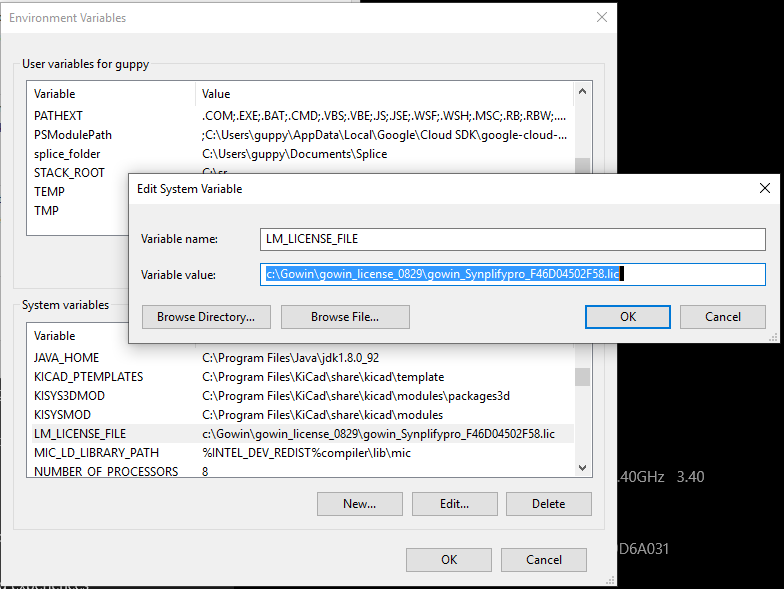
Set theLM_LICENSE_FILEenvironment
variable to the full path of thegowin_Synplifypro_????????????.liclicence file.
-
In GOWIN YunYuan IDE, set the local licence file to the other
gowin_????????????.liclicence file (not the same as the previous licence file).
-
Set the FPGA device as follows:

-
Our demo consists of a single Verilog file
demo.v:
-
Run the
Synthesizestep. Open theFloorPlannerand set the Ports to the
following Locations (i.e. the FPGA pin numbers)
-
Run the
Place & Routestep, thenProgram Device. Go to theCable Settingsscreen and clickQuery. Make sure that the USB cable is connected AND the dev board is powered up via the AC adapter.
-
Click the
Programbutton to copy the program into static RAM. TheDoneLED lights up and the demo code starts running, flashing the 4 LEDs at the bottom edge of the dev board.