ludvig-sandh/Chirp
A cross-platform modular digital synth written in C++, for real-time sound synthesis and audio experimentation.
Chirp 🎵🐦
A cross-platform real-time modular synthesizer written in modern C++ with ImGui and PortAudio.


Demo Video
About
Chirp started out as a small personal experiment. I wanted to see if I could synthesize bird sounds entirely from code.
That idea sort of grew as I implemented modules such as oscillators, LFOs, filters, reverb, etc. I realized I could just turn it into a full modular audio engine instead.
The original “bird synthesis” experiment still lives on as one of the built-in presets, which is why the project kept its name: Chirp
This project is entirely built by me as a hobby and learning experience.
It’s a way for me to explore and apply what I’ve learned about digital signal processing (DSP), modern C++ and software architecture in general.
At the same time, I wanted to challenge myself to create a complete, cross-platform desktop application with features like real-time DSP, GUI and build automation.
My goal has been to create something personal that combines my interests in music and programming.
Since 2020, I've been spending as much time on coding as I have on creating music, so a great deal of inspiration for this project has come from that part of my life.
No samples are used whatsoever in this application. The audio you hear is generated purely from code and first principles. No third-party digital signal processing libraries are used.
Features
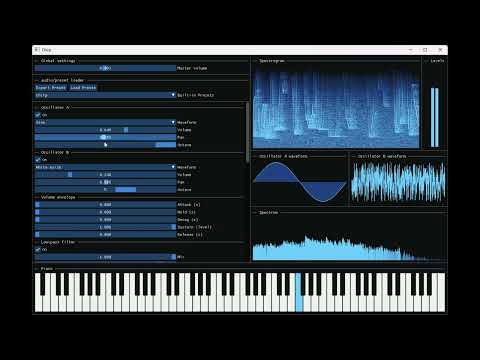
- Oscillators that support generating sounds from a set of different waveforms
- Volume and pan control
- Envelopes to specify the "shape" of the sound, by modulating volume over time
- Low-pass and high-pass filters to remove or highlight certain frequencies contained in the sound
- Feedback delay for echo effect, with different modes of stereo separation
- Reverb effect that simulates the reflections of sound in a physical space, adding a sense of depth and ambience
- Custom modulation of different audio parameters for even more control and creativity
- Customizable LFO/envelope shapes used as modulation sources
- Spectrogram and spectrum visualizers that show the frequency content over time
- Audio level bars that indicate loudness in both left and right audio channels
- Waveform displays that show the currently selected waveforms and what the oscillators will in fact generate
- A piano UI element that can be controlled via mouse or keyboard to play notes
- Save and load presets so you can reuse sounds you have created
- A set of built-in presets, including the "chirp" preset
- MIDI keyboard support: play and control the synthesizer directly from external MIDI devices
Architecture
- Audio is routed through a graph, where each node processes or generates audio. The result from the root node is what is written to the audio buffer provided by PortAudio library (played to the default audio device).
- Supports arbitrarily complex audio DAGs (directly acyclic graphs) which makes the audio engine completely modular. The synth is just a specific layout of an audio graph (a chain in this case: the audio is routed from top to bottom in the preset control window) but the system is flexible enough to support any configuration by deriving from the
AudioLayoutclass. - GUI and audio engine runs on separate threads, allowing for responsive UI while also allowing the audio engine to generate audio in real-time without interruption.
- A third thread is responsible for consuming the generated signal from the audio thread and computing the FFT of it. Then it passes the result to the GUI thread. I have implemented my own custom version of a bounded buffer (producer-consumer) synchronization construct for passing the audio signal between the audio and FFT threads. I'm not sure how much extra time it frees up for the audio thread in practice compared to computing the FFT directly, so it's mostly just an exercise in concurrency.
- A modulation matrix is used for storing the connections between audio modulation sources and destinations. This allows for LFOs/envelopes to control audio parameters as explained previously, but in general supports any number of connections and in theory even nested modulations (though not supported in the UI yet).
- Audio processing effects such as filters, feedback delay and reverb. These are implemented as nodes in the audio processing graph, which means they derive from
AudioProcessorNode. - Oscillators derive from generators, which also derive from
AudioProcessorNode. Generators representAudioProcessorNodes that generate sound, rather than modify incoming sound. Currently, no other classes derive fromGenerator, but it's built this way to support for example sample players or microphone input in the future. - The way the user can change the preset and hear the difference in real-time is by using a set of
std::atomic's. These atomics live in aAudioPresetobject, shared by both the GUI and audio threads. The GUI thread writes to these values on every frame and the audio thread reads them on every audio buffer callback. - The
AudioPresetobject is serialized to json in order to save presets. Likewise, a json file is deserialized to load a preset from disk. - The project was originally written for C++23 to be as modern as possible. However I realized during testing that all compilers didn't support some of the features yet. To keep the project more portable I decided to downgrade to C++20.
There are tons of other details I could go over, but these are some of the ones I find the most interesting.
If you’re curious to explore further, feel free to dive into the source. It’s heavily commented and organized around these core ideas.
Build Instructions
Requirements
- CMake ≥ 3.15
- C++20 compiler
- Git
Clone and build
git clone --recursive https://github.com/ludvig-sandh/Chirp.git
cd Chirp
cmake -B build -DCMAKE_BUILD_TYPE=Release
cmake --build build --config Release --parallel
The executable ends up in the build folder, or in build/Release, and it is ready to run.
Note:
If CMake reports an error such as
-- Building for: NMake Makefiles
or
CMAKE_CXX_COMPILER not set, after EnableLanguage,
it means no compiler toolchain was detected automatically.
In that case, you must remove the build folder (for example withrm -rf build), then retry by specifying the compiler toolchain explicitly when configuring:
MSVC (Visual Studio)
cmake -B build -G "Visual Studio 17 2022" -A x64 -DCMAKE_BUILD_TYPE=ReleaseMinGW (GCC)
cmake -B build -G "MinGW Makefiles" -DCMAKE_BUILD_TYPE=ReleaseNinja
cmake -B build -G Ninja -DCMAKE_BUILD_TYPE=ReleaseMost Linux and macOS environments detect a compiler automatically,
but on Windows, CMake may default to NMake, which requires a Visual Studio Developer Prompt.After this, you can continue with the next command:
cmake --build build --config Release --parallel
Running on Wayland (Linux Desktop)
Chirp uses GLFW for windowing. It works on both X11 and Wayland, but some Linux distributions
do not install Wayland development headers by default.If you get errors related to wayland, install the Wayland + OpenGL development packages using:
sudo apt-get update
sudo apt-get install -y \
  xorg-dev \
  libglu1-mesa-dev \
  libegl1-mesa-dev \
  wayland-protocols \
  libwayland-dev \
  libxkbcommon-dev
After installing those packages, re-run CMake.
Run without building
If you don’t want to compile Chirp yourself, you can also download a prebuilt binary directly from GitHub:
- Go to the Actions tab of this repository.
- Click the latest workflow run (with a green ✅ “Build” badge).
- Scroll down to the Artifacts section at the bottom.
- Download the ZIP file for your platform:
chirp-windows-latest.zipchirp-ubuntu-latest.zipchirp-macos-latest.zip
- Extract it and run the executable (
chirp.exeon Windows,chirpon Linux/macOS).
Note:
These binaries are automatically built and tested on every commit using GitHub Actions,
so they’re always up to date with the latest source.Also, take them with a grain of salt since they are compiled in specific environments and might not always work on all machines.
Project Structure
src/                         # Source code
├── main.cpp                 # Program entry point
├── MainApplication.cpp/.hpp # Main application setup and control logic
│
├── audio/                   # Core audio synthesis and processing
│   ├── core/                # Fundamental DSP classes (waveform, pan, gain, frequency, etc.)
│   ├── effects/             # Audio effects (reverb, filters, etc.)
│   │   └── dsp/             # Low-level DSP building blocks used by effects
│   ├── engine/              # Audio engine and buffer management (PortAudio backend)
│   ├── generator/           # Sound generation nodes (oscillators, noise, etc.)
│   ├── layout/              # Application-specific audio graph layout and node management
│   ├── modulation/          # Modulation sources (LFOs, envelopes, modulation matrix)
│   └── preset/              # Preset serialization, saving/loading, and default configuration
│
├── fft/                     # FFT utilities and spectral analysis
├── gui/                     # ImGui-based user interface components
│   └── windows/             # Classes corresponding to each window on screen
│       └── helper/          # Helper classes used in the window classes
├── synchronization/         # Thread synchronization utilities
├── midi/                    # External midi keyboard support
├── util/                    # Utility classes relevant for any part of the project
├── external/                # Third-party libraries
│
presets/                     # Default preset files bundled with the app
CMakeLists.txt               # Build configuration
README.md                    # Project overview and documentation
Improvements & Possible Future plans
Chirp is a complete synth, but there are many exciting features missing.
Some of them are:
- Recording to WAV: export audio output to
.wavfiles for use in other DAWs or projects - Dynamic effects chain: add and remove audio effects in real time within the processing graph
- New audio effects: implement distortion and other effects modules
- Samplers and sequencers: introduce sample-based playback and basic MIDI sequencing capabilities
- Unison and detune for oscillators: create wider, richer sounds through oscillator layering and detuning
License
This project is licensed under the MIT License — see the LICENSE file for details.
Credits
Chirp makes use of the following open-source projects: