l0rda/lovelace-multiple-entity-row
Show multiple entity states and attributes on entity rows in Home Assistant's Lovelace UI
multiple-entity-row
Show multiple entity states or attributes on entity rows in Home Assistant's Lovelace UI




Setup
Manually add multiple-entity-row.js
to your <config>/www/ folder and add the following to your ui-lovelace.yaml file:
resources:
  - url: /local/multiple-entity-row.js?v=3.1.1
    type: module
OR install using HACS and add this instead:
resources:
  - url: /community_plugin/lovelace-multiple-entity-row/multiple-entity-row.js
    type: module
Options
This card produces an entity-row and must therefore be configured as an entity in an entities card.
| Name | Type | Default | Description |
|---|---|---|---|
| type | string | Required | custom:multiple-entity-row |
| entity | string | Required | domain.my_entity_id |
| name | string | Override entity friendly_name |
|
| unit | string | Override entity unit_of_measurement |
|
| icon | string | Override entity icon |
|
| toggle | bool | false |
Display a toggle (if supported) instead of state |
| show_state | bool | true |
Set to false to hide the entity state |
| state_header | string | Show header text above the main entity state | |
| state_color | bool | false |
Enable colored icon when entity is active |
| format | string | Format timestamp value (relative, date, time, datetime) |
|
| entities | list | see below | Additional entity IDs or entity object(s) |
| secondary_info | string/object | see below | Custom secondary_info entity object |
| tap_action | object | see below | Custom tap action on main entity state |
Entity Objects
Similarly as with the default HA entities card, each entity can be specified by a simple entity ID string,
or by an object which allows more customization and configuration.
If you define entities as objects, either entity, attribute or icon needs to be specified. entity is only required if you want
to display data from another entity than the main entity specified above. attribute is necessary if you want to display an entity
attribute value instead of the state value. icon lets you display an icon instead of a state or attribute value
(works well together with a custom tap_action).
| Name | Type | Default | Description |
|---|---|---|---|
| entity | string | A valid entity_id (or skip to use main entity) | |
| attribute | string | A valid attribute key for the entity | |
| name | string/bool | friendly_name |
Override entity friendly_name, or false to hide |
| unit | string | unit_of_measurement |
Override entity unit_of_measurement |
| toggle | bool | false |
Display a toggle if supported by domain |
| icon | string/bool | false |
Display default or custom icon instead of state or attribute value |
| state_color | bool | false |
Enable colored icon when entity is active |
| tap_action | object | see below | Custom entity tap action |
| format | string | Format timestamp value (relative, date, time, datetime) |
Secondary Info
The secondary_info field can either be any string if you just want to display some text,
the string last-changed if you want to display the entity's last changed time,
or an object containing the following configuration:
| Name | Type | Default | Description |
|---|---|---|---|
| entity | string | A valid entity_id (or skip to use main entity) | |
| attribute | string | A valid attribute key for the entity | |
| name | string/bool | friendly_name |
Override entity friendly_name, or false to hide |
| unit | string | unit_of_measurement |
Override entity unit_of_measurement |
| format | string | Format timestamp value (relative, date, time, datetime) |
Tap Action
If toggle is set to true the default action is toggle, otherwise it is more-info.
| Name | Type | Default | Description |
|---|---|---|---|
| action | string | Required | Action to perform (more-info, toggle, call-service, url, none) |
| service | string | Service to call (e.g. light.turn_on) when action is call-service |
|
| service_data | object | Optional data to include when action is call-service |
|
| url_path | string | URL to open when action is url |
|
| confirmation | bool/string | false |
Enable/set text to present in a confirmation dialog |
| entity | string | A valid entity_id override when action is more-info |
Examples
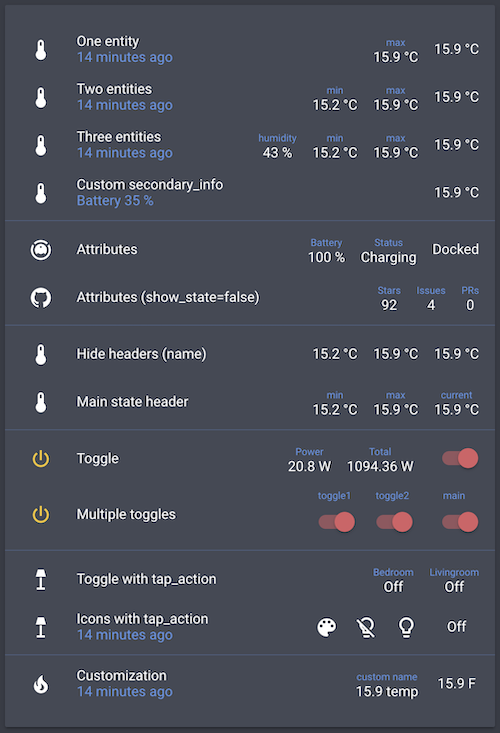
type: entities
entities:
  - entity: sensor.bedroom_temperature
    type: custom:multiple-entity-row
    name: One entity
    secondary_info: last-changed
    entities:
      - sensor.bedroom_max_temp

  - entity: sensor.bedroom_temperature
    type: custom:multiple-entity-row
    name: Two entities
    secondary_info: last-changed
    entities:
      - sensor.bedroom_min_temp
      - sensor.bedroom_max_temp

  - entity: sensor.bedroom_temperature
    type: custom:multiple-entity-row
    name: Three entities
    secondary_info: last-changed
    entities:
      - entity: sensor.bedroom_humidity
        name: humidity
      - sensor.bedroom_min_temp
      - sensor.bedroom_max_temp

  - entity: sensor.bedroom_temperature
    type: custom:multiple-entity-row
    name: Custom secondary_info
    secondary_info:
      attribute: battery_level
      name: Battery
      unit: '%'

  - type: section
  - entity: vacuum.xiaomi_vacuum_cleaner
    type: custom:multiple-entity-row
    name: Attributes
    entities:
      - attribute: battery_level
        name: Battery
        unit: '%'
      - attribute: status
        name: Status

  - entity:  sensor.lovelace_multiple_entity_row
    type: custom:multiple-entity-row
    name: Attributes (show_state=false)
    show_state: false
    entities:
      - attribute: stargazers
        name: Stars
      - attribute: open_issues
        name: Issues
      - attribute: open_pull_requests
        name: PRs

  - type: section
  - entity: sensor.bedroom_temperature
    type: custom:multiple-entity-row
    name: Hide headers (name)
    entities:
      - entity: sensor.bedroom_min_temp
        name: false
      - entity: sensor.bedroom_max_temp
        name: false

  - entity: sensor.bedroom_temperature
    type: custom:multiple-entity-row
    name: Main state header
    state_header: current
    entities:
      - sensor.bedroom_min_temp
      - sensor.bedroom_max_temp

  - type: section
  - entity: switch.livingroom_tv
    type: custom:multiple-entity-row
    name: Toggle
    toggle: true
    state_color: true
    entities:
      - entity: sensor.livingroom_tv_power
        name: Power
      - entity: sensor.livingroom_tv_power_total
        name: Total

  - entity: switch.livingroom_tv
    type: custom:multiple-entity-row
    name: Multiple toggles
    state_header: main
    toggle: true
    state_color: true
    entities:
      - entity: switch.livingroom_light
        name: toggle1
        toggle: true
      - entity: switch.livingroom_light_2
        name: toggle2
        toggle: true

  - type: section
  - entity: light.living_room
    type: custom:multiple-entity-row
    name: Toggle with tap_action
    state_header: Livingroom
    toggle: false
    tap_action:
      action: toggle
    entities:
      - entity: light.nightstand
        name: Bedroom
        tap_action:
          action: toggle

  - entity: light.living_room
    type: custom:multiple-entity-row
    name: Icons with tap_action
    secondary_info: last-changed
    entities:
      - entity: light.living_room
        icon: mdi:palette
      - icon: mdi:lightbulb-off-outline
        state_color: true
        tap_action:
          action: call-service
          service: light.turn_off
          service_data:
            entity_id: light.living_room
      - icon: mdi:lightbulb-outline
        state_color: true
        tap_action:
          action: call-service
          service: light.turn_on
          service_data:
            entity_id: light.living_room
          confirmation: 'Are you sure?'

  - type: section
  - entity: sensor.bedroom_temperature
    type: custom:multiple-entity-row
    name: Customization
    icon: mdi:fire
    unit: °F
    secondary_info: last-changed
    entities:
      - entity: sensor.bedroom_max_temp
        name: custom name
        unit: temp
My cards
xiaomi-vacuum-card |
multiple-entity-row |
github-entity-row |
attribute-entity-row