Analyzing Rectangles
This backend application consist of a REST API which exposes the 👉
endpoints documented by Swagger at
APP_HOST:APP_PORT/docs path. See the
Swagger section for more details.
Environment
This aplication is created using Node.js v20. It is recommended using
nvm (Node Version Manager) to manage
Node.js versions. Go to
github.com/creationix/nvm and check the
installation process for your OS.
Make sure to set the env variables. For local environment you can create a
.env file with the following environment variables:
APP_HOST=localhost
APP_PORT=3004
After cloning the repository
rectangles-demo you must
install the dependencies by running in the terminal:
npm installVS Code Extensions
It is recommended to install de suggested VS Code extensions suggested in the
file .vscode/extensions.json.
To test the API, you can use the
REST Client
extension, which allows you to send HTTP request and view the response in VS
Code.
Files with the extension ".http" are recognized by REST Client. In roder to
send a HTTP request, just select the query, then press F1, and select:
- Rest Client: Send Request
Running the server
After all dependencies are installed, just run the command:
npm run swagger # to generate server routes
npm run dev:server
Swagger
This projects uses
tsoa along with
swagger-ui-express to generate the documentation. The folder src/swagger
contains files autogenerated by tsoa, that includes routes and swagger spec
files specified in tsoa.json. The server uses
['/docs', '/openapi', '/swagger'] routes to deliver static content with the
API documentation generated by tsoa.
Testing
To run all unit tests, just run the following command:
npm run testBuild
To build in production mode, just run the following command:
npm run build-allEndpoints
The following endpoints are exposed by Express:
/adjacency/containment/intersection
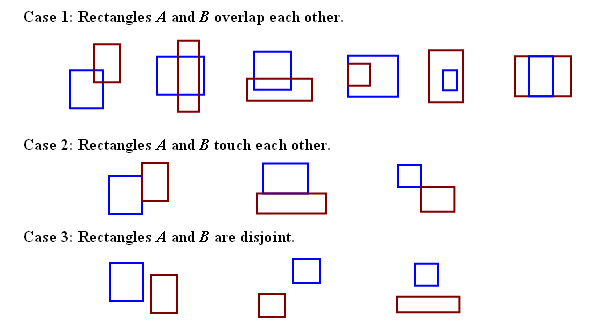
These are some base cases to analyze rectangles:
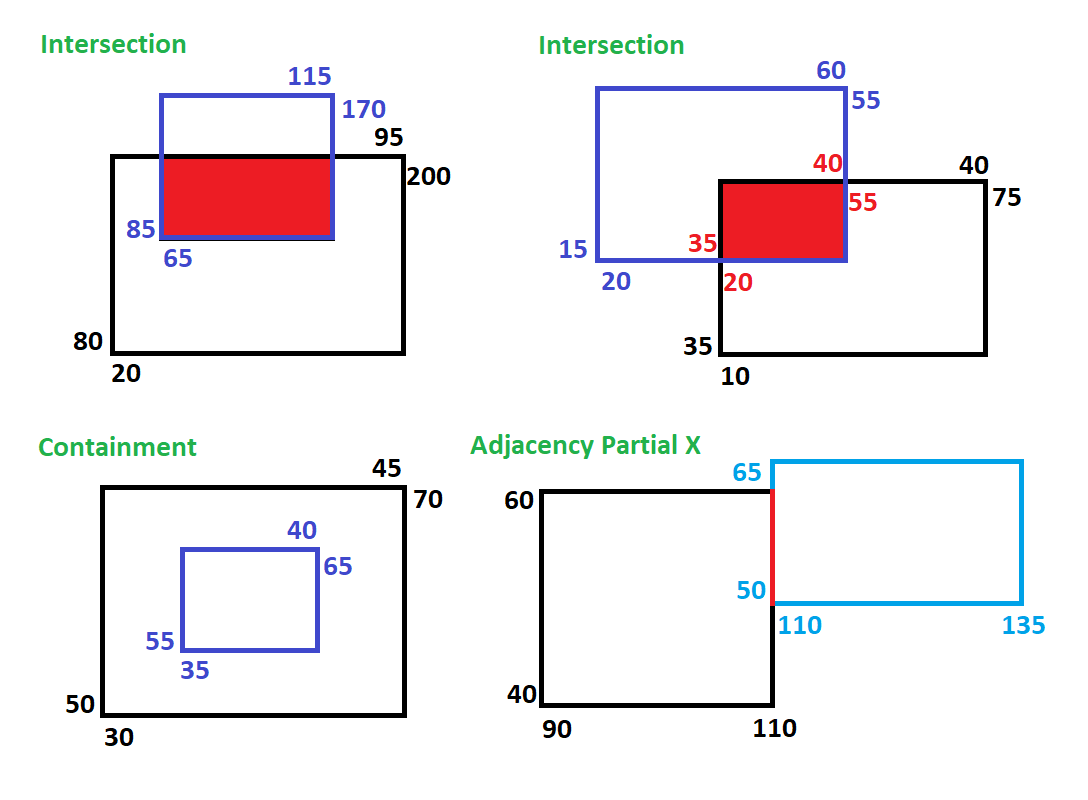
And these are some test cases for adjacency, containment, and intersection.
husky
Edit package.json > prepare script and run it once:
npm run prepareSee:
conventional-changelog/commitlint.
standard-version
standard-version needs to have a starting point to append the CHANGELOG and
other versions to. Simply run:
npm run release -- --first-releaseUsage
For a new release, just run
npm run releaseFor more details, please visit the Github site
standard-version