iisHong0w0/Axiom-AI-Aimbot
🎯 Advanced AI-powered aimbot with intelligent target detection, audio feedback system, and comprehensive parameter management. Built with Python, ONNX, and PyTorch.


Axiom AI
Adaptive aim assistance powered by computer vision to support gamers who need it most.
Download Latest Release
Discord
If this project helps you, please give us a ⭐ Star!
Overview
Axiom AI is a sophisticated computer vision application designed for real-time object detection and interaction. Built with Python and ONNX Runtime, it leverages DirectML for high-performance GPU acceleration to provide low-latency aim assistance. Featuring a modern Fluent Design UI with acrylic effects, multi-language support, and an intuitive setup wizard, Axiom makes advanced aim assistance accessible to everyone.
Key Features
-
Advanced Aim Control
- PID controller with separate X/Y axis tuning for precise adjustments.
- Bézier curve smoothing for natural, human-like mouse movement.
- Customizable FOV and independent detection range.
- Single-target mode for focusing on the nearest threat.
- FOV follows mouse cursor for dynamic aiming.
- Configurable head/body region ratios for fine-tuned targeting.
-
Smart Tracker (Prediction System)
- Velocity-based motion prediction for leading moving targets.
- Adaptive smoothing with configurable prediction time.
- Zero-lag reset on sudden direction changes or stops.
- Visual prediction overlay for debugging and tuning.
-
Auto Fire (Triggerbot)
- Adjustable delay and fire intervals.
- Target priority settings (Head / Body / Both).
- Always-on mode or key-activated toggle.
-
High Performance
- ONNX Runtime with DirectML for GPU-accelerated inference.
- DML ↔ CPU automatic fallback for maximum compatibility.
- Low-latency capture and inference loop with configurable intervals.
- Performance mode with optimized queue management.
- Idle detection throttling to reduce resource usage when not aiming.
-
Multiple Input Methods
mouse_event— Standard Windows API (default).ddxoft— Third-party driver-level mouse simulation.- Arduino Leonardo — Hardware-based HID mouse via serial COM port.
- Xbox 360 Virtual Controller — Gamepad emulation with adjustable sensitivity and deadzone.
-
Modern Fluent Design UI
- Built with PyQt6 + QFluentWidgets for a native Windows 11 look.
- Acrylic (frosted glass) window effect with configurable transparency.
- Dark / Light theme toggle.
- First-run Setup Wizard for quick configuration.
-
Multi-Language Interface
- English, 中文, Français, Deutsch, हिन्दी, 日本語, 한국어, Português, Русский, Español.
Supported Games (Pre-trained Models)
| Model | File |
|---|---|
| Apex Legends | apex.onnx |
| Counter-Strike 2 | CS2.onnx |
| Fortnite | Fornite.onnx |
| PUBG | Pubg.onnx |
| Roblox | Roblox.onnx |
| Valorant | Valorant[PURPLE].onnx |
You can also train and import your own ONNX models.
Why does Axiom exist?
Axiom is designed for gamers who are at a disadvantage compared to regular players, including but not limited to:
- Players grieving from parental loss
- Physical disabilities
- Intellectual disabilities
- Visual impairments
- Poor hand-eye coordination
- Poor FPS performance
- Hand tremors
- Parkinson's disease
- Neurological disorders
- Players with one arm/hand
- Players using feet due to hand loss
- Players using mouth due to limb loss
- Paralyzed players using brain-computer interfaces or eye trackers
- Colorblind players
- Blind players
- Players without glasses
- Elderly players
- Chronic fatigue syndrome
- Nystagmus sufferers
- Brain injury sequelae
- Spatial perception disorders
- Anxiety disorders
- ADHD
- Movement disorders
- Autism
- Sleep-deprived players
- Overconfident players
- Players prone to overthinking
- Emotionally volatile players
- Wrong DPI settings
- No mousepad users
- Limited mouse space
- Low-quality mouse users
- Cloud gaming users
- Mouse acceleration enabled
- No air conditioning in hot/humid areas
- Sweaty hands causing mouse slippage
- Poor posture or low chairs
- Very young child players
- Beginners or untrained players
- Unstable vision players
- Special controller users
- Lucid dreamers
- Sixth sense aiming players
- Religious players who consider aiming sinful
- Fatalists who believe fate decides everything
- Players seeking randomness and chaos
- Role-playing blind snipers
- Players who think crosshairs are decorative
- Players who think they're in third person
- Crosshair drift syndrome sufferers
- Voice navigation aiming players
- Schizophrenia
- Parallel world delay sync players
- Quantum state players
- Left-right hand fighting players
- Players who think right-click is fire
- Internal slow-motion animation players
- Moral players who wait for enemies to shoot first
- Hardware flip party
- Players who only aim at enemy weapons
- Players who only aim at enemy feet
- Players who only aim at enemy hands
- Players who only aim at enemy genitals
- Pixel-level instruction followers
- Players always aiming at the floor
- Feng shui players
- Players who chant before shooting
- Astrology-based FPS players
- Bad pixels on crosshair
- Screen reflection showing face in center
- Auto-sliding chairs
- Eyes-closed FPS challengers
- Left-hand-only announcement players
- No crosshair but forgot transparent crosshair stickers
- Noodle-eating players
- Extreme hypoglycemia sufferers
- Drunk players
- Extreme binocular disparity
- Sleep paralysis FPS players
- Players who believe enemies are illusions
- Players who can't distinguish directions
- Players who treat screen center as blind spot
- Severe choice paralysis
- Anti-authority players
- Performance anxiety players
- Players who don't want to harm virtual life
- Vibrating bed FPS players
- Low battery wireless mouse users
- 24FPS monitor users
- Slow reaction but fast movement players
- High altitude residents
- Quantum superposition enemy believers
- Mind's eye believers
- Wrong muscle memory players
- Projector users
- Cat-occupied mousepad players
Important Notice: This software is licensed under the PolyForm Noncommercial License 1.0.0. Commercial use is strictly prohibited.
System Requirements
Minimum Requirements
- OS: Windows 10/11 (64-bit)
- RAM: 16 GB
- Graphics: GTX 1060 6 GB / RX 580 8 GB (DirectX 12 compatible)
Recommended Requirements
- OS: Windows 11 (64-bit)
- RAM: 32 GB or higher
- Graphics: RTX 3060 or better
Usage
Basic Operation
-
Launch the Application
- Run
啟動Launcher.batorpython src/main.py. - On first launch, the Setup Wizard will guide you through initial configuration (language, theme, model selection).
- Run
-
Configure Settings
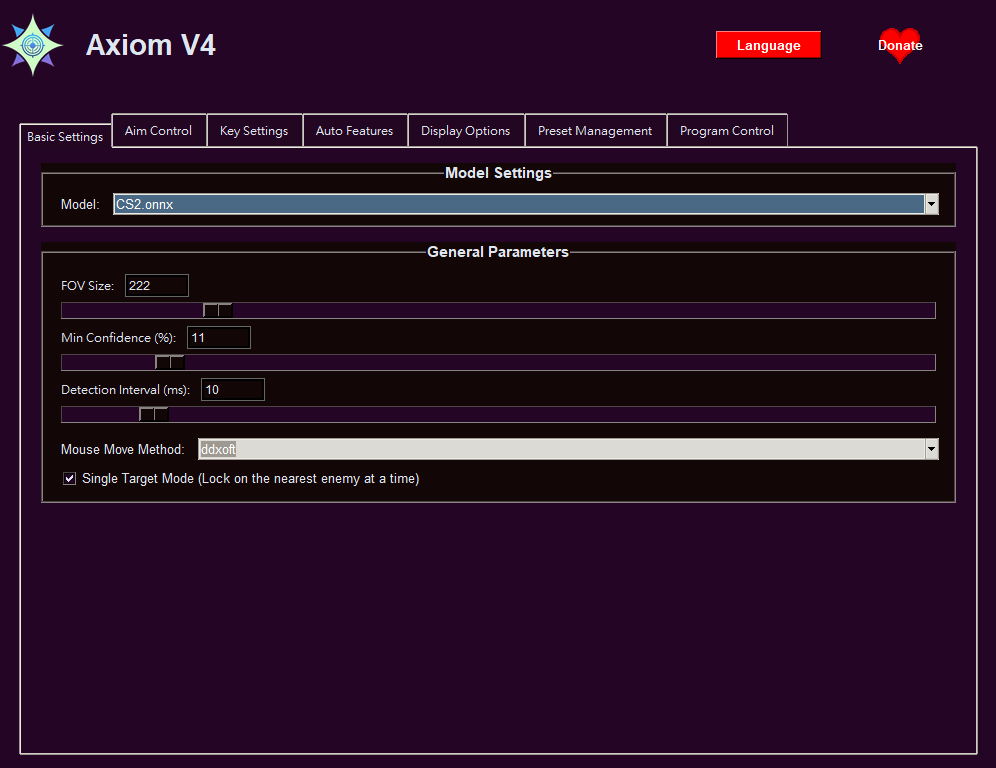
- Aim Tab — Select your game model, adjust FOV, detection range, and tune PID settings.
- Trigger Tab — Configure auto-fire delay, interval, and target priority.
- Keys Tab — Set your preferred hotkeys for toggling aim and auto-fire.
- Visuals Tab — Customize overlays (FOV circle, bounding boxes, status panel).
- Configs Tab — Save / load configuration presets.
- Other Tab — Mouse method, Arduino, Xbox controller, performance, and advanced options.
-
Start Detection
- Press the configured toggle key (default:
Insert). - The system will begin real-time detection and overlay.
- Press the configured toggle key (default:
Configuration Files
Settings are automatically saved to config.json in the project root. You can also save/load named presets via the Configs tab.
Project Structure
Axiom/
├── 啟動Launcher.bat          # Quick-start launcher
├── config/                   # Saved configuration presets
├── Model/                    # ONNX model files
├── src/
│   ├── main.py               # Application entry point
│   ├── version.py            # Version info
│   ├── core/                 # Core logic
│   │   ├── ai_loop.py        # Main detection & aim loop
│   │   ├── auto_fire.py      # Triggerbot logic
│   │   ├── config.py         # Configuration class & save/load
│   │   ├── inference.py      # ONNX inference & PID controller
│   │   ├── smart_tracker.py  # Velocity-based prediction tracker
│   │   ├── key_listener.py   # Global hotkey listener
│   │   ├── updater.py        # Auto-update checker
│   │   └── language_data/    # Multi-language JSON files
│   ├── gui/
│   │   ├── overlay.py        # DirectX overlay (FOV, boxes)
│   │   ├── status_panel.py   # In-game status panel
│   │   └── fluent_app/       # Fluent Design main window & pages
│   └── win_utils/            # Windows utilities
│       ├── mouse_move.py     # Mouse movement backends
│       ├── mouse_click.py    # Mouse click simulation
│       ├── arduino_mouse.py  # Arduino Leonardo HID driver
│       ├── ddxoft_mouse.py   # ddxoft driver integration
│       └── xbox_controller.py# Virtual Xbox 360 gamepad
└── LICENSE.txt
📄 License
This project is licensed under the PolyForm Noncommercial License 1.0.0.
- ❌ No Commercial Use — This software cannot be used for any commercial purpose.
- ✅ Personal Use — Free for personal, educational, and research purposes.
- ✅ Modification — You may modify and distribute the software.
- ✅ Attribution — Must include original license and copyright notice.
For full license details, see LICENSE.txt or visit PolyForm Noncommercial License.
📞 Contact
- Discord: Join our community
- GitHub: iishong0w0
- Email: iis20160512@gmail.com
Support Channels
- Discord Server — Community support and discussions.
- GitHub Issues — Bug reports and feature requests.
- Email — Direct communication with the developer.
Disclaimer: This software is provided "as is" without warranty. Use at your own risk. The developers are not responsible for any consequences of using this software. See Disclaimer.md for full terms.
Copyright © 2025-2026 iisHong0w0. All rights reserved.