gupta-aayushkr/F1-Racing
The project aims to process Formula 1 racing data, create an automated data pipeline, and make the data available for presentation and analysis purposes.
Formula1 Racing Project using Azure Databricks, ADLS & ADF
This repository serves as documentation for a Formula1 Racing project created using Azure services for data engineering. The project aims to process Formula 1 racing data, create an automated data pipeline, and make the data available for presentation and analysis purposes.
Formula 1 Racing Project Overview
Required Information
The Formula 1 racing project involves processing data for both driver champions and constructor champions. Points are awarded based on the finishing position in each race, and there are separate championships for drivers and constructors. Pole positions are determined through qualifying races.
Data Source
The data is sourced from the Ergest Developer API, providing tables such as circuits, races, constructors, drivers, results, pitstops, lap times, and qualifying.
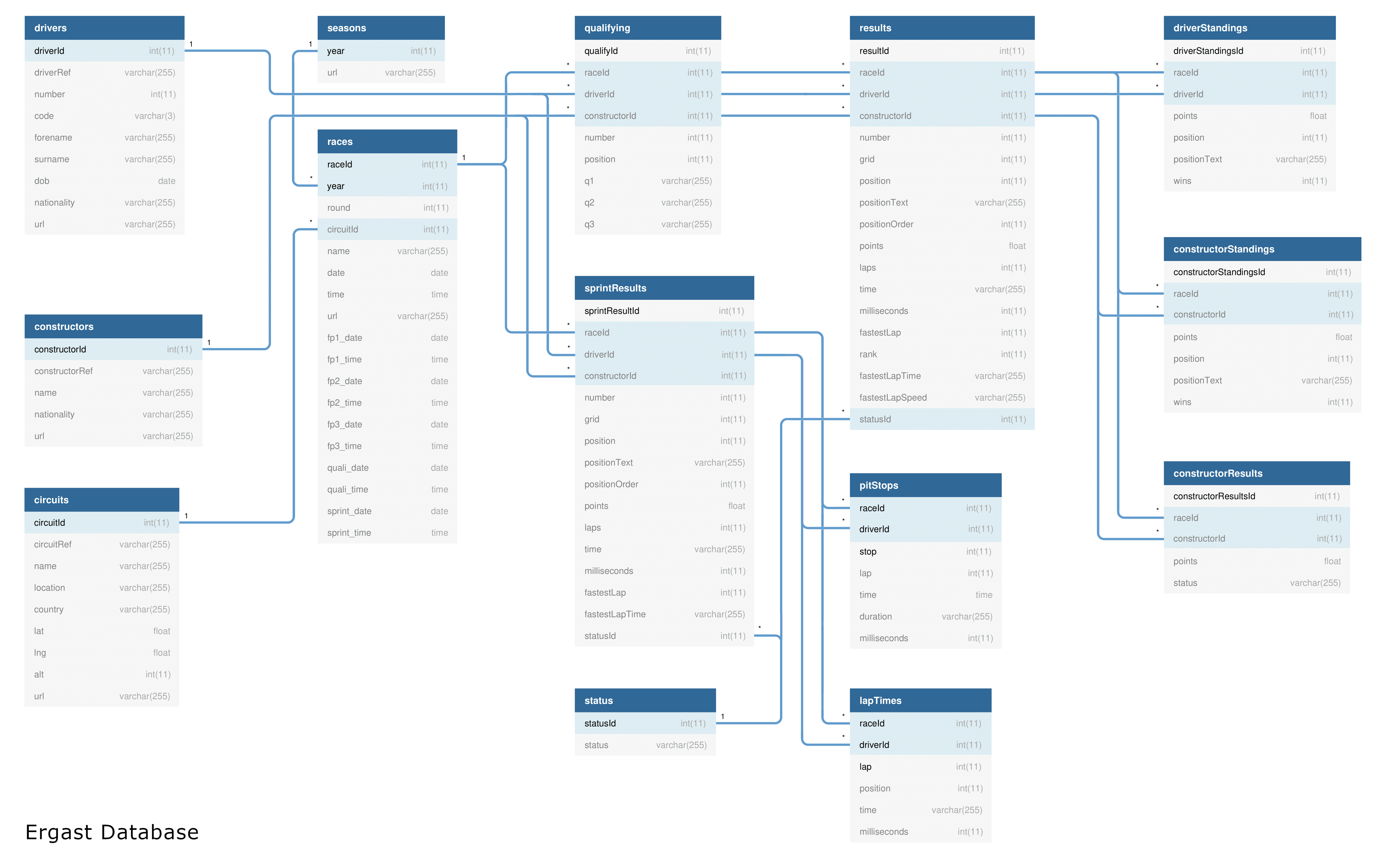
Project Resources and Architecture
Azure Services Used
- Azure Databricks: For compute using Python & SQL.
- Azure Data Lake Gen2 (Delta Lake / LakeHouse): For hierarchical storage and utilizing delta tables.
- Azure Data Factory: For pipeline orchestration for Databricks Notebook.
- Azure Key Vault: For storing secrets for ADLS credentials used in the Databricks Notebook.
Architecture Explanation & Project Working
Step 1: Setting up Storage using ADLS and Containers
- Created Azure Data Lake Storage with three containers: raw, processed, presentation.
Step 2: Setting up Compute using Databricks and connecting to Storage
- Utilized Azure Databricks with a specific cluster configuration.
- Mounted Azure Data Lake using Service Principal for secure access.
Step 3: Ingesting Raw Data
- Ingested eight types of files and folders from the raw container.
- Created separate notebooks for ingestion and converted raw data into processed data.
Step 4: Ingesting Processed Data
- Used processed data to perform further transformation and analysis.
- Created notebooks for race results, driver standings, constructor standings, and calculated race results.
Step 5: Ingesting Presentation Data For Analysis
- Stored data generated from processed notebooks in the presentation container.
- Analyzed and visualized dominant drivers and teams.
Azure Data Factory Pipeline Orchestration
Pipelines and Trigger
- Created Ingest Pipeline, Transform Pipeline, and Process Pipeline.
- Used Azure Trigger for automation.
- Orchestration ensures automated processing of raw and processed containers.
Azure Trigger
- Utilized tumbling window trigger for triggering based on past date data.
- Customized triggers for specific date ranges.
Budget Analysis For Project
- Total cost incurred: Rs. 3200, surpassing the Rs. 3000 budget.
- Major costs from Azure Databricks for compute and ADLS for storage.
- Cluster timeout management helped in cost control.