enisinanaj/carinfo-importer
REST API for importing car info
RESTful API with Spring MVC


This project is an example implementation of a RESTful API in Java using the Spring MVC framework.
The actions implemented are a couple of import functions. There's one endpoint exposed in POST that accepts two different content-type headers; text/plain for a single line import, or multipart/form-data for a CSV file import.
Both the single line and the file must be in the following format:
VF1KMS40A36042123,KB,H1,RENAULT
Getting Started
Clone this project and run the application with gradle, using gradle wrapper:
gradlew bootRun
or your own gradle installation
gradle bootRun
Prerequisites
You'll need Java JDK 1.8+ installed. Gradle is not necessary because gradlew wrapper is provided with the project as described above.
To check for bugs and be able to browse them locally you have to download Spotbugs from http://spotbugs.readthedocs.io/en/latest/installing.html. Download it in zip format, then launch the spotbugs executable that is found inside the bin folder. Once the application is running, you can go to File > Open and select the findbugs report file (.xml) generally inside ${project_root}/build/reports/spotbugs/main.xml
Available endpoints
POST /carinfo to import carinfo data. It can be called with two different content types. text/plain or multipart/form-data
text/plain example
## Import a single CSV line
curl -X "POST" "http://localhost:8080/carinfo" \
     -H 'Content-Type: text/plain; charset=utf-8' \
     -d "VF1KMS40A36042123,KB,H1,RENAULT"
the expected HTTP result is as follows
HTTP/1.1 201
Location: http://localhost:8080/carinfo/3
Content-Length: 0
Date: Sun, 24 Jun 2018 13:09:51 GMT
Connection: close

{
    "vin": "VF1KMS40A36042123",
    "carMake": "RENAULT"
}
returning a Location header that points at the newly created resource. In case of a file upload and multiple imports It's returning the Location of all the car info elements.
multipart/form-data example
## Request
curl -X "POST" "http://localhost:8080/carinfo" \
     -H 'Content-Type: multipart/form-data; charset=utf-8; boundary=__X_PAW_BOUNDARY__' \
     -F "file=VF1KMS40A36042123,KB,H1,RENAULT
SHSRE67507U001669,KB,H1,HONDA
JHMBE17407S200596,KB,H3,HONDA
VF36ERFJC21545586,KB,H1,PEUGEOT
VF3LB9HCGES022011,VA,H1,PEUGEOT
WVWZZZ9NZ7Y062120,VA,H3,VW
WF0WXXGCDW6R41261,VA,H1,FORD
WVWZZZ3CZEE062520,VA,H2,VOLKSWAGEN"
the expected result is as follows (if everything goes well):
HTTP/1.1 201
Location: http://localhost:8080/carinfo
Content-Length: 0
Date: Sun, 24 Jun 2018 20:49:57 GMT
Connection: close

[{
    "vin": "VF1KMS40A36042123",
    "carMake": "RENAULT"
},
{
    "vin": "SHSRE67507U001669",
    "carMake": "HONDA"
},
...]
otherwise if there were errors a simple 400 status code will be returned.
Running the tests
The tests are run easily with the gradle task
gradlew test
For a better reporting there is another gradle task available which runs the tests and aferwards ccreates the reports in jacoco xml format. This task also runs spotbugs. To have a browsable report from Jacoco you need to edit the build file build.gradle from this
jacocoTestReport {
	reports {
		xml.enabled true
		csv.enabled false
		html.enabled = false
		//html.destination file("${buildDir}/jacocoHtml")
	}
}
to this
jacocoTestReport {
	reports {
		xml.enabled false
		csv.enabled false
		html.enabled = true
	}
}
To have tests run and reports generated, execute the following gradle task:
gradlew check
Deployment
To deploy the application locally it's sufficient to just run the gradle task bootRun lik this:
gradlew bootRun
The app is also deployed on Heroku: https://carinfo-importer.herokuapp.com/carinfo
Authentication
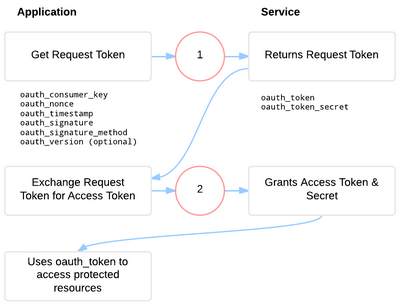
A suggested authentication method between the client(s) and this backend server would be two-legged OAuth 2.0.
As described in this image
Built With
- Spring MVC - The web framework used
- Gradle - Dependency Management
- JUnit 4.12 - Testing Framework
- JaCoCo - Java Code Coverage
- CodeCov - JaCoCo integration tool for GitHub
- CircleCI - Continuous Integration for GitHub
Authors
- Eni Sinanaj - Initial work
License
This project is licensed under the GPL 3.0 - see the LICENSE.md file for details