ablakely/TeleServ
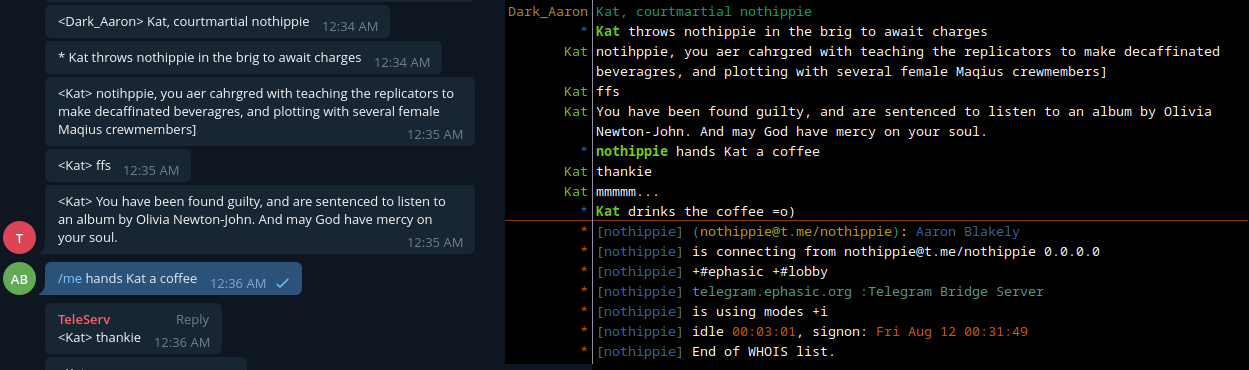
Telegram to IRC bridge in Python, that makes Telegram users appear as IRC users by linking as an IRC network server.
TeleServ
Telegram to IRC bridge server
What is TeleServ?
TeleServ is a telegram bot which links to an IRC network as an IRC server, this
allows Telegram users to appear as IRC users instead of relaying all messages
through a single IRC user. It also acts as a bouncer
by allowing users to have a constant connection to IRC.
What IRCds are supported?
TeleServ should work with any IRCd that uses TS6 for it's linking protocol, it has been tested on:
- InspIRCd 3.x (Protocol Version: 1205)
Installing
- Create a telegram bot (tutorial)
- Create a link block on the IRC server you'll be linking to.
- Edit
example.conf.jsonand rename toconf.json pip install pyTelegramBotAPI imgurpythonpython TeleServ.py
Usage
- Create a telegram group and add the bot to it.
- In the group use the
/setchancommand to link the group to an IRC channel. - Use
/connto connect your user the IRC channel.
Commands
TeleServ provides commands for both Telegram users and IRC operators.
Telegram
| Command | Arguments | Description |
|---|---|---|
| /help | (none) | Command list |
| /conn | (none) | Connects a telegram user to the IRC server |
| /setchan | <chan> | (Group Admin/Owner) Sets IRC destination channel |
| /me | <action> | Action command (* User slaps mIRC with a large trout) |
| /notice | <msg> | Send a notice to an IRC user (or channel if no nick given) |
| /pm | <nick> | Creates a private chat with an IRC user (private only) |
| /nick | (nick) | Change your IRC nick (replies with current if nick not given) |
| /topic | (none) | Fetch the topic for the IRC channel |
| /names | (none) | List the users in the IRC channel |
| /whois | <nick> | Lookup details about an IRC user |
| /photos | (none) | Lists the imgur albums the bot has created for you (private only) |
| /deletealbum | <album id> | Deletes an album the bot has created (private only) |
IRC
Usage: /msg TeleServ <command>
TeleServ will only respond to IRC operators.
| Command | Arguments | Description |
|---|---|---|
| help | (none) | Sends the user a list of commands. |
| userlist | (none) | Sends the user the list of users being connected. |
| whois | <nick or @telegramuser> | Sends the user information about a bridge user. |
Imgur

TeleServ has the ability to upload images sent to Telegram chats it is in to Imgur and forward the link to to uploaded images as an imgur album to IRC. To set this up you will need to:
- Create an Imgur account for your TeleServ instance.
- Create an Imgur API key with the "Anonymous usage" type
- Modify your conf.json with the ID and Secret keys that you generated, make sure to set
enabledtotrue. - TeleServ will message the channel you have set for loging with an authorization link, allow it access to the account you made.
- Set the pin imgur provides to you with
/msg TeleServ imgurpin <pin>on IRC
Pastebin

TeleServ has the ability to automatically post long Telegram messages to pastebin to prevent
flooding an IRC channel, it will not do this for private messages between IRC and Telegram users. To enable this functionality you
will need to create a Pastebin Account for your TeleServ instance and provide the needed details in
your conf.json from the API page. Make sure to set pastebinLongMessages to true. Messages
with a character count greater than or equal to messageLength will be posted to pastebin and a short preview.
Expiration Time
Pastebin does not support any other value for post expiration than the ones listed here.
| Value | Expiration Setting |
|---|---|
| N | Never |
| 10M | 10 Minutes |
| 1H | 1 Hour |
| 1D | 1 Day |
| 1W | 1 Week |
| 2W | 2 Weeks |
| 1M | 1 Month |
| 6M | 6 Months |
| 1Y | 1 Year |
Privacy
Due to limitations in the Pastebin API for free accounts, it is recommended to use the public setting
as non PRO accounts are only allowed to have 10 unlisted posts on the account.
| Value | Privacy Setting |
|---|---|
| 0 | Public |
| 1 | Unlisted |
| 2 | Private (Only acccount bot is using can view post) |
Copyright © 2022 Aaron Blakely