TieuLongPhan/SynRBL
Rebalancing chemical reaction
SynRBL: Synthesis Rebalancing Framework




SynRBL is a toolkit tailored for computational chemistry, aimed at correcting imbalances in chemical reactions. It employs a dual strategy: a rule-based method for adjusting non-carbon elements and an mcs-based (maximum common substructure) technique for carbon element adjustments.
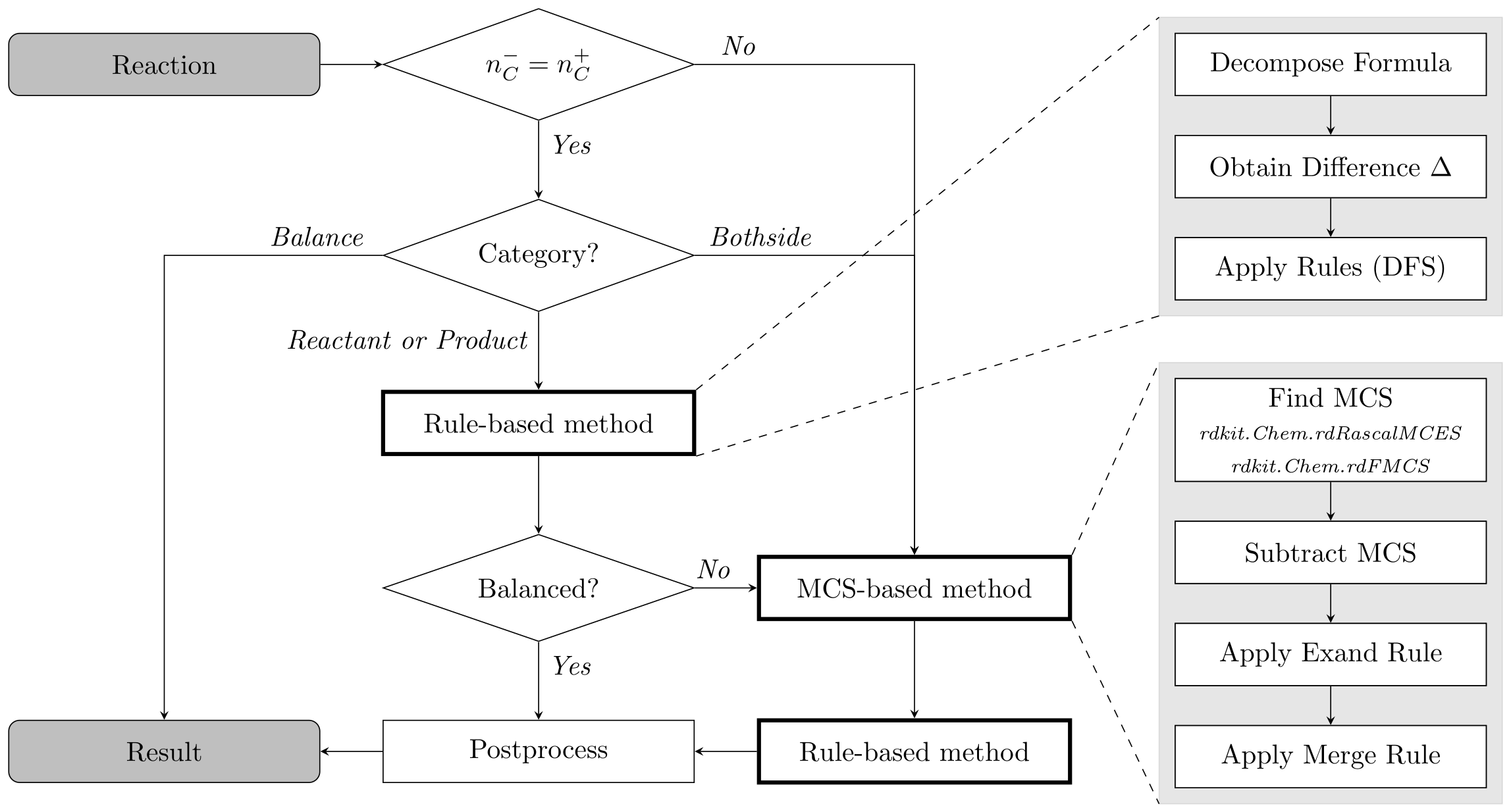
Table of Contents
Installation
The easiest way to use SynRBL is by installing the PyPI package
synrbl.
Follow these steps to setup a
working environment. Please ensure you have Python 3.11 or later installed on
your system.
Prerequisites
The requirements are automatically installed with the pip package.
- Python 3.11
- rdkit >= 2023.9.4
- joblib >= 1.3.2
- seaborn >= 0.13.2
- xgboost >= 2.0.3
- scikit_learn == 1.4.0
- imbalanced_learn >= 0.12.0
- reportlab >= 4.1.0
- fgutils >= 0.1.3
Step-by-Step Installation Guide
-
Python Installation:
Ensure that Python 3.11 or later is installed on your system. You can download it from python.org. -
Creating a Virtual Environment (Optional but Recommended):
It's recommended to use a virtual environment to avoid conflicts with other projects or system-wide packages. Use the following commands to create and activate a virtual environment:
python -m venv synrbl-env
source synrbl-env/bin/activate  # On Windows use `synrbl-env\Scripts\activate`
Or Conda
conda create --name synrbl-env python=3.11
conda activate synrbl-env- Install with pip:
pip install synrbl- Verify Installation:
After installation, you can verify that SynRBL is correctly installed by running a simple test.
python -c "from synrbl import Balancer; bal = Balancer(n_jobs=1); print(bal.rebalance('CC(=O)OCC>>CC(=O)O'))"Usage
Use in script
from synrbl import Balancer

smiles = (
  "COC(=O)[C@H](CCCCNC(=O)OCc1ccccc1)NC(=O)Nc1cc(OC)cc(C(C)(C)C)c1O>>"
  + "COC(=O)[C@H](CCCCN)NC(=O)Nc1cc(OC)cc(C(C)(C)C)c1O"
)
synrbl = Balancer()

results = synrbl.rebalance(smiles, output_dict=True)
>> [{
      "reaction": "COC(=O)[C@H](CCCCNC(=O)OCc1ccccc1)NC(=O)Nc1cc(OC)cc(C(C)(C)C)c1O.O>>"
      + "COC(=O)[C@H](CCCCN)NC(=O)Nc1cc(OC)cc(C(C)(C)C)c1O.O=C(O)OCc1ccccc1",
      "solved": True,
      "input_reaction": "COC(=O)[C@H](CCCCNC(=O)OCc1ccccc1)NC(=O)Nc1cc(OC)cc(C(C)(C)C)c1O>>"
      + "COC(=O)[C@H](CCCCN)NC(=O)Nc1cc(OC)cc(C(C)(C)C)c1O",
      "issue": "",
      "rules": ["append O when next to O or N", "default single bond"],
      "solved_by": "mcs-based",
      "confidence": 0.999,
  }]
New config
from synrbl import Balancer

smiles = 'CC(=O)O>>CCO'
synrbl = Balancer(use_default_reduction=True) # we try to match correct reduction agent
results = synrbl.rebalance(smiles, output_dict=True)
>> 'CC(=O)O.[AlH4-].[Li+].[H+].[AlH4-].[Li+].[H+]>>CCO.O.[AlH3].[Li+].[AlH3].[Li+]'

synrbl = Balancer(use_default_reduction=True) # leave hydrogen
results = synrbl.rebalance(smiles, output_dict=True)
>> 'CC(=O)O.[H][H].[H][H]>>CCO.O'
Batch Process
from synrbl import ReactionRebalancer, RebalanceConfig

data = [{'id':1, 'rxn':'CC(=O)O>>CCO'},
        {'id':2, 'rxn':('COC(=O)[C@H](CCCCNC(=O)OCc1ccccc1)NC(=O)Nc1cc(OC)cc(C(C)'
        +'(C)C)c1O>>COC(=O)[C@H](CCCCN)NC(=O)Nc1cc(OC)cc(C(C)(C)C)c1O')}]

config = RebalanceConfig(reaction_col="rxn", id_col="id", n_jobs=2, batch_size=500,
                         enable_logging=False, use_default_reduction=True)
rebalancer = ReactionRebalancer(config=config, user_logger=None)
result = rebalancer.rebalance(data, keep_extra=False)
result
>> [{'id': 2,
    'rxn': 'COC(=O)C(CCCCNC(=O)OCc1ccccc1)NC(=O)Nc1cc(OC)cc(C(C)(C)C)c1O.O>>COC(=O)C(CCCCN)NC(=O)Nc1cc(OC)cc(C(C)(C)C)c1O.O=C(O)OCc1ccccc1'},
    {'id': 1, 'rxn': 'CC(=O)O.[H][H].[H][H]>>CCO.O'}]
Use in command line
echo "id,reaction\n0,CC(=O)OCC>>CC(=O)O" > unbalanced.csv
python -m synrbl run -o balanced.csv unbalanced.csv
Benchmark your own dataset
Prepare your dataset as a csv file datafile with a column reaction of
unbalanced reaction SMILES and a column expected_reaction containing the
expected balanced reactions.
Rebalance the reactions and forward the expected reactions column to the
output.
python -m synrbl run -o balanced.csv --col <reaction> --out-columns <expected_reaction> <datafile>After rebalancing you can use the benchmark command to compute the success
and accuracy rates of your dataset. Keep in mind that an exact comparison
between rebalanced and expected reaction is a highly conservative
evaluation. An unbalance reaction might have multiple equaly viable
balanced solutions. Besides the exact comparison (default) the benchmark
command supports a few similarity measures like ECFP and pathway
fingerprints for the comparison between rebalanced reaction and the
expected balanced reaction.
python -m synrbl benchmark --col <reaction> --target-col <expected_reaction> balanced.csvReproduce benchmark results from validation set
To test SynRBL on the provided validation set use the following commands.
Run these commands from the root of the cloned repository.
Rebalance the dataset
python -m synrbl run -o validation_set_balanced.csv --out-columns expected_reaction ./Data/Validation_set/validation_set.csvand compute the benchmark results
python -m synrbl benchmark validation_set_balanced.csvContributing
License
This project is licensed under MIT License - see the License file for details.
Publication
Reaction rebalancing: a novel approach to curating reaction databases
Citation
@Article{Phan2024,
  author={Phan, Tieu-Long and Weinbauer, Klaus and G{\"a}rtner, Thomas and Merkle,
    Daniel and Andersen, Jakob L. and Fagerberg, Rolf and Stadler, Peter F.},
  title={Reaction rebalancing: a novel approach to curating reaction databases},
  journal={Journal of Cheminformatics},
  year={2024},
  month={Jul},
  day={19},
  volume={16},
  number={1},
  pages={82},
  issn={1758-2946},
  doi={10.1186/s13321-024-00875-4},
  url={https://doi.org/10.1186/s13321-024-00875-4}
}
Acknowledgments
This project has received funding from the European Unions Horizon Europe Doctoral Network programme under the Marie-Skłodowska-Curie grant agreement No 101072930 (TACsy -- Training Alliance for Computational)