darc - Darkweb Crawler Project
For any technical and/or maintenance information,
please kindly refer to the |docs|_.
.. |docs| replace:: Official Documentation
.. _docs: https://darc.jarryshaw.me
NB: Starting from version 1.0.0, new features of the project will not be
developed into this public repository. Only bugfix and security patches will be
applied to the update and new releases.
darc is designed as a swiss army knife for darkweb crawling.
It integrates requests to collect HTTP request and response
information, such as cookies, header fields, etc. It also bundles
selenium to provide a fully rendered web page and screenshot
of such view.
.. image:: https://darc.jarryshaw.me/en/latest/_images/darc.jpeg
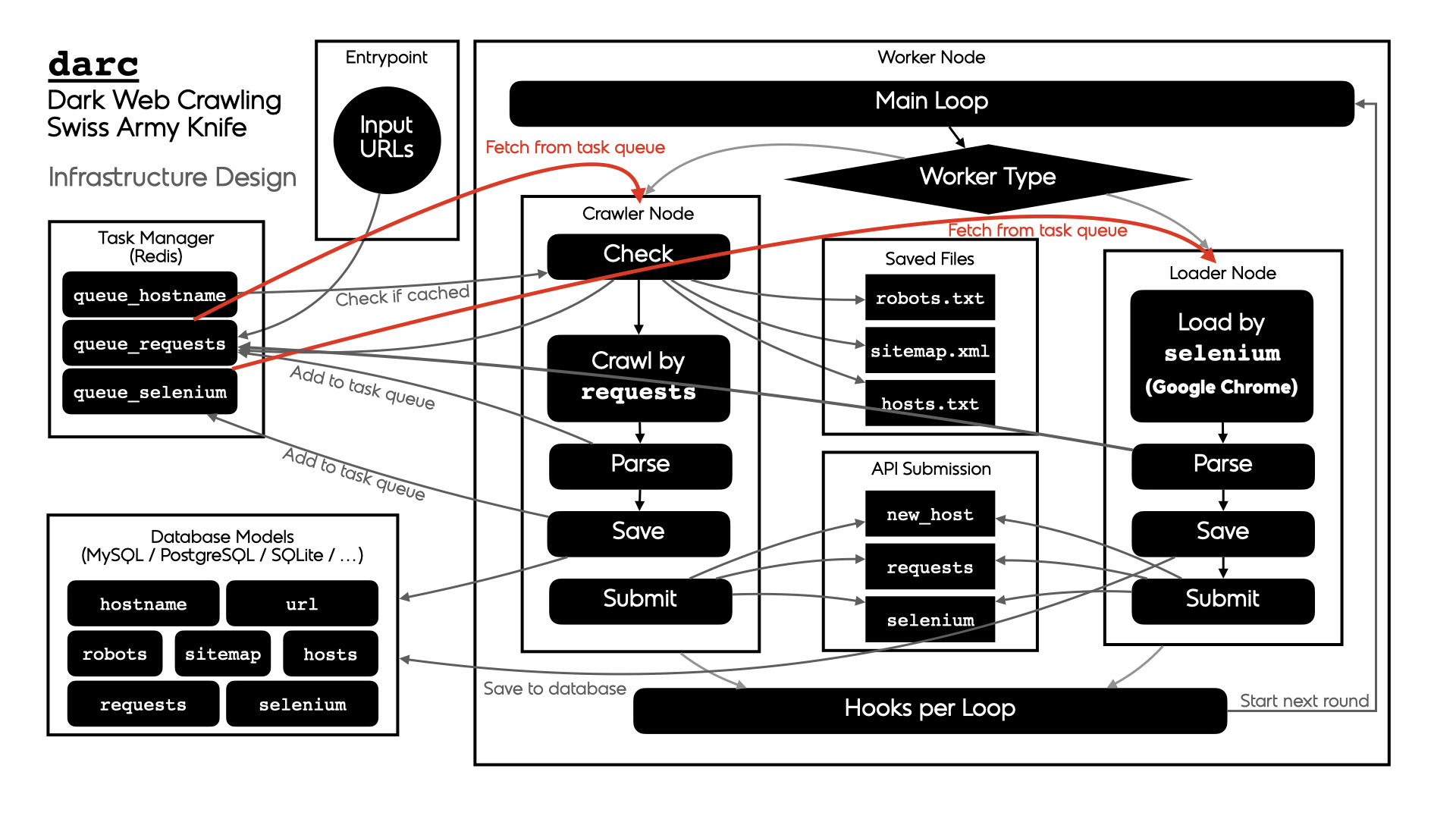
The general process of darc can be described as following:
There are two types of workers:
-
crawler-- runs thedarc.crawl.crawlerto provide a
fresh view of a link and test its connectability -
loader-- run thedarc.crawl.loaderto provide an
in-depth view of a link and provide more visual information
The general process can be described as following for workers of crawler type:
-
darc.process.process_crawler: obtain URLs from therequests
link database (c.f.darc.db.load_requests), and feed such URLs to
darc.crawl.crawler.NOTE:
If
darc.const.FLAG_MPisTrue, the function will be
called with multiprocessing support; ifdarc.const.FLAG_TH
ifTrue, the function will be called with multithreading
support; if none, the function will be called in single-threading. -
darc.crawl.crawler: parse the URL using
darc.link.parse_link, and check if need to crawl the
URL (c.f.darc.const.PROXY_WHITE_LIST,darc.const.PROXY_BLACK_LIST,
darc.const.LINK_WHITE_LISTanddarc.const.LINK_BLACK_LIST);
if true, then crawl the URL withrequests.If the URL is from a brand new host,
darcwill first try
to fetch and saverobots.txtand sitemaps of the host
(c.f.darc.proxy.null.save_robotsanddarc.proxy.null.save_sitemap),
and extract then save the links from sitemaps (c.f.darc.proxy.null.read_sitemap)
into link database for future crawling (c.f.darc.db.save_requests).
Also, if the submission API is provided,darc.submit.submit_new_host
will be called and submit the documents just fetched.If
robots.txtpresented, anddarc.const.FORCEis
False,darcwill check if allowed to crawl the URL.NOTE:
The root path (e.g.
/in https://www.example.com/) will always
be crawled ignoringrobots.txt.At this point,
darcwill call the customised hook function
fromdarc.sitesto crawl and get the final response object.
darcwill save the session cookies and header information,
usingdarc.save.save_headers.NOTE:
If
requests.exceptions.InvalidSchemais raised, the link
will be saved bydarc.proxy.null.save_invalid. Further
processing is dropped.If the content type of response document is not ignored (c.f.
darc.const.MIME_WHITE_LISTanddarc.const.MIME_BLACK_LIST),
darc.submit.submit_requestswill be called and submit the document
just fetched.If the response document is HTML (
text/htmlandapplication/xhtml+xml),
darc.parse.extract_linkswill be called then to extract all possible
links from the HTML document and save such links into the database
(c.f.darc.db.save_requests).And if the response status code is between
400and600,
the URL will be saved back to the link database
(c.f.darc.db.save_requests). If NOT, the URL will
be saved intoseleniumlink database to proceed next steps
(c.f.darc.db.save_selenium).
The general process can be described as following for workers of loader type:
-
darc.process.process_loader: in the meanwhile,darcwill
obtain URLs from theseleniumlink database (c.f.darc.db.load_selenium),
and feed such URLs todarc.crawl.loader.NOTE:
If
darc.const.FLAG_MPisTrue, the function will be
called with multiprocessing support; ifdarc.const.FLAG_TH
ifTrue, the function will be called with multithreading
support; if none, the function will be called in single-threading. -
darc.crawl.loader: parse the URL using
darc.link.parse_linkand start loading the URL using
seleniumwith Google Chrome.At this point,
darcwill call the customised hook function
fromdarc.sitesto load and return the original
selenium.webdriver.chrome.webdriver.WebDriverobject.If successful, the rendered source HTML document will be saved, and a
full-page screenshot will be taken and saved.If the submission API is provided,
darc.submit.submit_selenium
will be called and submit the document just loaded.Later,
darc.parse.extract_linkswill be called then to
extract all possible links from the HTML document and save such
links into therequestsdatabase (c.f.darc.db.save_requests).
Installation
NOTE:
darc supports Python all versions above and includes 3.6.
Currently, it only supports and is tested on Linux (Ubuntu 18.04)
and macOS (Catalina).
When installing in Python versions below 3.8, darc will
use |walrus|_ to compile itself for backport compatibility.
.. |walrus| replace:: walrus
.. _walrus: https://github.com/pybpc/walrus
.. code-block:: shell
pip install python-darc
Please make sure you have Google Chrome and corresponding version of Chrome
Driver installed on your system.
Starting from version 0.3.0, we introduced Redis_ for the task
queue database backend.
.. _Redis: https://redis.io
Since version 0.6.0, we introduced relationship database storage
(e.g. MySQL, SQLite, PostgreSQL, etc.) for the task queue database
backend, besides the Redis database, since it can be too much memory-costly
when the task queue becomes vary large.
.. _MySQL: https://mysql.com/
.. _SQLite: https://www.sqlite.org/
.. _PostgreSQL: https://www.postgresql.org/
Please make sure you have one of the backend database installed, configured,
and running when using the darc project.
However, the darc project is shipped with Docker and Compose support.
Please see the project root for relevant files and more information.
Or, you may refer to and/or install from the Docker Hub_ repository:
.. code-block:: shell
docker pull jsnbzh/darc[:TAGNAME]
.. _Docker Hub: https://hub.docker.com/r/jsnbzh/darc
or GitHub Container Registry, with more updated and comprehensive images:
.. code-block:: shell
docker pull ghcr.io/jarryshaw/darc[:TAGNAME]
or the debug image
docker pull ghcr.io/jarryshaw/darc-debug[:TAGNAME]
Usage
The darc project provides a simple CLI::
usage: darc [-h] [-v] -t {crawler,loader} [-f FILE] ...
the darkweb crawling swiss army knife
positional arguments:
link links to craw
optional arguments:
-h, --help show this help message and exit
-v, --version show program's version number and exit
-t {crawler,loader}, --type {crawler,loader}
type of worker process
-f FILE, --file FILE read links from file
It can also be called through module entrypoint::
python -m darc ...
NOTE:
The link files can contain comment lines, which should start with #.
Empty lines and comment lines will be ignored when loading.